Loom Pricing 2026: What Each Plan Actually Costs
Vorec Team · 2026-09-17 · About 8 min read
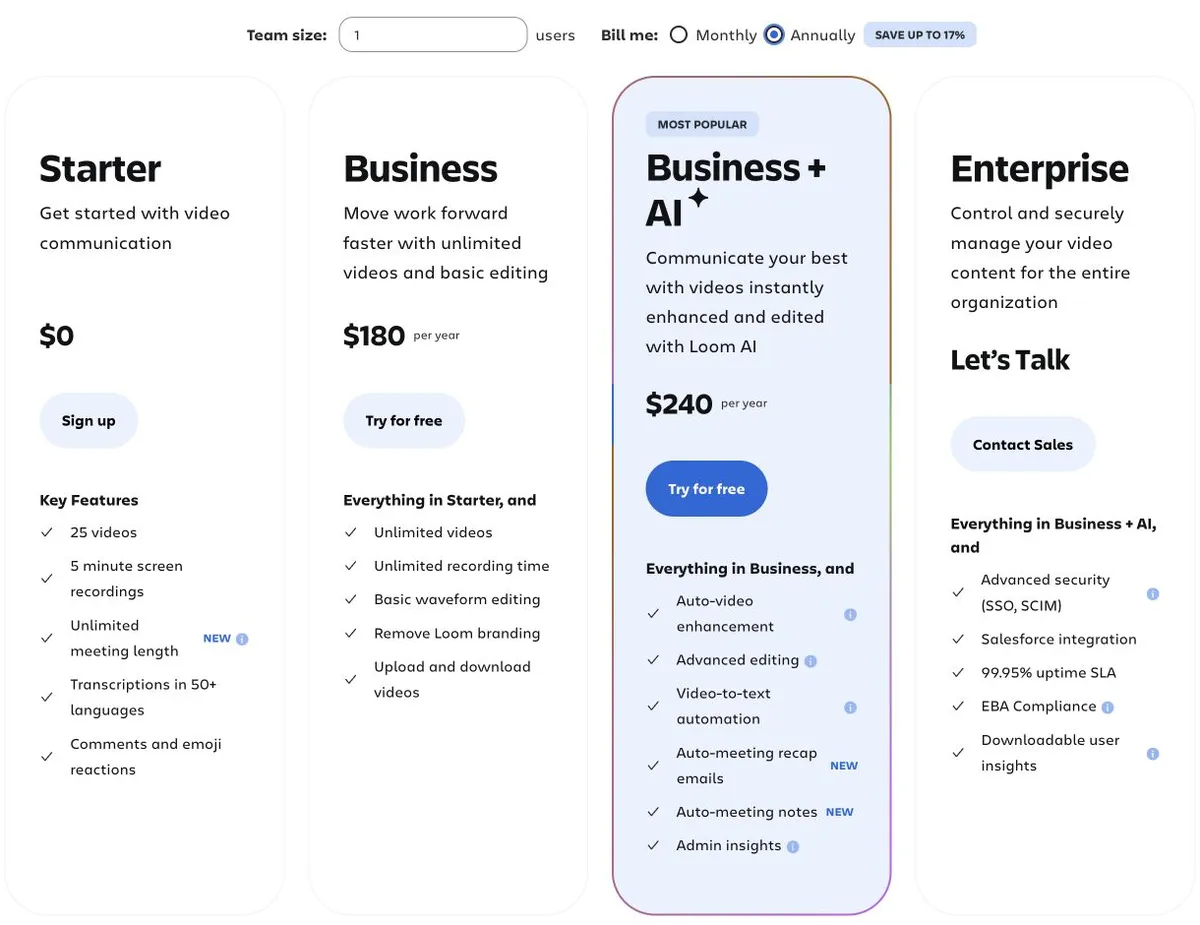
Loom costs $0 on Starter, $15 per user a month for Business billed annually ($18 monthly), $20 for Business + AI billed annually ($24 monthly), and custom pricing for Enterprise. Annual billing saves up to 17%. Starter includes 25 videos and 5-minute screen recordings, while transcript editing, AI summaries and chapters require Business + AI. Every price on the page was re-checked against Loom's pricing page on 6 October 2026.
Loom has four tiers and one thing that catches people out: the advanced AI editing features are not on the free plan, and not on Business either. They sit on Business + AI. Some AI is lower down — auto titles are on every tier, and auto CTA starts at Business — but transcript editing, summaries and chapters are the $24 tier.
Everything below was verified on Loom's own pricing page with the billing toggle switched, on 17 September 2026. The monthly Business and Business + AI prices and the one-user annual prices were re-checked on 30 September 2026 and had not changed. Re-checked on 6 October 2026: every Loom price and limit on this page, including the team totals below, matched Loom's pricing page, with each billing and seat setting read twice. Plans change; check before you buy.
The Short Version
| Plan | Monthly | Annual | Annual equivalent |
|---|---|---|---|
| Starter | $0 | $0 | Free |
| Business | $18/user/mo | $180/user/yr | $15/user/mo |
| Business + AI | $24/user/mo | $240/user/yr | $20/user/mo |
| Enterprise | Custom | Custom | — |
Annual billing saves up to 17%. Note the annual equivalents. If a comparison quotes Loom's monthly rate against a competitor's annual rate, Loom looks more expensive than it is.
What Starter Actually Includes — More Than People Expect
The free tier covers more than you might expect. It is not a crippled demo:
- Virtual backgrounds, camera frames and Recording Canvas
- Screen-only recording — you are never forced on camera
- Closed captions and transcriptions in 50+ languages
- Auto titles
- 25 videos and 5-minute screen recordings (meetings are listed separately with unlimited length)
A note on where to look: the Starter plan card lists only five "key features" — 25 videos, 5-minute screen recordings, unlimited meeting length, transcriptions in 50+ languages, and comments. The backgrounds, camera frames, Recording Canvas and auto titles above come from Loom's fuller feature comparison rather than the summary card. If you are checking a specific capability, read the comparison table, not the card.
If you have read that Loom cannot do backgrounds, or that it forces a webcam, that is wrong at every tier including free.
The Two Upgrade Triggers
Free to Business ($15–18): editing and length. Business adds trim and stitch, basic waveform editing, up to 4K, and lifts the recording-length and library limits. If your recordings are longer than the free cap or you need to cut mistakes, this is the jump.
Business to Business + AI ($20–24): the AI suite. This tier adds:
- Edit by transcript — delete words, the video cuts
- Filler-word and silence removal
- AI summaries and chapters
- AI-generated descriptions
If these are the AI features you need, budget for $24 monthly, not $18.
Business to Enterprise: SSO. SAML/SSO is Enterprise-only. If your security team requires it, that is a sales conversation regardless of headcount.
What It Costs In Practice
Annual billing. On 6 October 2026 we set Loom's own calculator to each headcount below and read the totals twice; they match the one-seat price multiplied out:
| Team | Business | Business + AI |
|---|---|---|
| 1 | $180/yr | $240/yr |
| 5 | $900/yr | $1,200/yr |
| 20 | $3,600/yr | $4,800/yr |
| 50 | $9,000/yr | $12,000/yr |
| 100 | $18,000/yr | $24,000/yr |
At 50 and 100 users the calculator labels the price by seat tier (46–50 and 91–100). Loom's FAQ draws a distinction here: annual plans bought on Loom.com are charged by the distinct number of paid users, while annual plans bought through Atlassian.com are billed on user tiers, at the tier closest to your user count. If you're buying through Atlassian, check the tier your headcount lands in.
Everyone who records needs a seat. Viewers do not. The common saving is to keep paid seats with the people who actually create, rather than buying the whole company a licence because two teams use it heavily.
Is There a Free Trial?
Loom's pricing-page FAQ, checked on 30 September 2026, lists a 14-day free trial of Business + AI, and a 14-day Enterprise trial arranged through sales. We could not establish from the page whether a card is required to start either, so check that before you sign up.
Is Loom Worth It?
Yes, if video is how your team communicates asynchronously and many people send recordings. Ubiquity is a real feature — recipients know what a Loom link is, which removes friction on every send.
Reconsider if you only need a handful of polished videos a year. At that volume you are paying a per-seat subscription for occasional use, and a one-off editor may cost less.
Check Starter first. For light internal use the free tier genuinely covers a lot, and plenty of teams upgrade before they needed to.
How It Compares
| Entry paid (annual equivalent) | Notable | |
|---|---|---|
| Loom | $15/user/mo | Ubiquity, AI on the $20 tier |
| Tella | $13/user/mo | Deeper editing, 4K on Pro, custom domain on Premium |
| Vidyard | $59/seat/mo | CRM/MAP integrations on custom-priced Teams |
| Vorec | $7.17/mo ($86/yr Starter) | Records your screen and drafts narration; can also generate a written guide |
Sources: Tella, Vidyard. The Tella and Vidyard figures come from our September 2026 checks and were not re-checked on 6 October. Formats differ, so this is orientation rather than like-for-like.
Quick Answers
How much does Loom cost per month?
Starter is free. Business is $18 per user per month on monthly billing. For a single user on annual billing it is $180 a year ($15 a month equivalent). Business + AI is $24 per user per month, or $240 a year for one user ($20 a month equivalent). For a team, Loom's calculator showed $18,000 and $24,000 a year at 100 users, the one-seat price multiplied out. Loom.com annual plans bill per paid user, while Atlassian.com plans bill by user tier, so check the channel you're buying through. Prices re-checked on 6 October 2026.
What are Loom's free plan limits?
Starter allows 25 videos per person and 5-minute screen recordings at up to 720p. Meetings are listed separately with unlimited length, and Loom's comparison table allows up to 50 workspace members on Starter. The plan is $0 and covers captions, backgrounds and Recording Canvas, as described above.
What do you get on the Loom Starter plan?
Starter is Loom's free plan. On 6 October 2026 it showed 25 videos per person, 5-minute screen recordings at up to 720p, transcriptions in 50+ languages, comments and auto titles. Paid plans lift the video count and recording length to unlimited and go up to 4K.
What does the Loom Business plan include?
Business is $18 per user per month, or $180 a year for one user on annual billing. It adds unlimited videos and recording length, up to 4K, trim and stitch, basic waveform editing, and auto CTA. It does not include transcript editing, AI summaries and chapters, or filler-word removal; those are on Business + AI.
Is Loom AI a separate add-on?
Not on Loom's pricing page as we saw it on 6 October 2026. The AI features are sold as a plan, Business + AI, at $24 per user per month or $240 a year for one user. The difference from Business is $6 a month, or $60 a year on annual billing, but that's our arithmetic between two plans. Loom doesn't list a standalone AI add-on price.
Where Vorec Fits
Loom is built around you narrating while you record. That works well for messages.
It is a harder fit for documentation at volume. For example, forty workflow tutorials can mean narrating forty times in a quiet room, and an interface change can mean re-recording the affected videos.
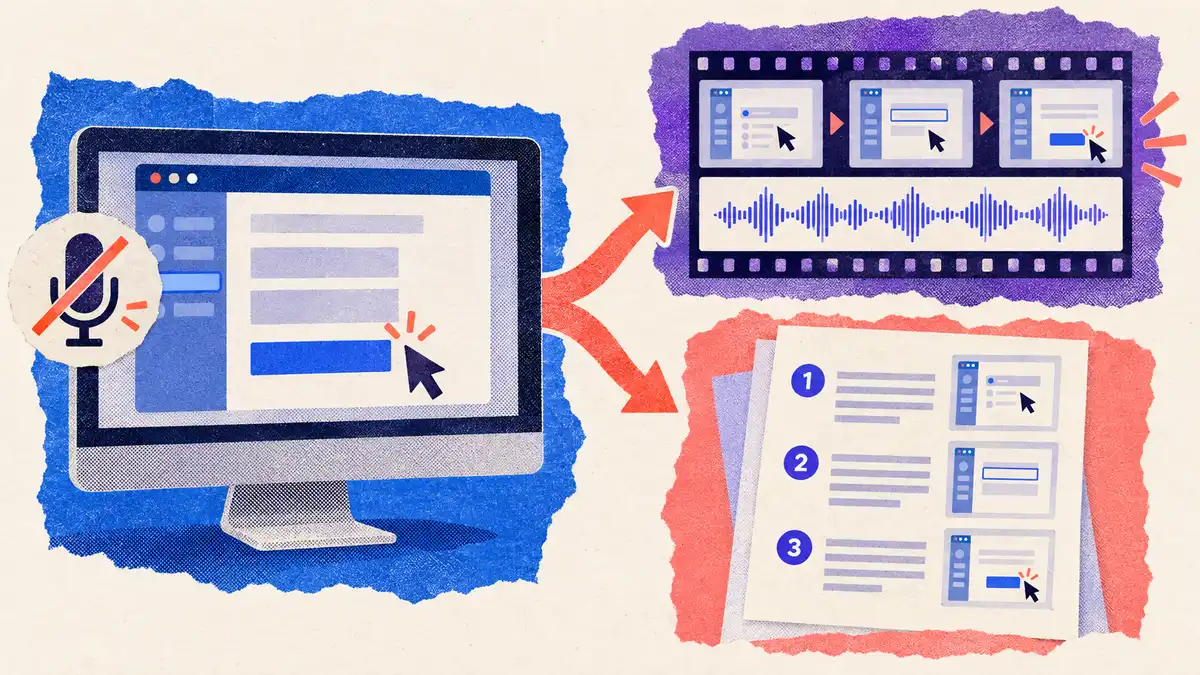
Vorec records your screen — it has its own macOS recorder, and an AI agent can drive that capture through the CLI, recording locally so you review the take before anything is uploaded. Record the workflow with no microphone and Vorec drafts narration matched to the workflow it captured, then generates the voiceover. Freeze-sync can hold a frame when an explanation needs more time than the recording allows. You can also generate a written step-by-step guide from the same capture, and narration can be regenerated in supported languages on eligible plans, without re-recording.
Plans start at $9/month, after a free trial with no credit card required (current allowances on the pricing page). Trial includes up to 3 projects; exports carry a watermark. Details are on our Vorec pricing page. It has a multi-track timeline editor with zoom, cursor and caption layers. It does not replicate Loom's async team-messaging workflow, which is what Loom is bought for.
Bottom Line
Price against the tier that holds your feature. Async messaging with light editing: Business at $15/user/month annually. Transcript editing, summaries and chapters: Business + AI at $20. SSO: Enterprise.
And compare on matched billing cycles. Loom quoted monthly against a rival quoted annually makes the comparison look worse for Loom than it is.
Related: our Loom alternatives roundup, Loom vs Tella and Loom vs Vidyard.
Related reading: 8 Best Screen Recording Software Tools in 2026, Clueso Pricing 2026, Synthesia Pricing 2026 and Guidde Pricing 2026; Vimeo pricing, verified plan by plan.
For how these plans compare with other tools on free offers, trials and credit meters, see our pricing study of 31 video and tutorial tools.
Compare and alternatives: Loom Without a Microphone: AI Narration Instead (2026), Camtasia vs Loom (2026): Polish or Speed?, Loom vs Scribe (2026): Video Messages or Written Guides?, Loom vs Guidde (2026): Video Messages or AI Guides?.
See also: Vorec vs Loom (2026): Narration, Editing and Price Compared.
See also: Screen Studio Alternatives (2026): 7 Tools Compared on Price and Platform.
See also: Descript vs Loom (2026): Video Messages or Text Editing?.
See also: Loom vs Snagit (2026): Video Messages or Screen Captures?, Loom vs OBS Studio (2026): Shared Links or Local Control?.
See also: Loom vs Zoom Clips (2026): Which for Async Video?.
See also: ScreenPal vs Loom (2026): Price, Limits, Best Fit.
See also: Add a Voiceover to a Loom Video (2026), How to Download a Loom Video as MP4 (2026).
Documentation rather than messaging? Record with Vorec, or upload one you already have, and get a narrated tutorial plus a written guide. Start your free trial, no card needed.