Synthesia Pricing 2026: Credits, Not Minutes
Vorec Team · 2026-09-18 · About 9 min read
Synthesia does not sell you video minutes. On its self-serve plans it sells credits, and the minute figures on the plan cards are alternatives drawn from one balance: video or dubbing or survey responses, not all three.
Getting that wrong is the difference between a plan that covers your year and one that runs dry in March.
Synthesia's plan prices, credits and feature tables below come from its pricing page, read in a browser with both the monthly and yearly billing states selected, each read twice after the toggle settled, on 10 October 2026. Billing rules and history come from Synthesia's help centre and announcements, linked where they appear. The plan that sits between Starter and Enterprise is now called Pro. Plans change; check before you buy.
The Short Version
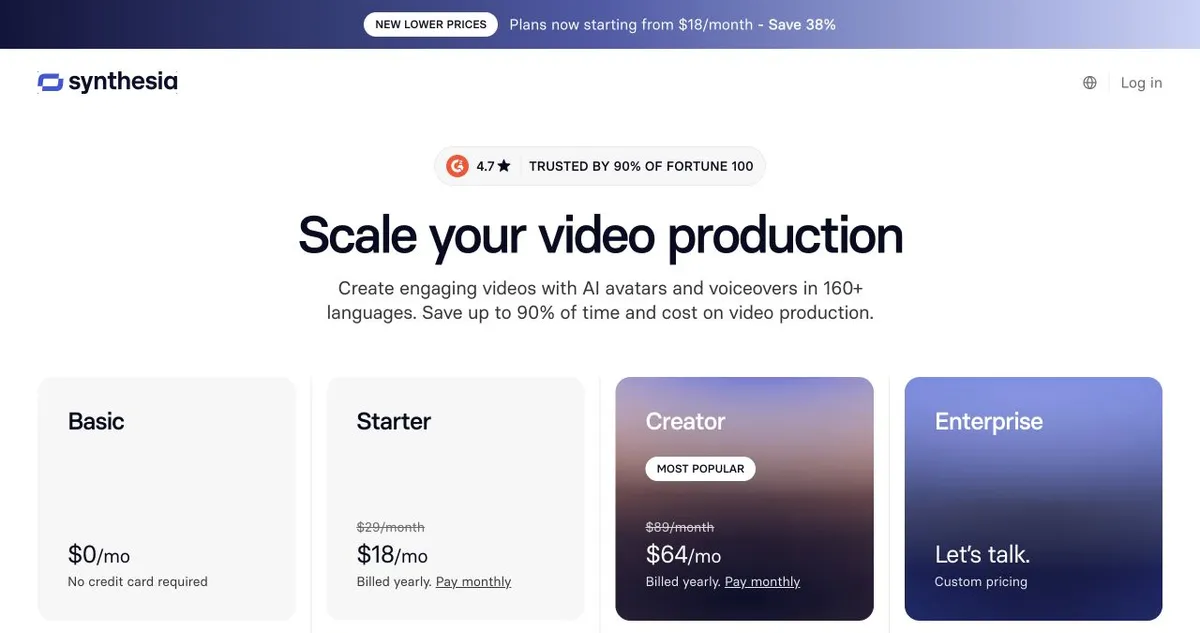
| Plan | Monthly | Billed yearly (monthly equivalent) | Plan credits | Seats |
|---|---|---|---|---|
| Basic | $0 | $0 | 500/month free allowance | 1 editor |
| Starter | $29 | $18/mo | 1,250/month or 15,000/year | 1 editor + 3 guests |
| Pro (lowest tier) | $89 | $64/mo | 6,000/month or 72,000/year | 1 editor + 5 guests |
| Enterprise | Custom | Custom | Custom volume | Custom |
Billed yearly, that works out to $216/year for Starter ($18 × 12) and $768/year for the lowest Pro tier ($64 × 12). Those totals are our arithmetic from the displayed monthly equivalents, not checkout totals.
Synthesia's FAQ says every plan includes the monthly free allowance of 10 minutes of video or dubbing, 3 survey responses, and 500 credits; paid plan credits are additional. Basic output carries a watermark; the paid tiers remove it.
Pro Has Five Credit Tiers
Pro has a credit dropdown. These are the five tiers the page showed:
| Monthly credits | Monthly price | Annual credits | Billed yearly (monthly equivalent) | Our arithmetic: yearly total |
|---|---|---|---|---|
| 6,000 | $89 | 72,000 | $64 | $768 |
| 12,000 | $176 | 144,000 | $126 | $1,512 |
| 24,000 | $347 | 288,000 | $250 | $3,000 |
| 36,000 | $514 | 432,000 | $370 | $4,440 |
| 48,000 | $676 | 576,000 | $486 | $5,832 |
Larger tiers are only slightly cheaper per credit. Per 1,000 credits, our arithmetic gives $14.83 at the lowest monthly tier and $14.08 at the highest, and $10.67 down to $10.13 on yearly billing. Yearly billing changes the unit price far more than moving up a tier does.
One Balance, Several Ways To Spend It
The paid-plan cards translate additional credits into alternatives, above the free allowance. Each line is an alternative, not an addition:
| Plan | Video | or dubbing | or survey responses |
|---|---|---|---|
| Starter, monthly | up to ~12 min | up to 16 min | 3 |
| Starter, yearly | up to ~150 min | up to 197 min | 42 |
| Pro (lowest), monthly | up to ~60 min | up to 78 min | 17 |
| Pro (lowest), yearly | up to ~720 min | up to 947 min | 205 |
The FAQ puts Starter at roughly 22 video minutes a month including the free allowance. Spend the balance on dubbing and the video minutes are gone.
The rates behind those figures, as the page states them:
- Video: the FAQ estimates about 100 credits per finished minute, and says the avatar footage and content affect the actual cost.
- Dubbing: the FAQ says 40 credits a minute without lip sync and 80 with. The calculator on the same page uses 76 credits a minute. We have not reconciled the two; check in-account if dubbing is your main use.
- Surveys: the first three responses are free, then 350 credits per response. Building and publishing a survey is free.
- Regeneration is charged only for the newly generated footage; the FAQ's example is a 3-second change charged for those 3 seconds.
What A Minute Actually Costs
If you spent the plan credits entirely on standard video, using the card's video equivalents and leaving out the free allowance:
| Plan | Arithmetic | Cost per video-minute |
|---|---|---|
| Starter, monthly | $29 ÷ ~12 min | about $2.42 |
| Starter, yearly | $216 ÷ ~150 min | about $1.44 |
| Pro (lowest), monthly | $89 ÷ ~60 min | about $1.48 |
| Pro (lowest), yearly | $768 ÷ ~720 min | about $1.07 |
This is allocation arithmetic, not a pay-as-you-go rate; Synthesia sells subscriptions, not individual videos. Moving from Starter to Pro does buy a cheaper minute, because Pro credits cost less per 1,000 ($14.83 monthly against Starter's $23.20).
Credits: Reset, Upfront, Expiry
From the pricing-page FAQ:
- Monthly free allowances and plan credits reset; unused credits do not roll over.
- On yearly billing, the year's credits are available upfront.
- Extra credits you buy stay valid for 12 months.
- When credits run out, video creation or survey collection pauses until you buy more or upgrade.
Synthesia also runs a promotional allowance for its Syren model: 2,000 credits for a limited time, for videos up to 3 minutes. Treat it as temporary.
Where Features Start
From the comparison table:
| Feature | Basic | Starter | Pro | Enterprise |
|---|---|---|---|---|
| Stock avatars | 9 | 125+ | 180+ | 240+ |
| Personal avatars | — | 3 | 5 | Unlimited, subject to reasonable consumption and compute |
| Languages and voices | 140+ | 140+ | 140+ | 140+ |
| Dubbing API | — | ✅ | ✅ | ✅ |
| Synthesia video API | — | — | Up to 360 min/year, deducted from plan usage | 360 min/year included, more as a paid add-on |
| Branching and calls to action | — | — | ✅ | ✅ |
| Interactive quizzes | — | — | — | ✅ |
| SCORM export | — | — | — | ✅ |
| One-click translation | — | — | — | ✅ |
The Pro card also lists branded video pages, interactive videos, on-brand avatars and priority chat and email support. The Enterprise card lists SAML/SSO, live team collaboration, brand kits, onboarding and implementation services, and a dedicated customer success manager.
Note that Pro's interactive videos do not include quizzes; the table places quizzes on Enterprise only.
AI roleplay has its own pricing: the base plans show 10 roleplay sessions a month on Basic, Starter and Pro, and 25 shared across workspaces on Enterprise. A learner-seat add-on with no session limit costs $29 per learner per month, or $25 billed yearly.
Two Things The Page Shows Differently
- Studio Avatar ($1,000/year). With monthly billing selected, the table shows it as an Enterprise-only add-on. With yearly billing selected, it appears for Starter, Pro and Enterprise. We are reporting what each view shows, not resolving which is policy.
- Dubbing rate. The FAQ's 40/80 credits a minute and the calculator's 76 do not match, as noted above.
The Separate API Rate Card
The pricing page has a separate API tab, which draws on the same credit balance:
| API product | Displayed rate |
|---|---|
| Interactive Avatars, avatar technology only (bring your own voice and LLM) | $0.10/min |
| Interactive Avatars, full stack | $0.20/min, marked coming soon |
| Dubbing, voice only | $0.40/min |
| Dubbing with lip sync | $0.80/min |
Do not confuse this with the "Synthesia video API" row in the plan table, which is the 360 minutes a year on Pro and Enterprise.
Billing, And One Thing To Do Before You Cancel
Per Synthesia's billing documentation, checked 10 October 2026, renewals are at the same per-unit price. Upgrades are immediate and prorated; downgrades take effect next cycle. Starter and Pro cancel self-serve, while Enterprise order-form customers go through their account team.
Export before you cancel. Synthesia's help documentation (checked 10 October 2026) states that once your term ends after cancellation, you lose access to your videos. Download anything you want to keep first.
If you are on the legacy Personal plan, Synthesia's plans article says it is in maintenance mode — you can keep it while the subscription stays active, but if it lapses you cannot buy it again.
Synthesia moved from minutes to credits on 18 August 2025, per its own announcement. Older articles may use pre-credit allowances or conversion rates; use today's plan cards for current estimates.
Is Synthesia Worth It?
Yes, if you need a presenter-led video in many languages and you do not want to film anyone. That is what Synthesia is built for, with 140+ languages and voices on every plan.
Yes, if your volume is predictable. Credits reward planning: there is no rollover, and regenerated footage is charged.
Look closely at Pro's tiers if you produce a lot. The per-credit price barely moves between tiers, so pick the smallest tier that covers your real usage, and prefer yearly billing if you can commit.
Reconsider if you are producing screen-recorded software tutorials. Synthesia is built around an avatar presenting a script, and the product's centre of gravity is a talking presenter rather than a walkthrough of an interface.
How It Compares
| Starting price (billing basis shown) | Notable | |
|---|---|---|
| Synthesia | $18/mo (billed yearly) | Avatar presenters, 140+ languages; one credit balance for video, dubbing and surveys |
| VEED | See our VEED pricing breakdown | Browser editor |
| Descript | See our Descript pricing breakdown | Text-based video editing |
| Vorec | $86/yr ($7.17/mo equivalent) | Records your screen and drafts the narration for it |
Synthesia prices were checked on 10 October 2026, and Vorec's against its live plan catalog the same day. For VEED and Descript, see the dated breakdowns. Formats differ, so this is orientation rather than like-for-like.
Quick answers
How much does Synthesia cost?
Basic is $0, Starter is $29 a month ($18 billed yearly) and Pro starts at $89 a month ($64 billed yearly); Enterprise is custom (10 October 2026).
Is there a free Synthesia plan?
Basic is $0 with 10 minutes of video a month and one editor.
Can Synthesia use a screen recording?
Its help center says you can upload an MP4 screen recording (up to 500 MB and 30 minutes), and silent recordings are accepted; we could not confirm automatic narration generated from the screen.
Where Vorec Fits
Synthesia is a strong fit for avatar-led presentations. For a policy explainer, onboarding module or multilingual training piece delivered by a presenter, it is built for exactly that.
It is a different job from documenting software. When the subject is the screen, what you need is the workflow captured and explained, not a presenter describing it.
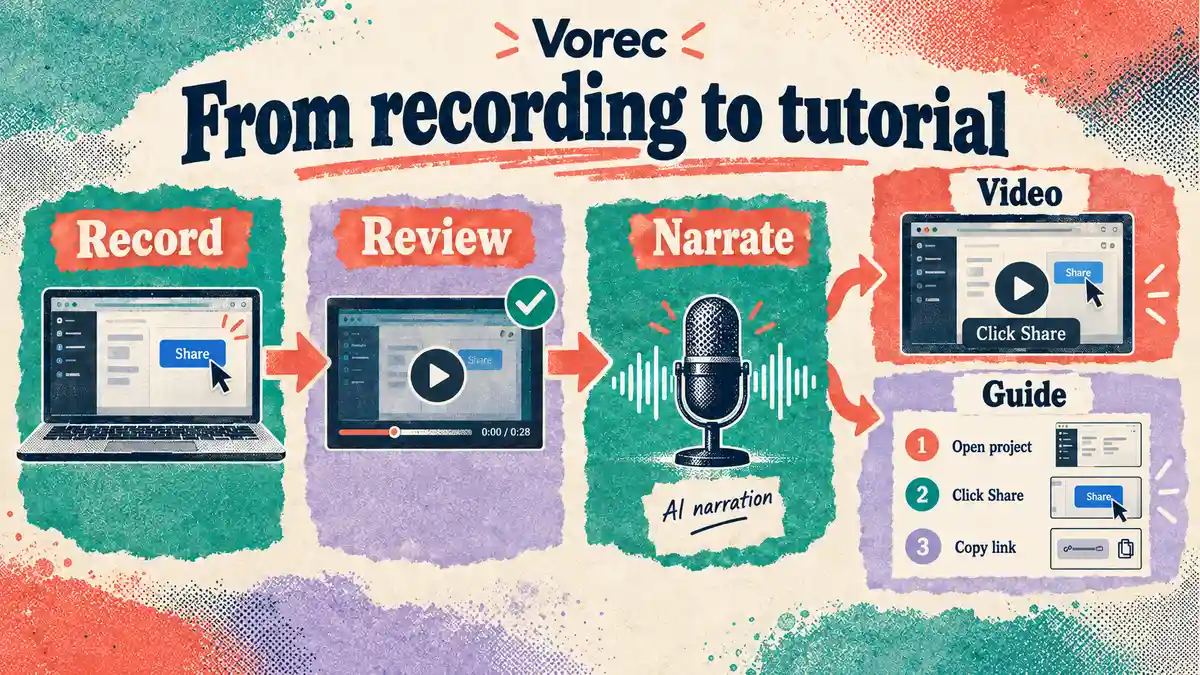
Vorec records your screen — it has its own macOS recorder, and an AI agent can drive it for you through the Claude Code plugin, capturing locally for you to review before anything is uploaded. It then drafts narration matched to the workflow it captured and generates the voiceover, so nothing is spoken into a microphone. In the editor you can add smooth cursor motion, cursor-follow zoom and click-based auto-zoom, and freeze-sync can hold a frame to give an explanation time to finish. The same capture can also produce a written step-by-step guide, with annotatable screenshots, and narration regenerates in supported languages on eligible plans, without re-recording. You can upload an existing recording instead if you already have one.
Paid plans start at $9/month (or $86/year). The free trial needs no credit card (current allowances on the pricing page). Trial includes up to 3 projects; exports carry a watermark.
Bottom Line
$216/year for Starter and $768/year for the lowest Pro tier, on yearly billing, by our arithmetic from the displayed monthly equivalents. Budget in credits, not dollars: one balance feeds video, dubbing and surveys, at about 100 credits per video-minute by Synthesia's estimate, with no rollover.
Before you buy, check which Pro tier you actually need, which dubbing rate applies to your account, and whether the Studio Avatar add-on is offered on your billing cycle.
Related: our Synthesia alternative for screen tutorials.
Related reading: Vidyard Pricing 2026 and Storylane Pricing 2026.
For how these plans compare with other tools on free offers, trials and credit meters, see our pricing study of 31 video and tutorial tools.
See also: Synthesia vs HeyGen (2026): Free Plans, Credits and Limits.
See also: Synthesia vs Colossyan (2026): Plans, Minutes, Credits.
See also: Synthesia vs InVideo (2026): Avatars or AI Clips?.
Want the recording to narrate itself? Record with Vorec, or upload one you already have, and get a narrated tutorial plus a written guide. Start your free trial.