Vidyard Pricing 2026: Every Plan and the AI Add-On
Vorec Team · 2026-09-18 · About 9 min read
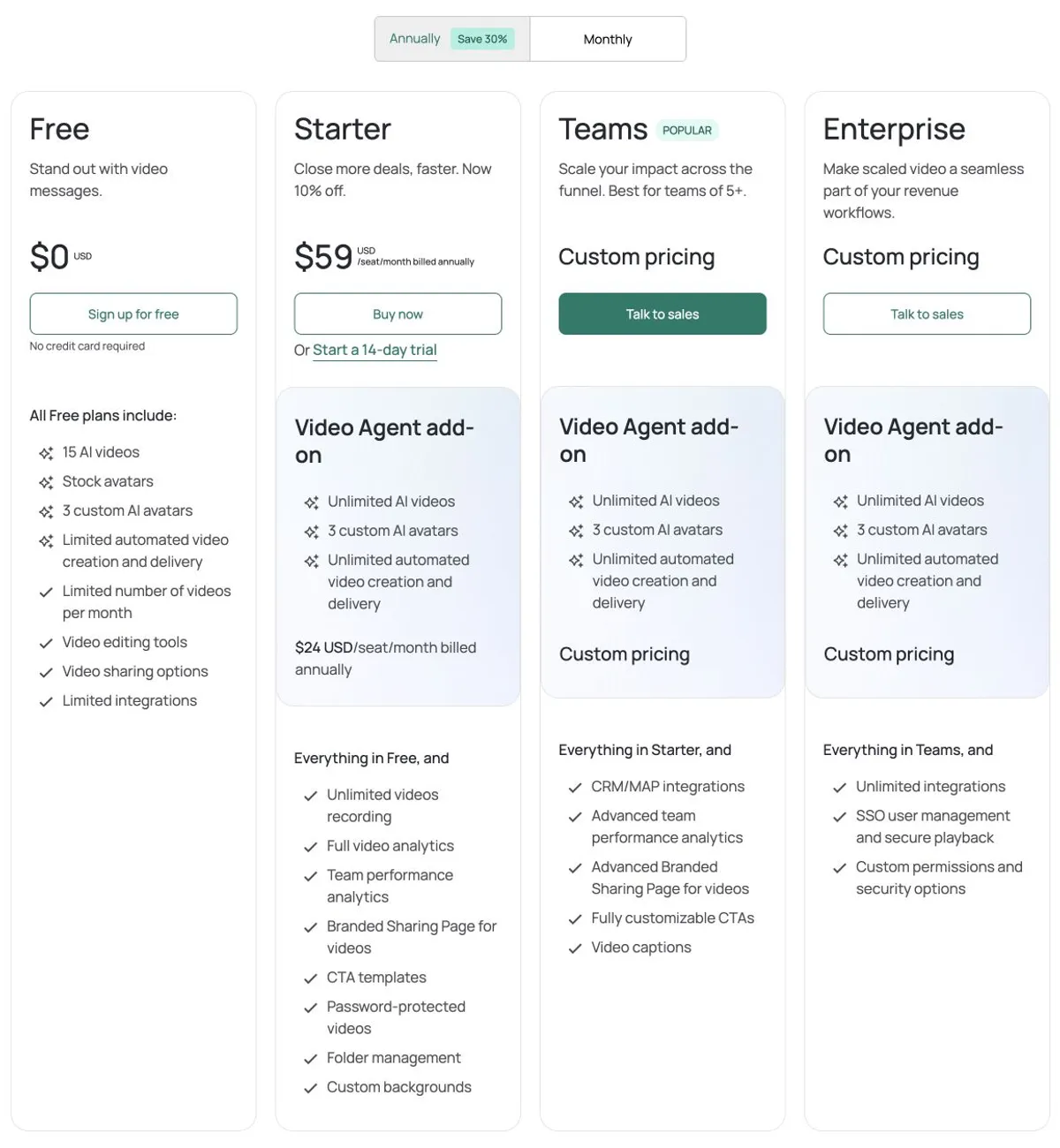
Vidyard costs $0 on Free, $59 per seat per month for Starter on annual billing ($89 billed monthly), and custom pricing for Teams and Enterprise. The Video Agent add-on is $24 per seat per month annually ($29 monthly), so Starter with Video Agent comes to $83 per seat per month, or $996 per seat per year. Free allows five recorded videos a month, 30 minutes each. Prices verified on Vidyard's pricing page on 17 September 2026.
If you have read that Vidyard starts around $19 a month, that figure is from a plan that no longer exists. Vidyard's entry paid tier is Starter at $59 per seat per month on annual billing — and Video Agent is not included in it. Starter does carry AI features of its own, including the AI script generator; Video Agent specifically is a separate add-on at $24 per seat per month, so if you need unlimited Video Agent usage the figure to budget is $83 per seat per month, or $996 per seat per year.
Everything below was verified on Vidyard's pricing page with the billing toggle switched through both states, on 17 September 2026. Plans change; check before you buy.
The Short Version
| Plan | Monthly | Annual equivalent | Annual per seat |
|---|---|---|---|
| Free | $0 | $0 | — |
| Starter | $89/seat/mo | $59/seat/mo | $708 |
| Video Agent add-on | $29/seat/mo | $24/seat/mo | $288 |
| Starter + Video Agent | $118/seat/mo | $83/seat/mo | $996 |
| Teams | Custom | Custom | Custom |
| Enterprise | Custom | Custom | Custom |
The combined rows are arithmetic on Vidyard's published per-seat prices, not a checkout receipt.
Two things to note about the prices as displayed. The Starter card currently shows "Now 10% off" with no expiry or renewal rate published, so treat $59 as the price you will actually be quoted rather than a list price to discount further — and expect renewal terms to be worth asking about. The annual toggle advertises "Save 30%", but $59 against $89 works out closer to 34%; price against the figures, not the badge.
The Plan Change That Invalidates Older Articles
This is why so much of what you will find is wrong.
Vidyard repackaged its plans on 20 February 2025, per Vidyard's own legacy-plans documentation. Pro and Plus were replaced by Starter. Pro users were then automatically migrated to Starter on 3 April 2025 at no extra cost to existing users.
Two consequences worth knowing:
- Any article quoting Pro at $19 or $29 is describing a plan you cannot buy. The current entry price is Starter.
- If you hold a legacy rate, cancelling and resubscribing loses it. Per the same documentation, added seats are charged at standard Starter pricing, and a cancel-then-resubscribe cycle does not restore the legacy rate. If you are on an old plan, that is an argument for staying put rather than restructuring.
What Free Actually Includes
Free is five recorded videos per month, 30 minutes each. The details matter more than the number:
- The allowance resets on your account signup day, not on the first of the month.
- Deleting a video does not refund the recording against your allowance.
- Duplicates count toward it; playlists do not.
- Existing videos do not expire, and your total library is not capped — the limit is on new recordings, not on how much you keep.
- Free users can create up to three custom avatars, which may require opting into free features in your profile. You do not need to buy an add-on for that.
Per Vidyard's usage-limits documentation, unlimited recording on paid plans still excludes uploads longer than 24 hours.
Downloads are not a free feature. Per Vidyard's download documentation, downloading a video requires a paid plan from Starter up, and Teams and Enterprise users additionally need the Download permission. You can get the original file and alternate MP4 resolutions — that is not a blanket 4K guarantee.
Two Places Vidyard's Own Sources Disagree
Both are worth checking in your account rather than trusting any article, including this one.
The AI video allowance. The pricing card and table both state 15 AI videos, and Vidyard's support documentation describes 15 as a lifetime total rather than a monthly allowance. But the Free row of a table on that same support page says 5. We could not reconcile them and have no evidence of what is actually enforced. Treat the published offer as 15 total, not 15 per month, and confirm in-account. Paid base plans also show 15 AI videos in support documentation, with unlimited requiring an add-on.
"Video Hosting: Not Included" on Free. The pricing table carries that label, which reads as though free videos cannot stay online or be shared. Vidyard's embed-limits documentation says something different: Free allows five videos with embedding enabled, and each of those can appear on unlimited webpages. Disabling embedding on one video frees a slot. That allowance is separate from the five new recordings per month. The sources conflict at the level of the category label, so do not read "Not Included" as "your free videos cannot be embedded".
The Upgrade Triggers
Free to Starter ($59–89): captions, CTAs and analytics. Starter adds automated captions, the AI script generator, a standard branded sharing page, basic and quick CTAs, analytics, reports and team performance, custom backgrounds, password protection and standard permissions. It is also the tier where downloading becomes possible at all.
Starter to Teams: control and integrations. Teams adds custom CTAs, advanced branding, Hubs, uploader widgets, scheduling and expiry, custom team permissions, domain restrictions, IP controls, access history and access requests, plus two data integrations.
Teams to Enterprise: scale and identity. Enterprise adds unlimited data integrations, API and ingestion integrations, custom metadata and SSO. Caption translation is a usage-billed add-on on Teams and Enterprise.
Three Card-vs-Table Traps
Vidyard's summary cards and its detailed comparison table disagree in three places, and in each case the table is more generous than the card suggests:
- The Teams card lists video captions, which implies captions begin there. The comparison table starts automated captions on Starter, and Vidyard's own migration documentation corroborates that.
- The Enterprise card advertises custom permissions. The table starts custom team permissions on Teams.
- Free shows "limited integrations", which does not mean none. Partner apps and Video Agent workflow integration are ticked on every tier. It is data integrations specifically that start on Teams.
If you are pricing a tier because of one feature, read the table row rather than the card.
The Teams card says "Best for teams of 5+". That is positioning, not a published seat minimum — no minimum billing language appears on the page, and we did not run an authenticated checkout to test it. Do not assume you must buy five seats.
What It Costs In Practice
Annual billing, per seat:
| Seats | Starter | Starter + Video Agent |
|---|---|---|
| 1 | $708 | $996 |
| 3 | $2,124 | $2,988 |
| 5 | $3,540 | $4,980 |
| 10 | $7,080 | $9,960 |
Starter takes a credit card. Per Vidyard's FAQ, other tiers are invoiced, with annual and multi-year options and renewal at the end of the term.
Is Vidyard Worth It?
Yes, if video is part of a sales or marketing motion and you need to know who watched what. The analytics, CRM-adjacent integrations and Hubs are the reason to buy Vidyard rather than a general screen recorder, and they are genuinely strong.
Reconsider if you mainly need recording and sharing. At $708 per seat per year, Starter is priced for a revenue team measuring engagement, not for someone sending occasional walkthroughs.
Budget for the add-on, not the headline. If the AI agent is why Vidyard is on your list, the number to plan around is $996 per seat per year, not $708.
How It Compares
| Entry paid (annual equivalent) | Notable | |
|---|---|---|
| Vidyard | $59/seat/mo | Viewer analytics from Starter, Hubs on Teams+; AI agent is a separate add-on |
| Loom | $15/user/mo | See our Loom pricing breakdown |
| Scribe | $25/seat/mo | See our Scribe pricing breakdown |
| Vorec | $9/mo | Narrated video from a silent recording, plus a written article |
Formats differ, so this is orientation rather than like-for-like.
Quick answers
How much does Vidyard cost?
Starter is $89 per seat a month, or $59 on annual billing; Teams and Enterprise are custom; the Video Agent add-on is $29 per seat a month ($24 annual) (15 October 2026).
Does Vidyard have a free plan?
Yes: 5 recordings a month up to 30 minutes each, 15 AI videos and 3 custom AI avatars, with no card required.
Where does CRM integration start?
CRM and marketing-automation integrations are listed from Teams, which is custom-priced, not on Starter.
Where Vorec Fits
Vidyard is built around personalised sales video and who watched it. The tracking is the product, and that is the right shape for outreach and follow-up. It is not a camera-only tool either — as its own pricing shows, it has AI scripts, custom avatars and AI video generation.
The difference is where the narration originates. Vidyard's AI works from a script you write or an avatar you direct, which suits a sales message, because what you want to say is the point. For workflow documentation the bottleneck is different: the content is already on screen, and describing it is the tedious part.
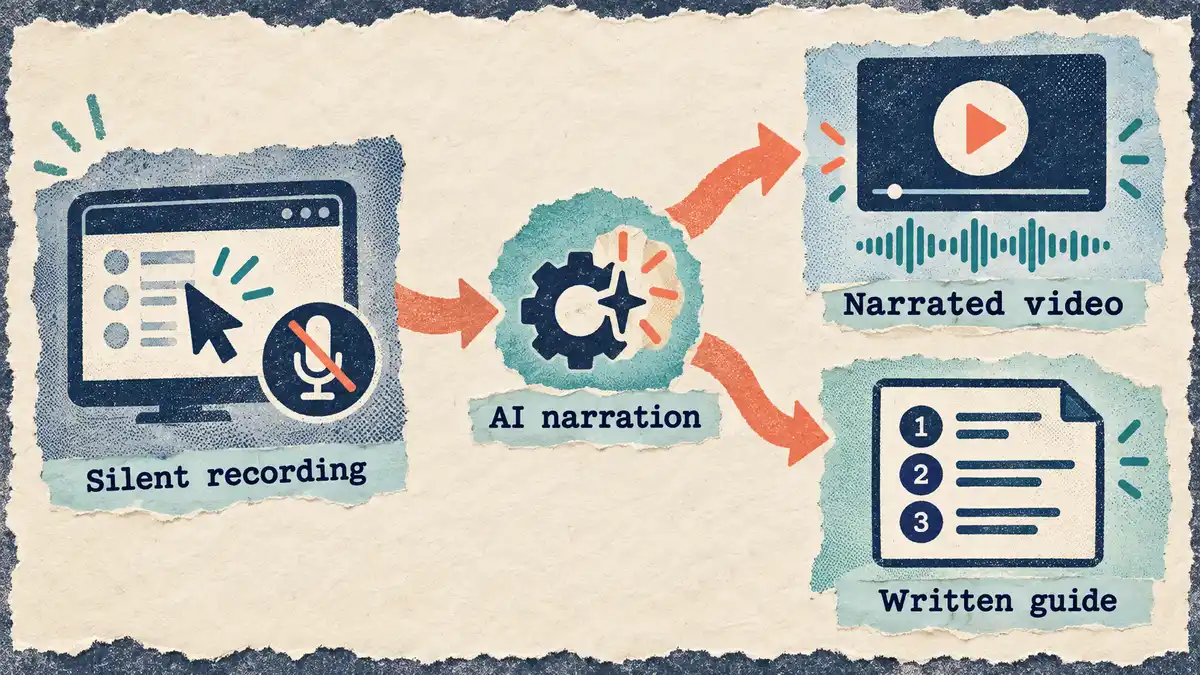
Vorec records your screen — it has its own macOS recorder, and an AI agent can drive that capture through the CLI, recording locally so you review the take before anything is uploaded. The AI uses the captured action data, writes narration matched to what happens on screen, and generates the voiceover, with no microphone involved. Freeze-sync holds the frame when an explanation needs more time than the recording allows. The same recording also produces a written step-by-step article, and narration can be regenerated in supported languages on eligible plans, without re-recording.
Plans start at $9/month with a free trial (current allowances on the pricing page); trial exports carry a watermark. It does not provide native customer-facing viewer analytics or CRM engagement sync, which is Vidyard's core strength.
Bottom Line
$708 per seat per year for Starter on annual billing, or $996 with Video Agent — which is the figure to budget if the AI agent is the reason Vidyard is on your shortlist. Monthly is $89 and $118 respectively.
Ignore any source quoting $19 or $29 as the base plan price: those were Pro and Plus, retired in the February 2025 repackaging. ($29 is still current — but as the monthly Video Agent add-on, not a plan.) And if you are sitting on a legacy rate, do not cancel and resubscribe to restructure — you will not get it back.
Related: our Vidyard alternative for AI-narrated demos and Loom vs Vidyard.
Related reading: Loom vs Tella, Screen Studio Pricing 2026 and Synthesia Pricing 2026; Vimeo pricing, verified plan by plan.
For how these plans compare with other tools on free offers, trials and credit meters, see our pricing study of 31 video and tutorial tools.
Documentation rather than sales video? Record with Vorec, or upload one you already have, and get a narrated tutorial plus a written guide. Start your free trial, no card needed.