Screen Studio Pricing 2026: $29/mo or $108/yr
Vorec Team · 2026-09-18 · About 9 min read
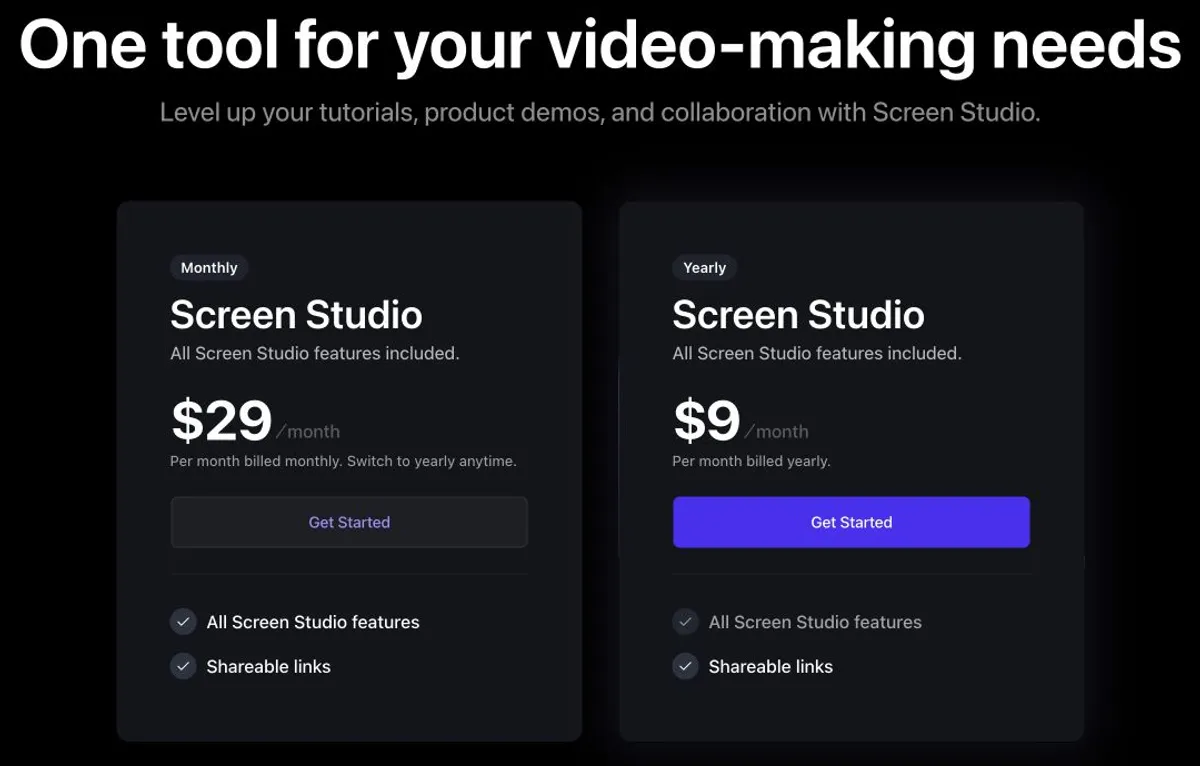
Screen Studio has two prices and they are not a ladder — they are the same product billed two ways. $29 per month, or $108 per year. Both include every feature; there is no cheaper tier and no more expensive one.
That makes the decision unusually simple, and it turns on a single number: monthly only saves you money for three months. By month four you have spent more than the annual price.
Everything below was verified on screen.studio and its own documentation, on 17 September 2026. Prices change; check before you buy.
The Short Version
| Billing | Price | Per year |
|---|---|---|
| Monthly | $29/month | $348 if held 12 months |
| Yearly | $9/month equivalent | $108 billed yearly |
Both options carry identical features. Screen Studio publishes no feature comparison table, because there is nothing to compare — the two cards describe the same product.
One wording caution: the yearly card advertises $9/month, but that is an annual commitment billed once at $108. It is not a $9 monthly charge you can cancel after a month.
The Break-Even Is Four Months
| Months held | Monthly cost | Annual cost | Cheaper |
|---|---|---|---|
| 1 | $29 | $108 | Monthly |
| 2 | $58 | $108 | Monthly |
| 3 | $87 | $108 | Monthly |
| 4 | $116 | $108 | Annual |
| 12 | $348 | $108 | Annual |
Over a full year, annual saves $240 — about 69% off the monthly rate, which is an unusually steep gap for this category.
So the rule is blunt: if you need Screen Studio for a specific short project, pay monthly and cancel. For anything longer than a quarter, annual is the only sensible choice. All figures are before tax, and the subscription auto-renews with cancellation effective at the end of the term.
Does Screen Studio have AI voiceover?
Yes: its homepage lists an AI voiceover where you type a script to add a voice and edit it later, and says the text leaves your Mac to generate the voice (re-checked 20 October 2026). That is text-to-voice. We did not find evidence that it writes narration from what happens in a silent recording, which is not proof it cannot. Screen Studio also lists video import, transcript editing, filler and pause shortening, local captions, MP4 up to 4K at 60 fps and a Mac-only app (macOS 13.1 or newer recommended).
Privacy note: its main page describes optional cloud transcription (audio deleted after it is returned), voice generation, share links and projects that upload files, and opt-out usage analytics, while its FAQ makes a broader statement about not sending recording data. Describe the optional network features rather than assuming none.
One-Time Licences: Gone For New Buyers, Still Valid If You Have One
This is the part generating the most discussion, and it needs stating precisely because it is easy to get wrong in both directions.
Per Screen Studio's own FAQ:
- One-time licences are no longer available for new purchases. If you are buying today, subscription is the only route. Any article offering you a "lifetime" price is describing something you cannot buy.
- Existing one-time licences remain valid, per the FAQ. It does not say prior purchasers were moved onto subscriptions.
- Access to the latest updates and features can expire, and may be renewed. So an old licence keeps working; it does not automatically keep getting new versions forever.
Legacy licence handling still works: Screen Studio's licence management guide lets a key holder disconnect a device and reuse the key elsewhere, without needing access to the old machine. Its activation guide still distinguishes email-based subscription activation from legacy licence keys.
What we could not verify, and will not guess: Screen Studio's current FAQ does not publish the renewal price for an expired one-time licence, how many years of updates such a licence included, which version was the last eligible one, or whether legacy share links are retained.
We also cannot date the change. We read Screen Studio's changelog in full and found no dated pricing-model announcement. A 27 June 2025 release fixes both refunded subscriptions remaining active and expired lifetime-licence validation, which proves both models existed by then — but that does not date when subscriptions launched or when new perpetual sales stopped. The Master Subscription Agreement was updated 4 September 2025, which is also not a pricing date. If you see a confident date elsewhere, it is not coming from Screen Studio's published pages.
There Is No Free Plan — And No Free Export
Worth being clear, because "free trial" gets assumed here.
Per Screen Studio's download page, you can use all features without an active plan except exporting video files. There is no free tier documented, and no timed 7- or 14-day trial documented either — no time limit is stated on that page at all.
So the model is: evaluate the app, and pay when you need a video file out of it. That is more generous than a two-week trial in one way and less in another — exporting a video file is the gated action, so you cannot take one away without paying. We did not test sharing or clipboard behaviour, so we cannot say what else may or may not leave the app.
The 30-Minute Limit People Misread
Screen Studio's shareable links documentation caps shared recordings at 30 minutes, and recommends exporting longer projects as files instead.
This is a limit on hosted share links, not on recording or on file export. You can record and export longer projects; what you cannot do is hand someone a Screen Studio link to a 45-minute video. Changelog entries from 9 June 2025 and 24 July 2025 show the link limit being raised to 30 minutes and then made consistent.
No total cloud-storage allowance or cap on the number of links is published anywhere we could find.
What You Get
Per Screen Studio's homepage, on either billing option:
- Video export up to 4K at 60fps, plus GIF
- Automatic zoom and cursor smoothing — the motion polish the product is known for
- Editing, local transcripts and subtitles, and audio enhancement
- iPhone and iPad recording via a Mac
Platform is the constraint to check first. Screen Studio's FAQ states plainly that it is macOS only, that Windows is not ready, and that there are no near-future plans for it. It runs on Intel and Apple Silicon, with Ventura 13.1 or later recommended. iPhone and iPad capture requires a Mac — there is no standalone iOS editor and no Windows version.
Students and educators get 40% off. Screen Studio's FAQ and its educational discount request page describe a 40% discount applied via an educational email address, or by submitting proof of student status to support for a code. Applying 40% to the published prices would give $64.80/year or $17.40/month — but Screen Studio does not publish which plans qualify, whether it applies at renewal, or whether it stacks, so treat those as arithmetic rather than quoted checkout prices.
A Note On Devices
Older articles and cached search results state a specific device count. The current pricing cards do not show one. Screen Studio's Master Subscription Agreement, updated 4 September 2025, says the device count is whatever is specified in your Order, and that an account is for one individual with no shared logins — though accounts may be reassigned to a replacement person.
If a device count matters to your purchase, confirm it at checkout rather than trusting any figure you read, including ones from a few months ago.
Is Screen Studio Worth It?
Yes, if you are on a Mac and you want recordings that look polished without editing them. The automatic zoom and cursor smoothing is genuinely the differentiator, and at $108 a year it is inexpensive for the quality of motion it produces.
Yes, if you can commit to a year. The annual price is 69% below monthly, which is a wide enough gap that paying monthly long-term is simply a mistake.
Reconsider if you are not on macOS. There is no Windows version and the vendor says there are no near-future plans for one. No workaround changes that.
Reconsider if you need to share long recordings by link. The 30-minute share-link ceiling means anything longer has to travel as a file.
How It Compares
| Entry paid | Notable | |
|---|---|---|
| Screen Studio | $108/yr | Automatic zoom and cursor motion; macOS only |
| Loom | $15/user/mo | See our Loom pricing breakdown |
| Camtasia | $39/yr entry | See our Camtasia pricing breakdown |
| Vorec | $9/mo | Narrated video from a silent recording, plus a written article |
Formats differ, so this is orientation rather than like-for-like.
Quick answers
How much does Screen Studio cost?
$29 a month or $9 a month billed yearly ($108 a year, calculated); both include all features (re-checked 20 October 2026).
Can I buy a one-time Screen Studio licence?
No: one-time licences are no longer sold, though existing ones remain valid.
Does Screen Studio have a student discount?
Its FAQ lists a 40% education discount via an educational email or proof of student status.
Where Vorec Fits
Screen Studio makes a recording look polished. The automatic zoom, the cursor motion, the pacing — that is what you are paying for, and it is the reason people choose it.
It works on the audio and video you give it: microphone, system audio, or footage you already have. We did not find documentation of narration authored automatically from silent on-screen actions, so if a recording has no commentary on it, supplying that commentary is your job.
Vorec overlaps on the motion polish and differs on the narration. It records your screen through its own macOS app — or an AI agent can drive that recorder for you through the Claude Code plugin — and it smooths cursor motion and zooms the frame to follow the action automatically, the same class of finish Screen Studio is bought for.
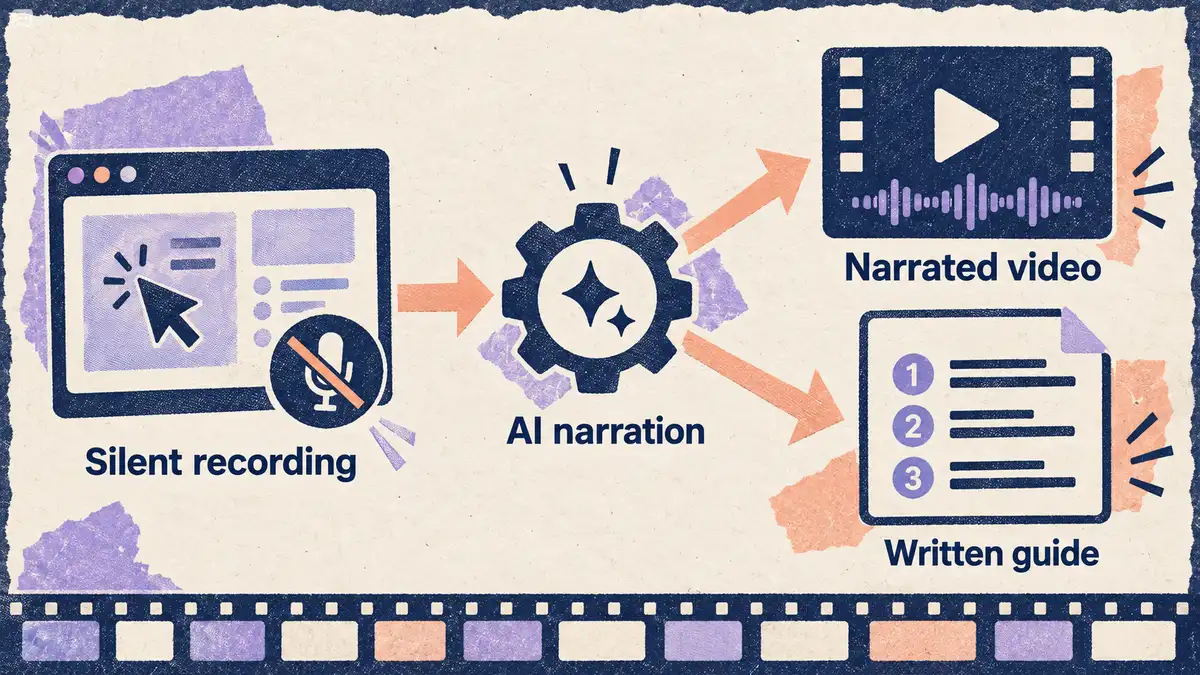
What Vorec adds is the narration itself. The AI uses the captured action data, writes commentary matched to what happens on screen, and generates the voiceover, so nothing is spoken into a microphone and there are no voiceover to re-record. Freeze-sync holds the frame when an explanation needs more time than the recording allows. The same capture also produces a written step-by-step guide, and narration regenerates in supported languages on eligible plans, without re-recording.
Plans start at $9/month with a free trial (current allowances on the pricing page); trial exports carry a watermark. The recorder app is macOS, as Screen Studio's is, while the editor and upload path run in the browser.
Bottom Line
$108 a year, unless you genuinely need it for three months or less — in which case $29 a month and cancel. Month four is where that flips, and annual is 69% cheaper across a full year.
One-time licences cannot be bought any more, but if you own one it still works; what can lapse is access to new versions. And check the platform before anything else: this is a macOS product, stated by the vendor as having no near-term Windows plans.
Related: our best screen recording software guide and Loom pricing.
Related reading: Snagit Pricing 2026.
For how these plans compare with other tools on free offers, trials and credit meters, see our pricing study of 31 video and tutorial tools.
See also: Screen Studio Alternatives (2026): 7 Tools Compared on Price and Platform.
Want the recording to narrate itself? Record with Vorec, or upload one you already have, and get a narrated tutorial plus a written guide. Start your free trial, no card needed.