Snagit Pricing 2026: $39/Year and the Licence Change
Vorec Team · 2026-09-17 · About 10 min read
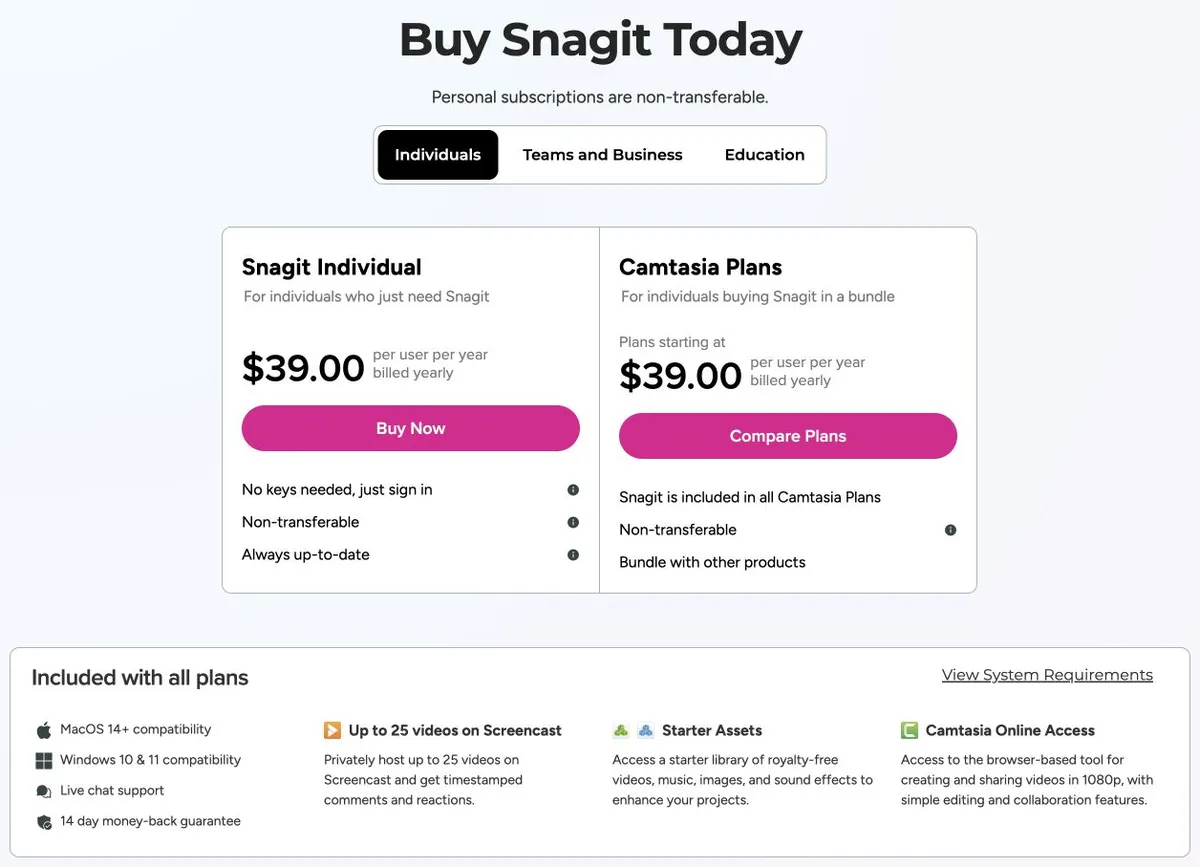
Snagit costs $39 per user per year for an Individual licence and $48 per user per year on Business, falling to $45.60 from ten seats, all billed annually with no monthly option. Educators pay $39.36 and verified full-time students $19.99 a year, and Enterprise is a custom annual fee with a three-year price lock. Snagit 2025 and later are subscription-only. The Individual and Business prices were re-checked on TechSmith's store on 20 October 2026.
Snagit costs $39 per user per year — and that standard individual price is cheaper per seat than the plan sold for teams. Business costs $48, and its volume discount at ten seats only brings it to $45.60. Outside of education pricing, buying Snagit for a team is more expensive per person than buying it for individuals, at every quantity below a hundred seats.
That is not a mistake in their pricing. Business buys you licensing behaviour, not features. Whether you need it is the real decision, and most articles on this topic never mention that the two prices differ at all.
Everything below was verified on TechSmith's Snagit store, team and education pages, and TechSmith's own licensing documentation, on 17 September 2026. The Individual price ($39) and the Business base price ($48) were re-checked against TechSmith's store on 30 September 2026 and had not changed, and the fully functional 15-day trial was confirmed on TechSmith's Snagit product page. The 10-99 seat volume rate and the education prices below were not re-checked and keep their 17 September date. Prices change; check before you buy.
Re-checked 20 October 2026: Snagit Individual is $39 per user a year and Business $48 per user a year, with Enterprise custom and a three-year price lock. The store lists macOS 14 or newer and Windows 10 or 11, 25 hosted Screencast videos and Step Capture (clicks to screenshots and instructions). TechSmith's Business page mentions a discount from 10 users while its product marketing says 5 or more, so check the quantity at checkout. The 14 days on the store is a money-back guarantee, not a trial length. We did not find evidence of generated narration included in the standalone $39 plan; the AI voiceover tools are described as part of the wider suite, which is not proof the plan lacks them.
The Short Version
| Plan | Price | Notes |
|---|---|---|
| Individual | $39/user/yr | Named user, non-transferable, sign-in required |
| Business, 1–9 seats | $48/user/yr | Transferable seats, deployment tooling |
| Business, 10–99 seats | $45.60/user/yr | Volume discount |
| Business, 100+ | Contact sales | — |
| Enterprise | Custom annual | 3-year price lock, dedicated success manager |
| Educators | $39.36/user/yr | Accredited institutions; transferable key |
| Students | $19.99/yr | Verified full-time students; non-transferable |
There is no monthly option for Snagit. Every price above is billed annually.
One clarification, because the store layout invites the mistake: the card next to Individual showing "from $39/year" is Camtasia bundles, not a higher Snagit tier. Snagit itself has exactly one standalone individual price.
Business Costs More Than Individual. Here's What You Get.
| Seats | Individual total | Business total | Difference |
|---|---|---|---|
| 5 | $195 | $240 | +$45 |
| 10 | $390 | $456 | +$66 |
| 25 | $975 | $1,140 | +$165 |
| 50 | $1,950 | $2,280 | +$330 |
Business is worth the premium when deployment and licence control matter more than the per-seat rate. Per TechSmith's comparison, Business adds:
- Transferable seats — reassign a licence when someone leaves. Individual licences are non-transferable and tied to a named user.
- No end-user sign-in — Individual requires each person to sign in to activate. Business and legacy keys can avoid that.
- Offline activation and deployment packages for managed rollouts
- Seat additions mid-term
- Phone support and extended version support
- Custom cloud-sharing controls
Enterprise adds flexible licensing, assisted security review and custom legal terms, on a custom annual fee with a three-year price lock.
If you are five people who each install their own software and nobody leaves often, Individual at $39 is the right purchase and saves you money. If you are IT deploying to fifty machines and need to reclaim licences when staff change, the $330 premium buys the thing that makes that possible.
Read the support rows carefully rather than the cards. The Business card highlights "phone and chat" support, which reads as though Individual gets neither — but chat, email, knowledge base, tutorials, certification and webinars are available on all plans. Phone support is the actual Business addition.
The Licence Change, Precisely
This is what most people are actually searching for, and the dates get repeated wrongly across the web.
Snagit 2025 and later are subscription-only. Per TechSmith's transition documentation, last updated 10 June 2026: perpetual-licence upgrades ended after 1 January 2025, and the transition took effect with the 2025 release on 12 February 2025.
What happened to existing owners:
- Existing perpetual copies remain usable, subject to operating-system compatibility. Nobody's installed software was switched off.
- Active maintenance converted to a Legacy License Subscription — renamed in a wording update on 18 November 2025 — which grants access to future versions while it stays renewed.
- Discounted legacy renewal is available through at least 2030. Note that this is a discount, not a price freeze: TechSmith's documentation permits annual price increases.
Snagit 2024 support dates: through 31 December 2026 without maintenance, or 2 October 2027 with legacy maintenance.
Time-sensitive: existing active-maintenance customers can still add Snagit 2024 seats until October 2026. That window is closing within weeks of this writing. If you are holding a perpetual estate and planned to expand it, that is the deadline.
Is there any perpetual route left? Not a general one for 2025 and later. Two narrow qualifications are worth stating accurately rather than declaring the door shut: the active-maintenance seat additions above, and existing App Store and Amazon purchases, which TechSmith describes as perpetual 2024 licences with no updates beyond 2024. We did not verify current storefront availability of those, so treat them as worth checking rather than as a confirmed option.
On expiry, TechSmith states that captures remain in your local library and that a limited export grace period exists. No duration is published for that grace period, so do not plan around a specific number — if you see one quoted, it is not from TechSmith's documentation.
A sign-in detail that the FAQ contradicts itself on. An early line states no sign-in is required; later text qualifies it. The accurate version: Individual requires sign-in activation, while Business and legacy keys can avoid it. Activation happens online and then re-checks roughly every 90 days, with offline alternatives available for organisations.
What You Actually Get — And What The "25 Videos" Means
The trial is 15 days with no content limit. Separately, the store offers a 14-day money-back guarantee. Those are two different clocks and neither extends the other.
Now the number that causes the most confusion. Snagit's listing mentions 25 videos, and it is widely misread as a cap on how much you can record or export. It is not. That is the free Screencast hosting tier — TechSmith's sharing service — not a limit on Snagit itself. Screenshots are unlimited subject to terms, and there is a 12-month inactivity rule on hosted content and accounts.
If you want more hosting, Screencast Pro is a separate product at $99.99/user/year or $9.99/user/month. It is included in Camtasia Pro at $599/year, not in Snagit.
What the Snagit subscription does include: the Starter Assets library and Camtasia Online at 1080p. Not the premium asset library, and not unlimited Screencast.
Snagit runs on Windows 10 and 11, and macOS 14 or later, across all plans. Education licences carry no usage limits.
Is Snagit Worth It?
Yes, if you capture and annotate screenshots constantly — callouts, arrows, blurred fields, step numbers. At $39 a year it is inexpensive for how much annotation it offers, and its callout, arrow, step-number and blur tooling is the reason long-time users stay with it.
Reconsider if you are buying it for video. Snagit records the screen, but it is a capture-and-annotate tool with light trimming, not an editor. If your output is a narrated tutorial you will end up buying something else as well — and note that the Camtasia Editor watermark people mention belongs to Camtasia's Editor, not to Snagit.
Reconsider if the subscription model itself is the objection. That is the single most common complaint in the threads ranking for this term, and no feature comparison resolves it. There is no general perpetual path for current versions.
Buy Individual, not Business, unless you need the licensing. The Business premium is real money at scale and buys deployment and transferability, not capability.
How It Compares
| Entry paid | Notable | |
|---|---|---|
| Snagit | $39/user/yr | Deep screenshot annotation; no monthly option |
| Camtasia | see our Camtasia pricing breakdown | Same vendor, same licence transition |
| Scribe | $25/seat/mo (Personal) | Step-by-step documents; see our Scribe pricing breakdown |
| Vorec | $9/mo | Records and narrates automatically, plus a written article |
Formats differ, so this is orientation rather than like-for-like.
Quick Answers
How much does Snagit cost?
Individual is $39 per user per year, billed annually. Business is $48 per user per year for transferable seats. There is no monthly option. TechSmith lists no completely free version, only a fully functional 15-day trial. Prices re-checked on 30 September 2026.
Where Vorec Fits
Snagit's output is an annotated still, or a short clip you trimmed yourself. For "here is the button, here is what it does", that is often exactly right, and inexpensive for the depth of annotation it offers.
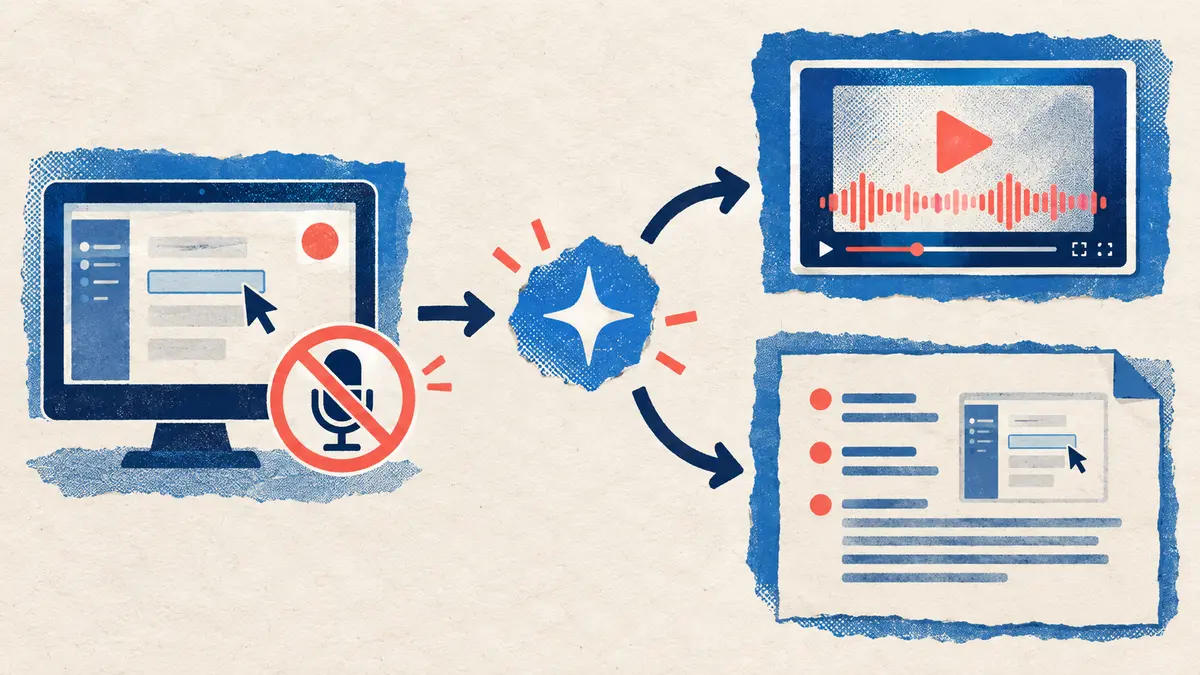
Where it runs out is narration. A Snagit recording is silent unless you talk over it — and if you are documenting forty workflows, that means narrating forty times, in a quiet room, and re-recording whenever the interface changes.
Vorec records your screen through its own macOS app — an AI agent can drive that recorder for you through the Claude Code plugin — and then narrates what it captured. The AI uses the captured action data, writes commentary matched to what happens on screen, and generates the voiceover, so nothing is spoken into a microphone and there are no voiceover to re-record. Cursor motion is smoothed and the frame zooms to follow the action. Freeze-sync holds a frame when an explanation needs longer than the recording allows. The same capture also produces a written step-by-step guide with annotatable screenshots, and narration regenerates in supported languages on eligible plans, without re-recording. You can upload an existing recording instead if you already have one.
Plans start at $9/month with a free trial (current allowances on the pricing page); trial exports carry a watermark. Vorec's article editor does include image annotation for the screenshots in a generated guide, though Snagit's dedicated capture-and-annotate tooling is far deeper and is what it is bought for.
Bottom Line
$39 per user per year, billed annually, no monthly option. Buy Individual unless you specifically need transferable seats, deployment packages or activation without end-user sign-in — Business costs more per seat at every volume below 100, and its ten-seat discount at $45.60 is still above the Individual rate.
Subscription is the only path for 2025 and later versions. If you hold perpetual licences with active maintenance and intend to add seats, the October 2026 deadline for adding Snagit 2024 seats is the date to act on.
And check whether you are actually buying Snagit or buying hosting. The "25 videos" figure is Screencast's free tier, not a Snagit limit.
Related: our Snagit alternative for narrated video and Camtasia pricing — same vendor, same transition.
Related reading: 8 Best Screen Recording Software Tools in 2026, Screen Studio Pricing 2026 and Tango Pricing 2026.
For how these plans compare with other tools on free offers, trials and credit meters, see our pricing study of 31 video and tutorial tools.
See also: Camtasia vs Snagit (2026): Which TechSmith Tool Do You Need?.
See also: Loom vs Snagit (2026): Video Messages or Screen Captures?, Scribe vs Snagit (2026): Step Guides or Capture App?.
Need narration, not just capture? Record with Vorec, or upload one you already have, and get a narrated tutorial plus a written guide. Start your free trial, no card needed.