Camtasia Pricing 2026: Plans From $39 to $599 a Year
Vorec Team · 2026-09-17 · About 6 min read
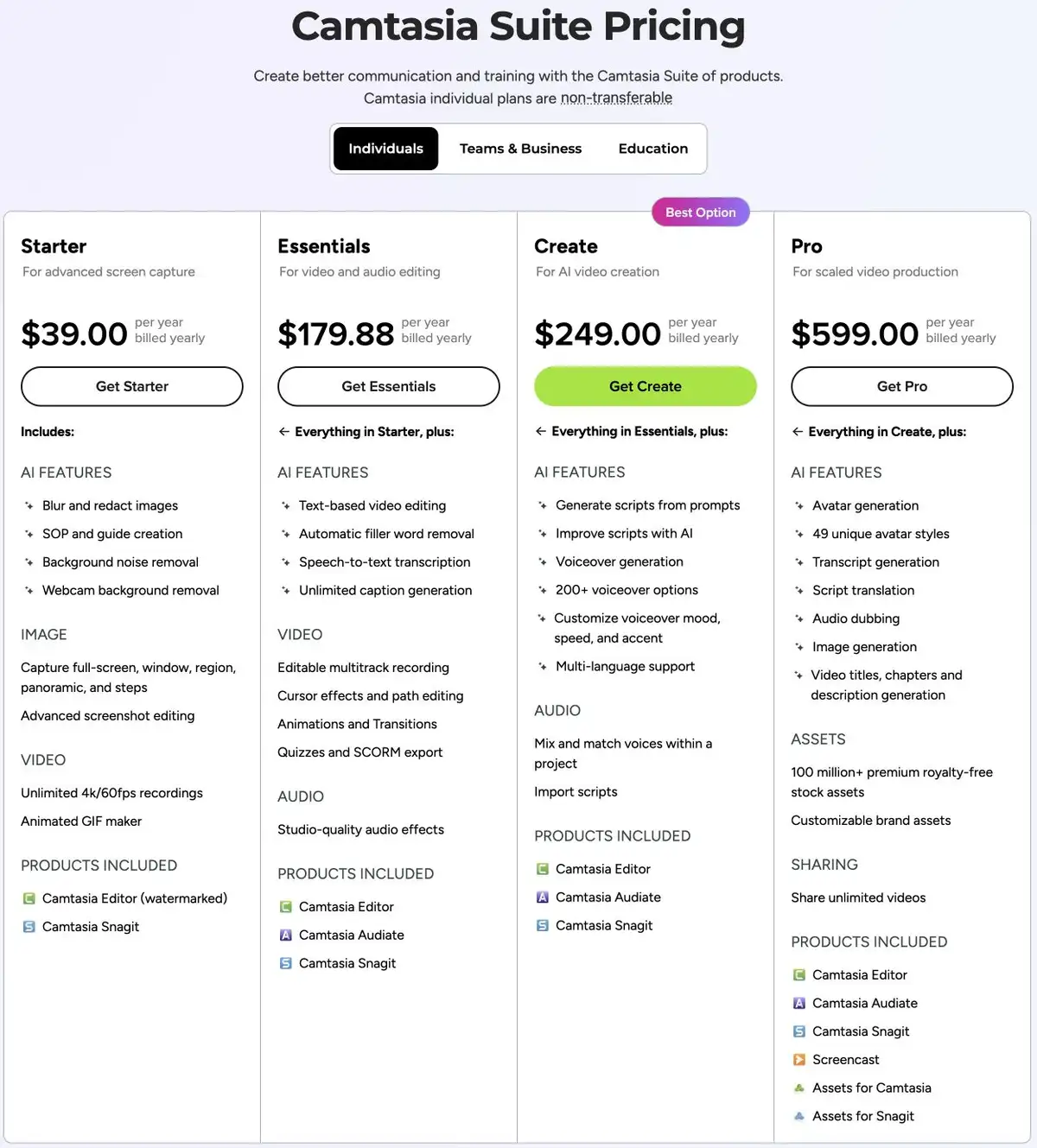
Two things surprise people about Camtasia pricing in 2026. First, new versions are subscription-only — TechSmith moved to annual subscriptions with the Camtasia 2025 release on 12 February 2025. Second, the $39 Starter plan does include the editor — multitrack editing, zoom-and-pan and SCORM quizzing are all listed — but its exports are watermarked. Watermark-free output starts a tier higher.
Figures below come from TechSmith's Camtasia store page, verified 17 September 2026. The four individual prices were re-checked against the same page on 30 September 2026 and had not changed.
The Short Version
| Plan | Annual | Aimed at |
|---|---|---|
| Starter | $39/yr | Advanced screen capture |
| Essentials | $179.88/yr | Video and audio editing |
| Create | $249/yr | AI-assisted video creation |
| Pro | $599/yr | Scaled video production |
| Enterprise | Custom | Teams and organisations |
The Licence Change That Upset Long-Time Users
TechSmith moved to annual subscriptions with the Camtasia 2025 release on 12 February 2025. Perpetual upgrades stopped after 1 January 2025.
If you hold an existing perpetual licence it keeps working on the version you own, subject to OS compatibility, but it will not receive new features. One qualification worth knowing: per TechSmith's transition FAQ, existing customers on active maintenance can still add Camtasia 2024 seats until October 2026. Outside that, new purchases are annual subscriptions.
That is the whole "why is Camtasia so expensive now" story. The yearly figure did not necessarily jump; the shape changed. A tool people bought once every few years now renews annually.
Which Tier Is Actually "Camtasia"
This is the practical question, and the pricing page rewards careful reading.
Starter ($39) includes the Camtasia Editor — multitrack editing, zoom-and-pan and SCORM quizzing are all listed — but exports are watermarked. You can edit and publish on Starter; the output simply carries a watermark.
Essentials ($179.88) is where watermark-free export begins. For most people asking "how much is Camtasia", this is the real number — roughly 4.6x the headline — because a watermarked export may be unsuitable when your brand or client requires watermark-free output.
Create ($249) adds AI video creation: AI script generation and AI-generated voiceovers, with 200+ voiceover options, mood, speed and accent adjustment and multi-language support listed. TechSmith's Create help page says script translation, audio dubbing and stock avatars are Pro additions (checked 20 October 2026). If you do not want to narrate your own videos, this is the tier, not Essentials.
Pro ($599) adds AI avatars — 49 unique avatar styles — and further production features.
So the honest answer to "what does Camtasia cost" is $179.88 a year for watermark-free editing, $249 if you want AI narration, and $599 if you want avatars.
Camtasia Generates Narration — This Is Widely Misreported
Worth stating plainly because many comparison articles claim otherwise.
From Create upward, Camtasia includes an AI script generator and AI voice generation with 200+ voiceover options. Essentials and above include Audiate for transcript-based editing and filler-word removal.
"Camtasia makes you record your own voice" has not been true since these features shipped. If you have ruled it out on that basis, the ruling was based on stale information.
What It Costs Over Time
Because it is now a subscription, compare across years:
| 1 year | 3 years | |
|---|---|---|
| Starter | $39 | $117 |
| Essentials | $179.88 | $539.64 |
| Create | $249 | $747 |
| Pro | $599 | $1,797 |
A perpetual licence used to amortise across three or four years. That option is closed to new buyers, which is the genuine cost increase for anyone who upgraded infrequently. See also the legacy licence and maintenance FAQ.
Is There a Free Trial?
Per TechSmith's trial support page, checked on 30 September 2026, the trial is per app rather than for the whole bundle: the Camtasia Editor trial has no time limit and is watermarked, while the Audiate trial runs 7 days and the Snagit trial 15. Do not read "free trial" as a 7- or 15-day trial of the full Camtasia bundle. The store lists Audiate in Essentials, while TechSmith's trial support page names Create and Pro as the plans that remove the Audiate trial limits, so confirm what your plan includes at checkout if it matters to you.
Is It Worth It?
Yes, if you make screen tutorials regularly and need zoom-and-pan, callouts, captions and interactive quizzing with SCORM output. For compliance training, that quizzing capability can decide the purchase on its own. Note it is listed from Starter — but watermarked until Essentials.
Yes, if your content needs updating. A Camtasia project is a timeline you reopen when the UI changes next quarter, rather than re-recording from scratch.
Reconsider if you make a handful of videos a year. The learning cost is paid every time you return to it, and the subscription runs whether you open it or not.
Quick Answers
How much is Camtasia?
Camtasia is sold as an annual subscription. Starter is $39 a year with a watermarked editor, Essentials is $179.88, Create is $249 and Pro is $599. Watermark-free export starts at Essentials. Prices re-checked on 30 September 2026.
Can you still buy Camtasia once?
New versions are subscription-only. TechSmith moved to annual subscriptions with the Camtasia 2025 release on 12 February 2025 (the date appears in TechSmith's Camtasia Windows 2025 version history, release 2025.0.0), and perpetual upgrades stopped after 1 January 2025. An existing perpetual licence keeps working on the version you own, subject to operating-system compatibility, but does not receive new features. The licence-change section above has the detail and the TechSmith source.
Where Vorec Fits
Camtasia is a professional editor that assumes you will operate it. Even its AI tiers assume you are directing the result.
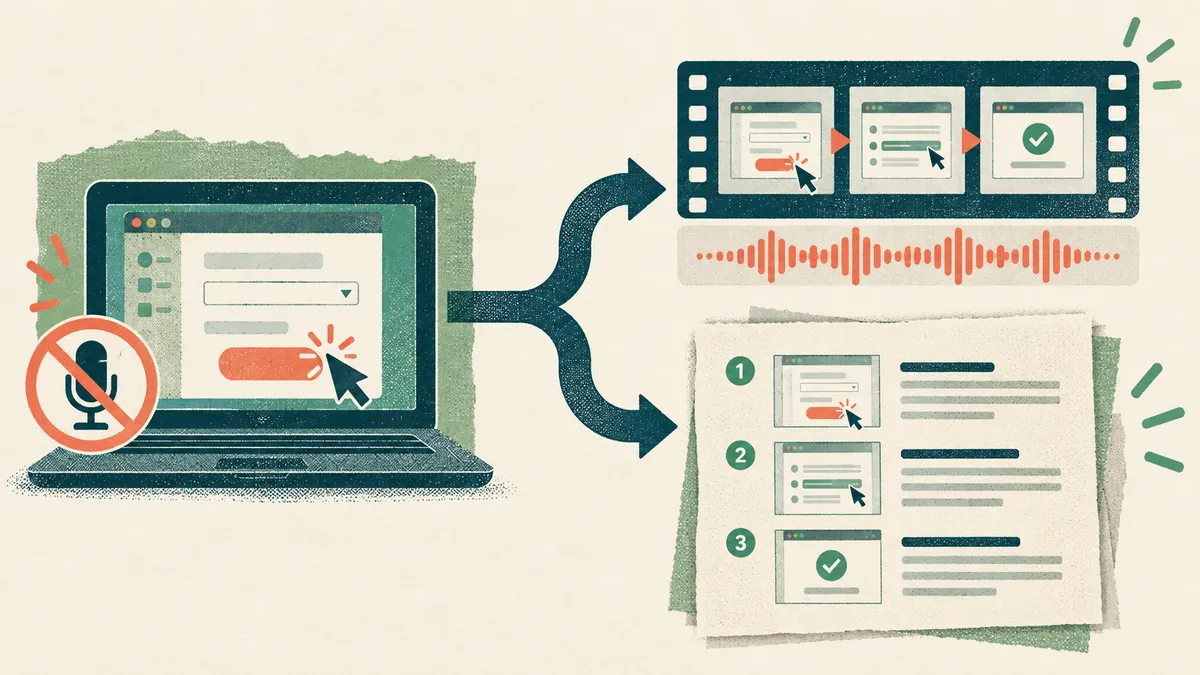
Vorec targets a narrower job: a narrated tutorial from a screen recording. It has its own macOS recorder, and an AI agent can drive it for you through the Claude Code plugin, capturing locally for you to review before anything is uploaded. Vorec then drafts narration matched to the workflow it captured and generates the voiceover, so nothing is spoken into a microphone. In the editor you can add smooth cursor motion, cursor-follow zoom and click-based auto-zoom, and freeze-sync can hold a frame to give an explanation time to finish. The same capture can also produce a written step-by-step guide, and narration regenerates in supported languages on eligible plans without re-recording. You can upload an existing recording instead.
Vorec plans are $9, $24 or $59 a month, or $86, $230 or $566 a year. The free trial needs no credit card (current allowances on the pricing page) with no credit card required. Trial includes up to 3 projects; exports carry a watermark. Vorec does not author SCORM quizzes; if your training needs graded quizzing inside an LMS, Camtasia's quiz and SCORM features are built for that.
Bottom Line
Camtasia is the same capable editor it always was, sold differently. $179.88/year is the realistic figure for the editing most people mean, $249 if you want AI narration, $599 for avatars and translation.
If you are here because a renewal arrived and the perpetual licence you expected did not, that is a fair reason to reopen the decision — just reopen the right one. The question is not only which editor, but whether you should be editing at all.
Related: our Camtasia alternative guide, Is Camtasia Worth It and Camtasia vs Descript.
Related reading: 8 Best Screen Recording Software Tools in 2026, Camtasia vs Loom, Camtasia vs Captivate vs Articulate and Clueso vs Camtasia for L&D Teams.
See also: Camtasia Alternatives (2026): 7 Tools Compared on Price and Editing.
See also: Screen Studio Alternatives (2026): 7 Tools Compared on Price and Platform.
Want the recording to narrate itself? Record with Vorec, or upload one you already have, and get a narrated tutorial plus a written guide. Trial includes up to 3 projects; exports carry a watermark. Start your free trial, no card needed.
For how these plans compare with other tools on free offers, trials and credit meters, see our pricing study of 31 video and tutorial tools.