Camtasia vs Descript (2026): Timeline or Transcript?
Vorec Team · 2026-09-12 · About 6 min read
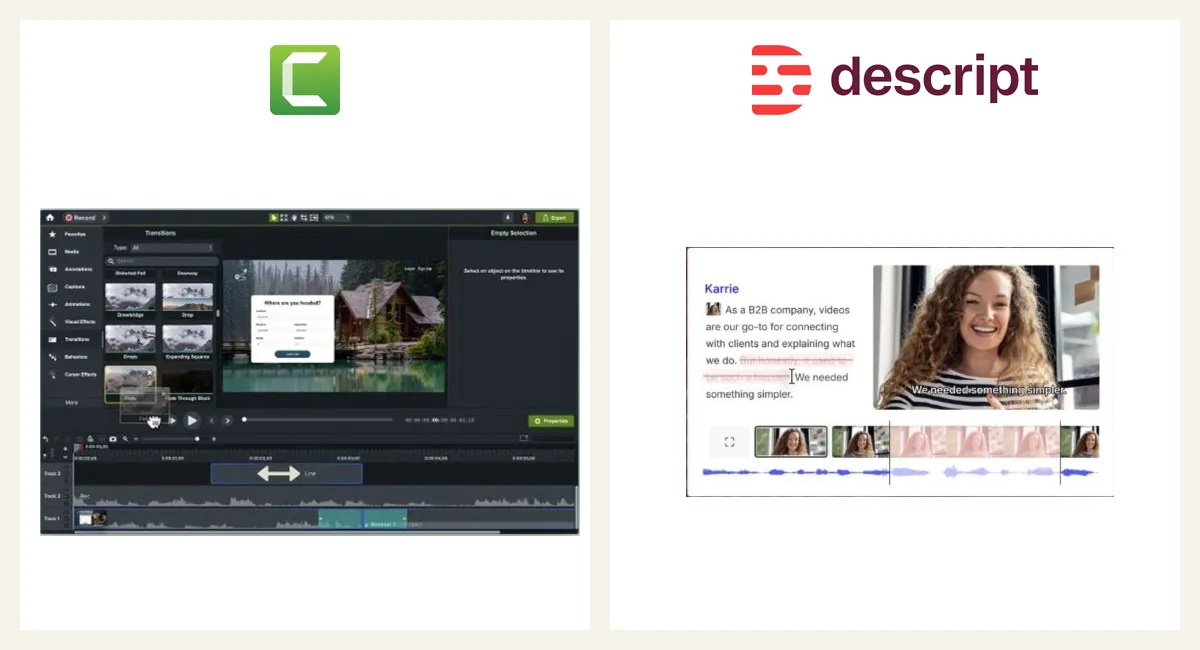
Descript made a genuinely novel argument: editing video should feel like editing a document. Delete a sentence from the transcript, and it vanishes from the video. Camtasia emphasizes timeline control, but now also includes transcript editing through Audiate in Essentials and above.
For screen tutorials specifically, that choice shapes everything downstream. Here is the comparison.
The 30-Second Verdict
- Pick Descript if your videos are talk-led — the narration carries the content and the screen illustrates it. Editing by transcript is genuinely faster for that shape.
- Pick Camtasia if your videos are screen-led — the clicks carry the content and the voice explains them. Zoom, callouts and pacing matter more than sentence surgery.
- Compare narration workflows if your recording is silent: both products offer AI speech tools, while Vorec focuses on creating narration from screen activity.
Talk-Led vs Screen-Led Is the Real Axis
This is the distinction most comparisons miss, and it predicts satisfaction better than any feature table.
A talk-led video is a podcast with visuals: an explainer, a walkthrough commentary, a course lecture. The spoken track is the spine. Descript is superb here — cut filler words globally, remove a tangent by deleting a paragraph, fix a fluffed line by typing over it with a voice clone.
A screen-led video is a tutorial: "click Settings, then Integrations, then paste the key." The screen is the spine and the voice is annotation. Here transcript editing solves a problem you barely have, while the problems you do have — the button being 11 pixels tall, the cursor being invisible, the pace being wrong — are timeline problems.
Get this backwards and you will spend the subscription fighting the tool.
Pricing in 2026
| Free tier | Entry paid | Higher tiers | |
|---|---|---|---|
| Descript | Free: 1 media hour, 720p with watermark, 100 AI credits once | Hobbyist $24 monthly, $16 with annual billing | Creator $35 / $24; Business $65 / $50 per person |
| Camtasia | Free Camtasia Online / desktop trial | $39/yr Starter (watermarked editor) | $179.88/yr Essentials · $249/yr Create · $599/yr Pro |
Prices checked 7 and 15 October 2026 (Descript) and 7 October 2026 (Camtasia). Camtasia figures are US individual annual prices; Starter includes a watermarked editor. Essentials and above provide watermark-free editing. Team and regional prices differ. TechSmith pricing.
The structural note: new Camtasia versions are subscription-only, following the Camtasia 2025 release in February 2025; perpetual upgrades stopped after 1 January 2025. Existing perpetual licences stay valid for the version you own, subject to OS compatibility. Descript has been subscription from the start, with the wrinkle that AI features (voice cloning, studio sound, generated speech) are metered — the sticker price is not the whole cost if you lean on them.
Head-to-Head
Removing mistakes
Descript: delete the words. The cut happens. Filler-word removal across an hour of footage is one click.
Camtasia offers timeline cuts, plus transcript editing and automatic filler-word removal in Essentials and above.
Descript remains worth considering for a document-centered workflow, but transcript editing is no longer exclusive to it.
Screen-tutorial polish
Camtasia's zoom-and-pan, cursor highlighting, click effects and callouts exist specifically because screen recordings are hard to read at playback size. Descript has zoom and basic annotation, but this is not what the product is optimised for.
Camtasia wins, clearly, for click-by-click tutorials.
Fixing narration without re-recording
Descript lists AI Speech, with text-to-speech, custom voice clones and Regenerate, within a shared AI credit pool on Hobbyist and above. For a talk-led video with one flubbed sentence, retyping the line and regenerating it is a real time saver.
Camtasia Create ($249 a year) and Pro can generate narration from text with 200+ voice options; Create excludes script translation, dubbing and stock avatars, which are Pro additions.
Descript wins.
Quizzing and LMS
Camtasia has interactive quizzing and LMS-compatible output. Descript does not target this at all.
Camtasia wins, and if you are in corporate training this may end the comparison immediately.
Learning curve
Neither is trivial. Descript is more intuitive on day one if you think in documents; Camtasia is more predictable if you have used any editor before. "Is Camtasia hard to learn" is a common pre-purchase question, and the honest answer is: it is a real editor, so yes, somewhat.
Descript wins on first-day comfort.
Feature Matrix
| Descript | Camtasia | |
|---|---|---|
| Edit by transcript | ✅✅ | ✅ Essentials and above |
| Filler-word removal | ✅✅ | ✅ Essentials and above |
| Generated speech / replacement narration | ✅ | ✅ Create / Pro |
| Zoom, callouts, click effects | Basic | ✅✅ |
| Quizzing / LMS | ❌ | ✅ |
| Multitrack timeline | ✅ | ✅✅ |
| AI script tools | ✅ Underlord | ✅ Create / Pro |
| Entry price | Hobbyist $24 monthly ($16 annual billing) | Starter $39/yr (watermarked editor) |
Compare the Narration Workflow
Both products now offer AI assistance for scripts and speech. The practical question is how much work remains to turn a silent software recording into an accurately timed tutorial. Descript video editing, Camtasia plans.
Vorec focuses on that workflow: record your screen silently (its macOS recorder, or upload), then generate narration matched to the captured workflow. Freeze-sync holds frames when explanations need more time. The recording can also produce a written guide and narration in other languages.
Plans start at $9/month, with a free trial with no credit card required (current allowances on the pricing page) (trial exports carry a watermark).
Questions people ask
Is Descript or Camtasia better for screen tutorials?
Camtasia is built for screen-led tutorials: zoom, callouts and click effects on a timeline. Descript suits talk-led video that you edit through the transcript. Both now list transcript editing (Camtasia through Audiate on Essentials and above) and AI speech.
Which is cheaper, Descript or Camtasia?
Camtasia's Starter is $39 a year with a watermarked editor, and Essentials ($179.88 a year) removes the watermark. Descript's paid plans start at $24 a month ($16 with annual billing) and meter media hours and AI credits. See Descript pricing and Camtasia pricing.
Can Camtasia or Descript narrate a silent recording automatically?
Both can generate speech from a script. We did not confirm either drafting a script from what happens on screen. For that workflow see Vorec or compare tools in best tutorial video creators.
Which supports quizzes and LMS output?
Camtasia lists quizzing and SCORM output (Essentials and above). We did not find those on Descript's plan matrix, which is not proof it lacks them.
Who Should Pick What
Choose Descript if: your content is talk-led, you edit long spoken footage, and retyping audio would save you real time.
Choose Camtasia if: your content is screen-led, you need zoom and callouts to make UI legible, or you need quizzing and LMS output.
Choose a narration tool if: the recording exists but the voiceover does not, and you would rather it never had to.
Bottom Line
Descript and Camtasia are both good, and the "which is better" framing is close to meaningless without knowing whether your voice or your screen is doing the teaching.
For talk-led work, consider Descript; for screen-led editing, consider Camtasia. For silent recordings, compare each product's complete narration workflow before choosing.
Related: our Descript alternative guide and Camtasia alternative guide.
Related reading: Clueso vs Camtasia for L&D Teams, Camtasia vs Loom and Camtasia vs Captivate vs Articulate.
See also: Camtasia Alternatives (2026): 7 Tools Compared on Price and Editing.
See also: Vorec vs Descript (2026): Transcript Editing or Drafted Narration?.
See also: Descript Alternatives (2026): 7 Tools Compared on Editing and AI Speech.
See also: Descript vs Riverside (2026): Recording Studio or Text Editor?.
See also: Camtasia vs Filmora (2026): Training Videos or Creator Edits?.
Never narrate again? Record with Vorec, or upload one you already have, and get a narrated tutorial plus a written guide. Start your free trial, no card needed.
Source: Descript pricing, checked 15 October 2026: Hobbyist is $16 per person per month with annual billing, or $24 with monthly billing.