Loom vs Vidyard (2026): What $59 a Seat Actually Buys
Vorec Team · 2026-09-17 · About 6 min read
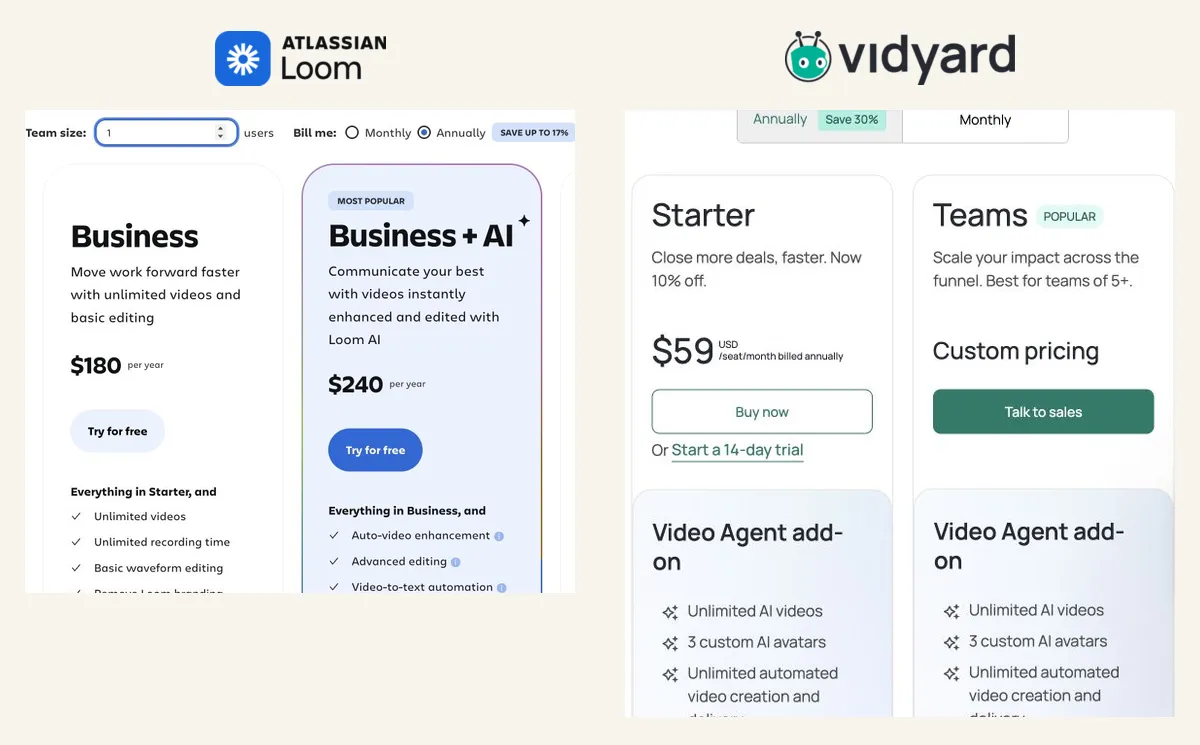
Loom is the better value for internal async video messaging; Vidyard is the pick only when you need AI avatars or CRM-attributed sales video, and CRM integrations sit on its custom-priced Teams tier, not the $59 Starter. On annual billing Loom Business is $15 a user a month against Vidyard Starter at $59 a seat, so 20 senders cost $3,600 a year on Loom versus $14,160 on Vidyard. Both have free plans. Prices read from each vendor's pricing page on 6, 15 and 21 October 2026.
Loom and Vidyard both record your screen and face and produce a shareable link. The prices diverge sharply. On matched annual billing: Loom Business at $15 per user per month ($180/year) against Vidyard Starter at $59 per seat per month. Loom's monthly rates are $18 and $24; Vidyard's Starter is $89 monthly.
The useful question is what that gap buys, and the answer is more specific than most comparisons say: not what sits on the $59 tier.
All figures below come from each vendor's own pricing page — Loom and Vidyard. Vidyard was read on 15 October 2026 (its Starter card showed a "Now 10% off" label, so treat $59 as the displayed offer price). Loom's monthly prices were read on 21 October and its annual prices on 6 October 2026.
The 30-Second Verdict
- Pick Loom if video is internal communication. Business is $18, Business + AI is $24, and both are self-serve.
- Pick Vidyard if you need AI avatars at volume, or CRM-attributed engagement — but price the right tier, because those are two different tiers.
- Start on Vidyard Free if avatars are what you are evaluating. It includes more than people expect.
Pricing, Exactly
On matched annual billing:
| Free | Entry paid (annual) | Higher (annual) | |
|---|---|---|---|
| Loom | ✅ Starter | $15/user/mo ($180/yr) Business | $20/user/mo ($240/yr) Business + AI · Enterprise custom |
| Vidyard | ✅ | $59/seat/mo | Teams custom · Enterprise custom |
Loom's monthly rates are $18 and $24; Vidyard's Starter is $89 monthly. Quote both vendors on the same billing period; mixing Loom's annual rate with Vidyard's monthly one, or the reverse, distorts the gap.
Vidyard's Video Agent add-on is $24/seat/month annually ($29 monthly) on Starter, custom on Teams and Enterprise.
Both vendors publish their entry pricing and both keep their top tier custom. Neither is hiding the ball.
The Thing Most Comparisons Get Wrong
CRM attribution is the standard reason given for choosing Vidyard — engagement data landing against a deal record so a rep can act on it.
That sits on Teams, not Starter. Vidyard's own feature comparison lists CRM/MAP integrations as "Everything in Starter, plus…" at the Teams tier. And Teams is custom-priced.
So "pay $59 and get CRM attribution" is wrong. The accurate version: $59 buys the video platform; CRM attribution requires a Teams quote. If CRM is your reason for looking, get that number before comparing anything.
Vidyard's Free Tier Is More Capable Than Expected
Worth testing before you price anything:
- 5 recordings a month, up to 30 minutes each, no card required
- 15 AI videos (the reset period is not stated)
- Stock avatars and 3 custom AI avatars
- Limited automated video creation and delivery
- Video editing and sharing tools
Custom AI avatars on a free plan is unusual. If avatars are the capability you are evaluating, test them at $0 rather than assuming they are paid-only.
What Loom Includes, By Tier
From Loom's pricing page, since these get misreported:
- Virtual backgrounds, camera frames and Recording Canvas on every tier, Starter included
- Screen-only recording on every tier — nobody is forced on camera
- Closed captions from Starter; transcriptions in 50+ languages
- Auto titles across tiers
- Trim, stitch and basic waveform editing from Business ($18)
- Edit by transcript, summaries, chapters, filler-word removal on Business + AI ($24)
- Up to 4K on Business and above
- SSO/SAML on Enterprise only
The Real Cost Comparison
For a rep doing AI-avatar outbound:
| Monthly per seat, annual billing | |
|---|---|
| Loom Business + AI | $20 |
| Vidyard Starter | $59 |
| Vidyard Starter + Video Agent | $83 |
Those are not the same product — Loom's plan matrix lists no AI avatars — but if you are choosing where a seat budget goes, that is the shape of it.
Feature Matrix
| Loom | Vidyard | |
|---|---|---|
| Entry paid price, annual | $15/user/mo | $59/seat/mo |
| Free tier | ✅ | ✅ incl. 15 AI videos, 3 custom avatars |
| Screen-only recording | ✅ all tiers | ✅ |
| Virtual backgrounds / camera frames | ✅ all tiers | Compare current plan |
| Captions / transcription | ✅ Starter+ | ✅ tier-dependent |
| Trim & stitch | ✅ Business+ | Compare current plan |
| Edit by transcript | ✅ Business + AI | Not verified |
| AI avatars | Not on its plan matrix (21 Oct) | ✅ incl. limited on Free |
| CRM / MAP integrations | Limited | ✅ Teams tier, custom |
| SSO | Enterprise | Compare current plan |
Quick answers
Loom vs Vidyard cost for 20 people who send video
At list prices, 20 Loom Business seats cost $3,600 a year on annual billing (20 × $15 × 12) or $4,320 on monthly billing (20 × $18 × 12). 20 Vidyard Starter seats cost $14,160 a year on annual billing (20 × $59 × 12) or $21,360 monthly (20 × $89 × 12). Vidyard describes its custom-priced Teams plan as built for teams of five or more, so a 20-sender team may be steered to a quote instead; we did not request one.
Which tier do I need for CRM integration?
On Vidyard, CRM and marketing-automation integrations are listed from Teams (custom price), not Starter. Vidyard's Video Agent workflow names Salesloft, Salesforce, HubSpot, Marketo and Zapier. We did not check which CRM integrations Loom lists per tier.
Is Loom or Vidyard better for async video messaging?
For internal updates at a self-serve price, Loom: Business is $15 a user a month on annual billing. For sales outreach that needs AI avatars or CRM-attributed engagement, Vidyard, on the tier that includes the feature you need.
Do Loom and Vidyard have free plans?
Yes. Loom Starter is $0 with up to 50 members, 25 recordings per person and 5-minute screen recordings at 720p. Vidyard Free is $0 with 5 recordings a month up to 30 minutes each, plus 15 AI videos and three custom AI avatars.
Where Vorec Fits
Vorec handles workflow documentation: record with its macOS recorder or upload a recording, and it drafts narration matched to each on-screen step and voices it with AI, so no microphone is needed. Freeze-sync can hold a frame when a point needs more time than the recording allows. Vorec can also generate a written step-by-step guide from the same capture, and on paid plans narration can be regenerated in supported languages without re-recording.
Plans start at $9/month, with a free trial with no credit card required (current allowances on the pricing page); trial exports carry a watermark. It includes a multi-track timeline editor with zoom, cursor and caption layers. It does not generate AI avatars or attribute engagement to a CRM.

Who Should Pick What
Choose Loom if: video is internal communication and you want a self-serve price. Budget Business + AI at $24 if you want the AI features.
Choose Vidyard if: AI avatars are central — test them free first — or you need CRM attribution, in which case get a Teams quote rather than assuming $59 covers it.
Choose a narration tool if: the bottleneck is producing documentation at volume rather than distributing messages.
Bottom Line
$59 against $15 on matched annual billing is a real gap, but it does not buy what people assume. It buys Vidyard's video platform and avatar capability. CRM attribution — the differentiator most often cited — is a tier above, at a price you have to ask for.
Vidyard publishes Starter and the Video Agent add-on; Teams and Enterprise are custom, as Loom's Enterprise tier is.
Related: our Loom alternatives roundup and Vidyard alternative guide.
Related reading: Loom vs Tella, Vidyard Pricing 2026 and Loom Pricing 2026.
Documentation rather than messaging? Record with Vorec, or upload one you already have, and get a narrated walkthrough plus a written guide. Start your free trial, no card needed.