Vorec vs Loom (2026): Narration, Editing and Price Compared
Vorec Team · 2026-10-20 · About 3 min read
Loom is built around you speaking while you record; Vorec drafts the narration for you from the captured workflow. That is the main difference. This page compares them from Loom's pricing page (6 October 2026) and Vorec's plan catalog (5 October 2026). Prices are dollars as displayed, we did not test the tools against each other, and "not checked" means we could not confirm it, not that it is absent. Vorec is our product.
What Loom does
Loom records screen and camera for a shareable link, with auto titles, transcription and closed captions on every tier and apps for Mac, Windows, iOS and Android. Starter is $0 with 25 recordings per person and screen recordings up to five minutes, up to 720p. Business is $18 per user a month ($15 with annual billing, shown as $180 a year) with trim, stitch and basic waveform editing and up to 4K; Business + AI is $24 ($20, $240 a year) and adds transcript editing, filler and silence removal, and summaries and chapters. Enterprise is by quote. See Loom pricing.
What Vorec does
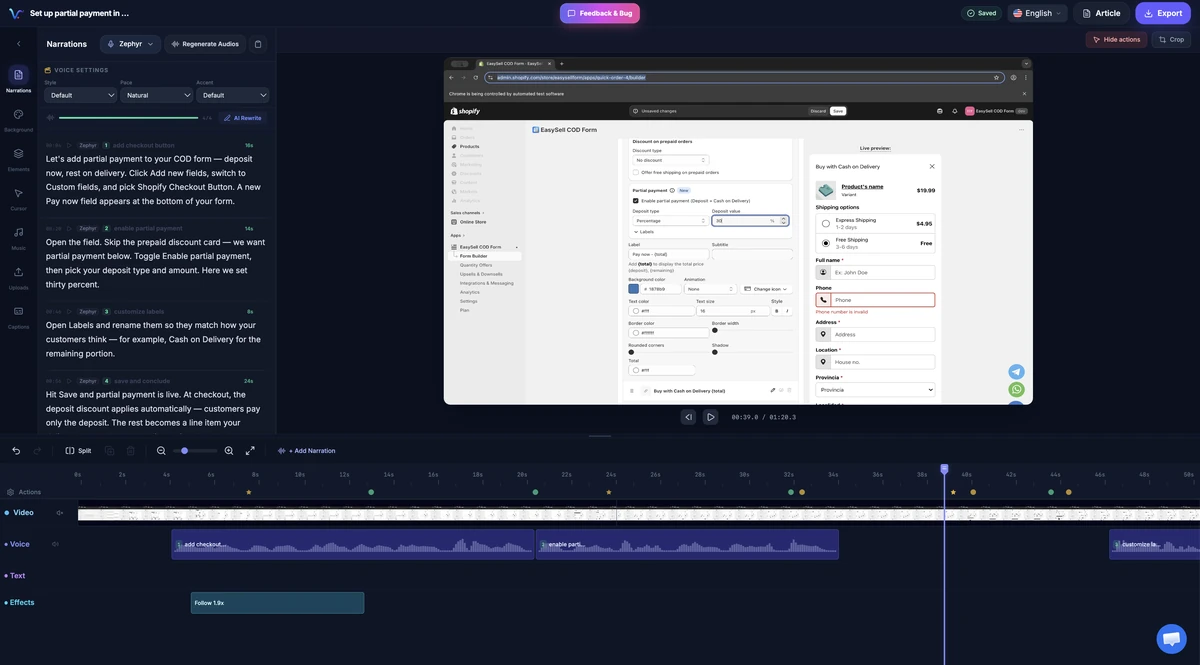
Vorec records with its own macOS recorder or takes a recording you upload. An AI coding agent can drive the recorder through the CLI, saving the take locally for you to review before anything is uploaded. Vorec drafts narration matched to the captured workflow, generates the voiceover, and freeze-sync can hold a frame while an explanation finishes. A written step-by-step guide can be generated from the same capture. Plans (catalog, 5 October 2026): 7-day trial with 100 credits and no credit card; Starter $9, Pro $24, Business $59 a month ($86, $230, $566 a year). See Vorec pricing.
Loom vs Vorec
| Loom | Vorec | |
|---|---|---|
| Recording | Loom recorder (Mac, Windows, iOS, Android) | Own macOS recorder, or upload |
| Narration | You speak while you record | AI-drafted from the captured workflow |
| Microphone | Yes, for narration | No |
| Editing | Trim and stitch on paid plans; transcript editing on Business + AI | Timeline editor; regenerate single segments |
| Written guide | Not checked | On request, from the same capture |
| Free option | Starter plan | 7-day trial, 100 credits |
| Paid start (monthly billing) | $18 per user | $9 |
| Longest recording | Starter: 5-minute screen recordings; paid: no length limit listed | Starter 10 min; Pro 20; Business 30 (video length per plan) |
When Loom fits
- Quick messages to teammates where your voice and face help
- Instant sharing without a post-production step
- You already work in Loom and want its transcription and captions
When Vorec fits
- You want a narrated tutorial without speaking
- You have recordings that need narration added afterwards
- You want a video and a written guide from one capture
- An AI agent should capture the flow while you approve the take
Frequently asked questions
Is Vorec a Loom alternative?
For tutorials and documentation, yes: it drafts narration so you do not record your voice. For quick personal messages, Loom is built for that. See best Loom alternatives.
Can Vorec narrate a Loom recording?
Yes, if you upload the recording. See Loom alternative with AI narration.
Which is cheaper?
Vorec Starter is $9 a month; Loom Business is $18 per user a month ($15 with annual billing). Plans meter different things (seats versus credits), so compare against your volume.
Related reading: Loom pricing, Loom vs Tella and the pricing study of 31 video tools.
Record or upload a workflow and get a narrated tutorial plus a written guide. Start the 7-day trial: 100 credits, no card. Trial includes up to 3 projects; exports carry a watermark.