Tella Pricing 2026: No Free Plan, and What Pro Includes
Vorec Team · 2026-09-18 · About 8 min read
Tella's pricing page lists no free creator plan. Every new workspace gets a 7-day trial of Pro features, starting when you create the account — not when you first record — with no card required, per Tella's trial documentation. After that, recording, editing and exporting stop, though videos you already made stay viewable and shareable.
Knowing the clock starts at signup rather than at first use is worth a few days of trial.
Update, 20 October 2026: Tella's current pricing page lists Tella Agent (beta, chat-based editing) and AI credits: Pro includes 3,000 credits per user per month and Premium 6,000 pooled, monthly credits expire, and top-ups (rechecked 23 October 2026) run from 25,000 credits for $25 up to 2,500,000 for $2,250, with up to 10% off larger amounts, sold one-time or as a monthly top-up (purchased credits do not expire). The page also lists transcription in 106 languages. These credits are for AI features, not recording minutes. Annual per-user prices were still $13 (Pro) and $19 (Premium).
Everything below was verified on Tella's pricing page with both billing states checked, plus Tella's plans and billing documentation, on 18 September 2026. The monthly and annual Pro and Premium prices and the 7-day trial were re-checked on 30 September 2026 and had not changed. Prices change; check before you buy.
The Short Version
| Plan | Monthly | Annual equivalent | Per year |
|---|---|---|---|
| Pro | $26/user/mo | $13/user/mo | $156 |
| Premium | $39/user/mo | $19/user/mo | $228 |
| Enterprise | Custom | Custom | Custom |
You pay for creators, not viewers. Tella's team page states viewers are unlimited and free, so do not price your whole team at creator rates.
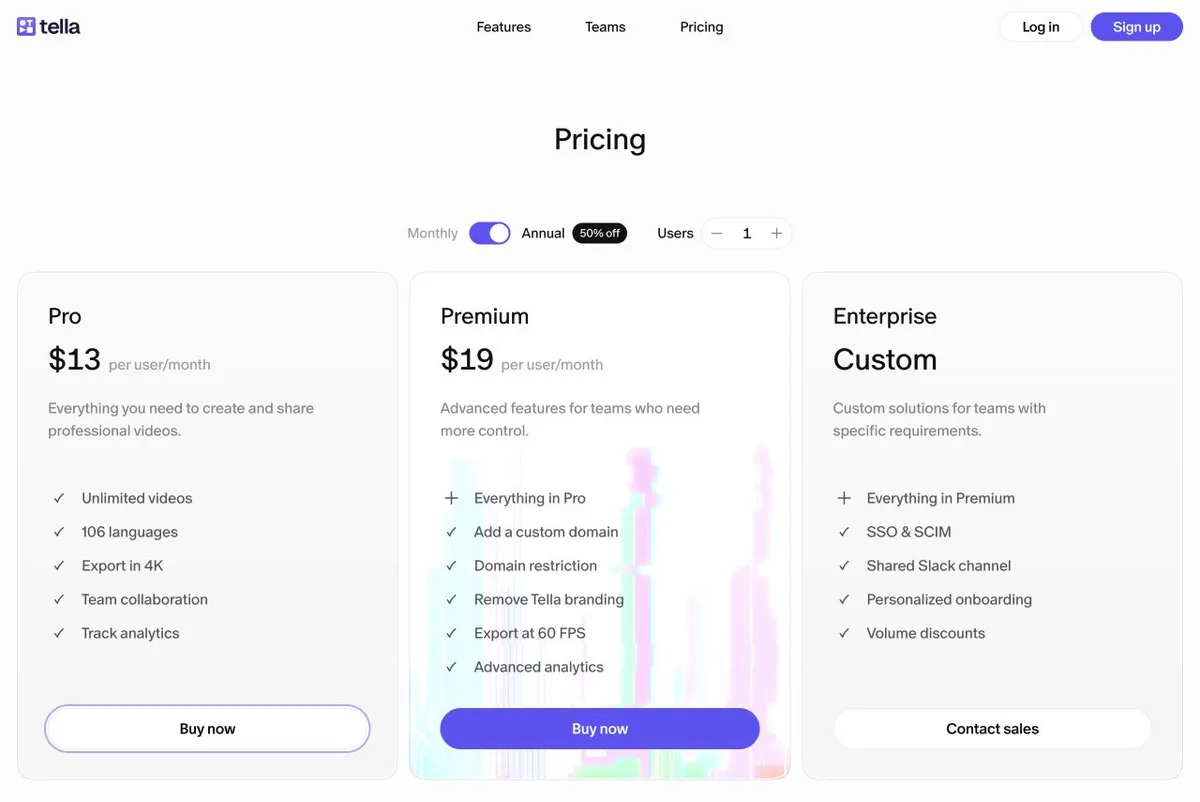
A UI trap on the pricing page. The comparison table header keeps showing "$13 / $19 billed annually" even when the top cards are switched to Monthly. Read the top cards for monthly pricing. The annual saving badge says 50%, but $19 against $39 is closer to 51% — price against the dollar figures, not the badge.
What The Trial Includes, And What It Holds Back
The 7-day trial lets you record, edit, export finished videos and share them. What it withholds until you pay:
- HD 30FPS only, and 2-hour clips — 4K and longer clips are paid
- No uploading existing videos
- No raw-recording exports
- No speed controls or timelapse
When the trial or a subscription ends, your videos remain viewable and shareable — you simply cannot record, edit or export any more.
Pro Is More Complete Than Most Comparisons Admit
This is worth stating plainly, because Tella is frequently described as the lightweight option. On the paid tiers you get unlimited videos, unlimited storage and unlimited bandwidth, with a six-hour limit per clip — that is per individual recording, not per month and not per finished project; you combine clips for longer pieces.
Pro already includes: 4K recording and export, auto-zoom, timeline and transcript editing, an AI mistakes finder, silence, filler-word and buffer removal, layouts, blur and highlight, AI audio enhancement, transcription in 106 languages, team collaboration, password protection, custom branding and logo overlay, every export form (video, audio, raw, individual clips, thumbnail, subtitles), CTAs, embeds, and AI document generation.
Native Mac and Windows recorders plus a Chrome extension are listed on all paid tiers.
Premium adds custom domains, embed-domain restriction, white-label video pages, priority support and full analytics history. Pro's analytics cover total and unique views, watch time, engagement and conversion funnels — but only the last 5 individual viewers, top 5 sources and locations, and 30 days of history. Premium removes those limits.
Enterprise adds a shared Slack channel, SSO and SCIM included, and onboarding.
Two Places The Cards Mislead
60FPS is not Premium-only. The card makes it look that way. The comparison table and Tella's plans documentation both say Pro supports 60FPS for videos up to 5 minutes; Premium removes the length restriction. 4K is already on Pro.
SSO is not Enterprise-only either. The comparison table ticks it only for Enterprise, but Tella's FAQ and team page offer SSO and SCIM as add-ons on any paid plan. A dated entry in Tella's changelog from 10 July 2026 puts each at $125/month per workspace, included on Enterprise. If you need SSO on Pro, it exists — at a price the table does not show.
One more distinction to keep narrow: Premium's "Remove Tella branding" refers to white-labelling the hosted video page. It is not evidence that a video downloaded on Pro carries a watermark — Pro's custom branding is ticked.
Where Tella's Own Pages Disagree
Tella's teams page still says recordings are capped at 2 hours and that password protection starts at Premium. Both are contradicted by the current pricing page and plans documentation, which show 6 hours per clip on paid tiers and password protection on Pro. The pricing and plans pages are more specific and agree with each other, so treat the teams page as out of date rather than authoritative. That page also mentions 5GB per-file uploads, which we could not corroborate elsewhere.
What It Costs In Practice
Annual billing, per creator:
| Creators | Pro | Premium |
|---|---|---|
| 1 | $156 | $228 |
| 3 | $468 | $684 |
| 5 | $780 | $1,140 |
| 10 | $1,560 | $2,280 |
Viewers cost nothing, so these figures should reflect only the people who actually record.
Is Tella Worth It?
Yes, if you want polished screen recordings without a heavy editor. At $156 a year, Pro includes 4K, auto-zoom, filler-word removal and AI document generation — genuinely strong for the price.
Go to Premium for custom domains, white-label video pages or analytics beyond 30 days. If none of those matter, Pro is the plan.
Budget SSO separately if you need it — $125/month per workspace is more than a Pro seat.
Reconsider if you need a forever-free tier. Tella's pricing page lists none (its terms mention a free fallback in an education context, which we could not confirm), and the 7-day clock starts at signup.
How It Compares
| Starting price (billing basis shown) | Notable | |
|---|---|---|
| Tella | $156/creator/yr | 4K, auto-zoom and document generation on the entry tier; no free plan listed |
| Loom | $180/user/yr (annual billing) | See our Loom pricing breakdown |
| Screen Studio | $108/yr (annual billing) | See our Screen Studio pricing breakdown |
| Vorec | $86/yr ($7.17/mo equivalent) | Records your screen and drafts the narration for it |
Formats differ, so this is orientation rather than like-for-like.
Quick answers
How much does Tella cost?
Pro is $26 per user a month ($13 with annual billing) and Premium is $39 ($19); Enterprise is custom (12 and 20 October 2026).
Does Tella have a free plan?
Its pricing page lists no free creator plan; new workspaces get a 7-day trial of Pro with no credits.
What are Tella's AI credits for?
They power Tella Agent (beta, chat-based editing) and other AI features: Pro includes 3,000 per user a month and Premium 6,000 pooled; monthly credits expire and purchased credits do not.
Where Vorec Fits
The overlap here is real and worth being straight about. Tella records the screen, applies auto-zoom, edits by transcript, generates documents and documents agent tooling of its own — this is not a comparison where one side lacks the basics.
The difference is where the narration comes from. Tella's filler-word and transcript cleanup tools refine an existing spoken track, tightening audio you recorded. Tella documents agent editing and management of recorded or uploaded videos; Vorec additionally provides a local macOS recorder workflow driven by its CLI.
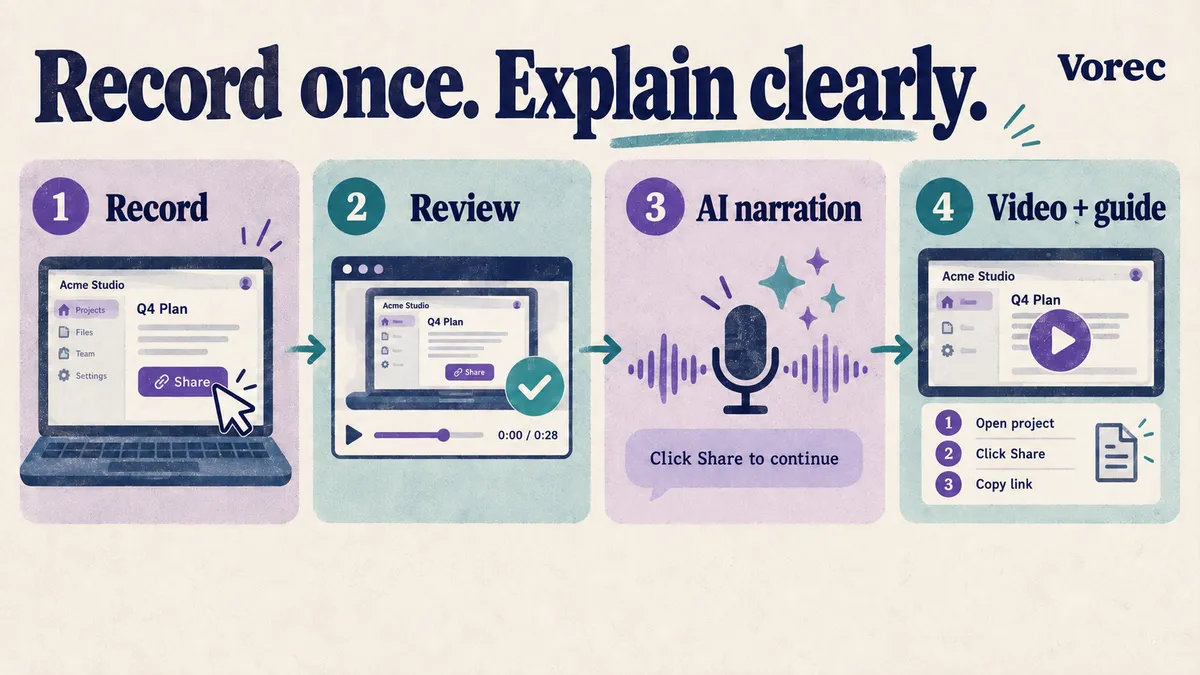
Vorec records your screen through its own macOS recorder, and an AI agent can drive that capture through the CLI, recording locally so you review the take before anything is uploaded. It then uses the captured action data — or analyses a recording you upload — to draft narration matched to the workflow and generate the voiceover, so no microphone narration is required. In the editor you can add smooth cursor motion, cursor-follow zoom and click-based auto-zoom, and freeze-sync can hold a frame to give an explanation time to finish. The same capture can also produce a written step-by-step guide with annotatable screenshots, and narration regenerates in supported languages on eligible plans without re-recording.
Plans start at $9/month, with a free trial with no credit card required (current allowances on the pricing page); trial exports carry a watermark.
Bottom Line
$156 per creator per year for Pro, $228 for Premium, and viewers are free — so count only the people who record. Pro is the plan for most teams: 4K, auto-zoom and document generation are already there.
Three things the cards will not tell you: 60FPS is on Pro for videos up to 5 minutes, SSO and SCIM are each a $125/month add-on rather than Enterprise-only, and the six-hour limit applies to each clip rather than your finished video.
Related: our Loom vs Tella comparison.
Related reading: VEED Pricing 2026, Descript Pricing 2026 and Supademo Pricing 2026.
Compare and alternatives: Best Loom Alternatives in 2026 (With Real Screenshots).
See also: Vorec vs Tella (2026): Presenter Videos or Drafted Narration?.
See also: Screen Studio Alternatives (2026): 7 Tools Compared on Price and Platform.
See also: Tella Alternatives (2026): 7 Tools Compared on Price and Polish.
Want the recording to narrate itself? Record with Vorec, or upload one you already have, and get a narrated tutorial plus a written guide. Start your free trial, no card needed.
For how these plans compare with other tools on free offers, trials and credit meters, see our pricing study of 31 video and tutorial tools.