What Is Vorec? AI Narrated Tutorials From a Screen Recording (2026)
Vorec Team · 2026-10-21 · About 4 min read
Vorec is a tool that turns a screen recording into a narrated tutorial video and, on request, a written step-by-step guide. It has its own macOS recorder, and it also accepts recordings made elsewhere. AI drafts narration matched to the workflow that was captured, generates the voiceover, and you review and edit the script before publishing. No microphone narration is required. This page describes what Vorec does from our own plan catalog (5 October 2026) and product documentation; Vorec is made by the same team that publishes this blog.
Who Vorec is for
Teams and solo builders who document software: product teams making help-center tutorials, support teams answering the same question repeatedly, developers who want demos and walkthroughs of what they just built, and trainers producing consistent narrated videos. It is built for tutorials and documentation, not for talk-led video editing or interactive click-through demos.
How it works
- Capture. Record with Vorec's macOS recorder, which saves cursor and click data alongside the video, or upload a recording you already have. An AI coding agent (Claude Code or Codex) can drive the recorder through the Vorec CLI; the take stays on your disk for you to review before anything is uploaded.
- Draft. Vorec uses the captured action data, or analyzes an uploaded recording, to draft narration matched to the workflow. It is a first draft: read it and fix product names and terms.
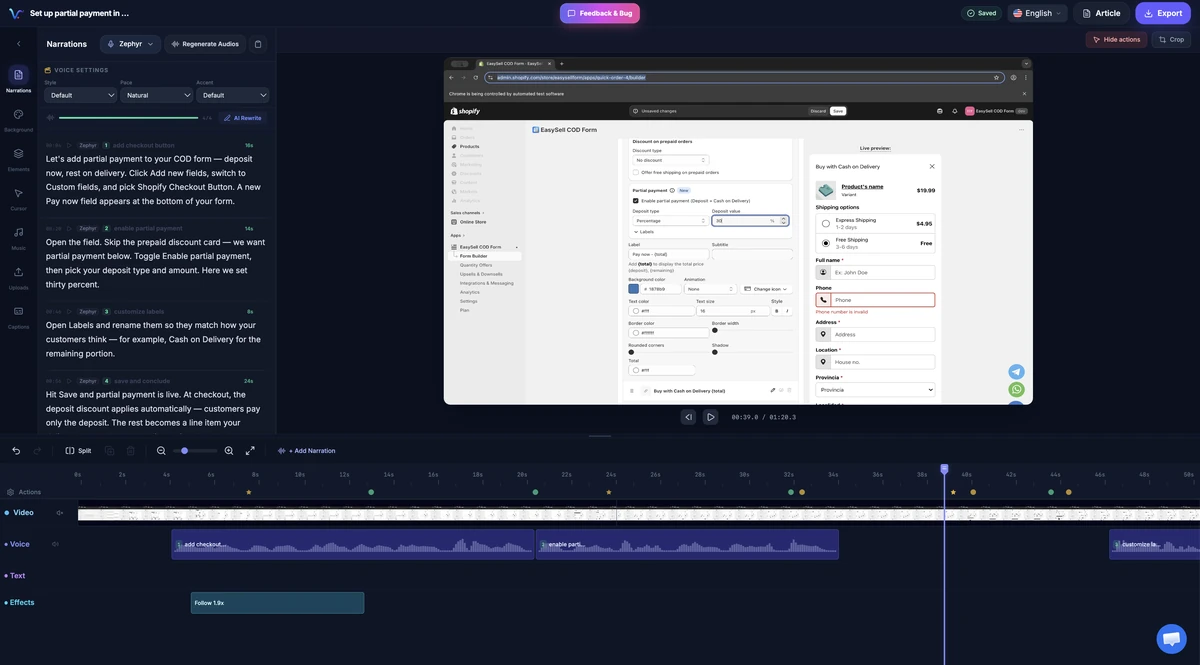
- Edit. The editor shows narration segments beside the preview and a multi-track timeline. You can rewrite a line, regenerate a single segment, add captions, callouts, spotlight, blur, music, and smooth cursor motion, cursor-follow zoom and click-based auto-zoom. Freeze-sync can hold a frame so an explanation finishes before the next action.
- Export and publish. Export an MP4 (Starter 1080p; Pro and Business up to 4K), and generate a written guide with annotatable screenshots from the same capture if you want one.
Plans and credits
| Plan | Monthly | Yearly | Monthly credits | Longest video | Export |
|---|---|---|---|---|---|
| Trial (7 days) | $0, no card | n/a | 100 once | 5 minutes | 1080p, watermarked, up to 3 projects |
| Starter | $9 | $86 | 150 | 10 minutes | 1080p |
| Pro | $24 | $230 | 500 | 20 minutes | 4K |
| Business | $59 | $566 | 1,500 | 30 minutes | 4K, 5 team seats, API access |
Plan catalog read 5 October 2026; launch credit allowances can differ from the standard amounts shown. Credits are spent per action: video analysis costs 8 credits for a video up to 3 minutes, 15 up to 8 minutes, 25 up to 15 minutes and 45 up to 30 minutes; a voice clip costs 2 credits (4 if over 100 words); a translation costs 3; a written guide costs 3; an AI rewrite costs 1. Narration can be regenerated in other languages: 3 on Starter, all supported languages on Pro and Business. See Vorec pricing.
What Vorec does not do
- It is not an interactive demo builder: there is no native branched interactive demo, hosted-video lead gate or CRM sync.
- It has no native customer-facing viewer-analytics dashboard.
- The recorder runs on macOS; recordings from other systems can be uploaded.
- AI narration can mislabel an element or term, which is why the script is yours to review.
How Vorec compares
- Versus Loom or Tella: they record you speaking; Vorec drafts the narration. See Vorec vs Loom and Vorec vs Tella.
- Versus Descript: Descript edits video through the transcript. See Vorec vs Descript.
- Versus Guidde or Clueso: similar goals, different capture and plan structure. See Vorec vs Guidde and Vorec vs Clueso.
- AI screen recorder roundup: best screen recorder with AI narration.
- Wider field: best tutorial video creators and best video to documentation tools.
Frequently asked questions
What is Vorec?
A tool that records your screen and drafts AI narration for it, producing a narrated tutorial video and, on request, a written step-by-step guide.
Is Vorec free?
It has a 7-day trial with 100 credits and no credit card; paid plans start at $9 a month.
Do I need a microphone?
No. The narration is generated; you review the script and choose a voice.
Can I use a recording I already have?
Yes. Upload it and Vorec drafts narration from an analysis of the recording.
Can an AI agent use Vorec?
Claude Code and Codex can record a tutorial through the Vorec CLI and the record-tutorial skill. The take is saved locally and you approve it before it is uploaded and narrated. The hosted API is on the Business plan.
Is it a video editor?
It has a multi-track timeline for voice, music, text and effects, but it is built for tutorials and documentation rather than general video editing.
See also: Video Tool Alternatives and Comparisons (2026 Hub).
Record or upload a workflow and get a narrated tutorial plus a written guide. Start the 7-day trial: 100 credits, no card. Trial includes up to 3 projects; exports carry a watermark.