Gemini Omni 1.2 Flash in Google Vids: 15-Second Clips (2026)
Vorec Team · 2026-11-06 · About 9 min read
Gemini Omni 1.2 Flash is Google's video-generation model that became generally available in the Gemini API on 5 November 2026 and began rolling out to Google Vids the same day. It generates 3 to 15 second clips with native audio, improves character and subject consistency across up to 6 reference images, and in Vids it adds a slider that sets a clip's length from 3 to 15 seconds. For anyone who makes software tutorials the practical change is in the b-roll and the intro, not in the walkthrough itself: the model generates footage from a prompt, while the screen recording of your product still has to be captured.
Checked on 6 November 2026 against six primary pages: the Gemini API changelog, the Gemini Omni Flash model page, the Gemini API pricing page, deprecations page and video generation guide, and the Google Workspace Updates post for Vids. The dates and numbers below are theirs; where a sentence is our reading of what it means for tutorials, it says so.
What changed in the Gemini API on 5 November 2026
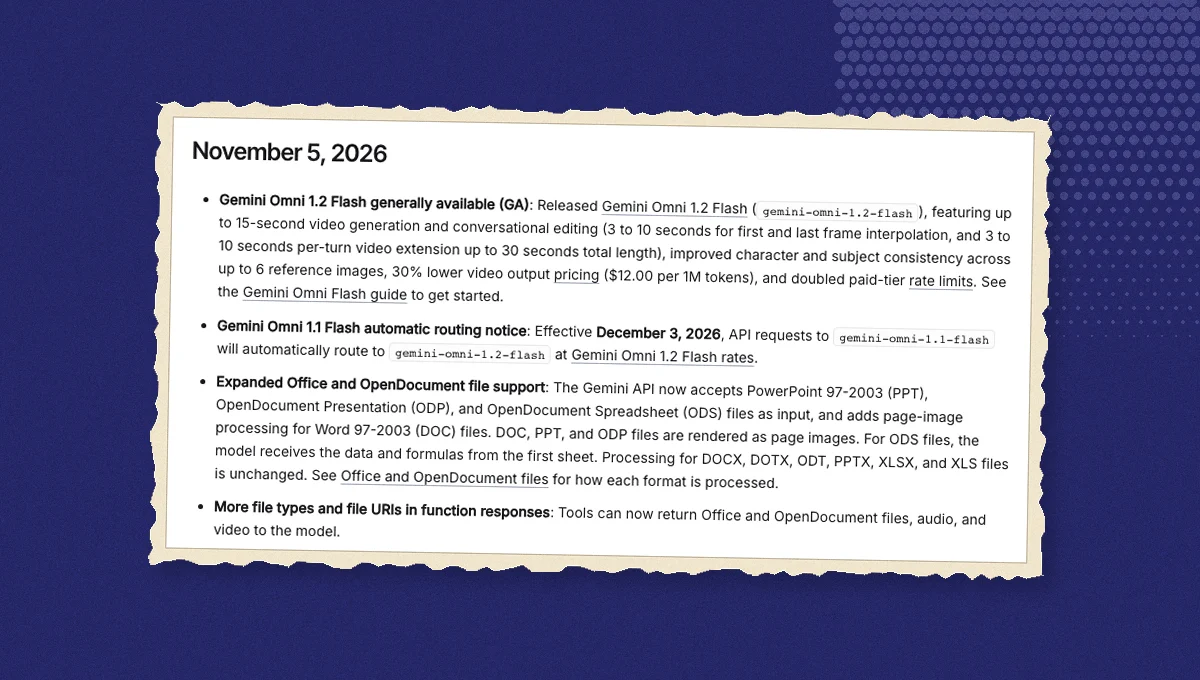
The changelog entry for 5 November 2026 makes `gemini-omni-1.2-flash` generally available. The entry and the model page together describe the model this way:
| Gemini Omni 1.2 Flash | Gemini Omni 1.1 Flash | |
|---|---|---|
| Status on the models page | Stable, latest update November 2026 | Stable, latest update August 2026 |
| Output video length | 3 to 15 seconds | 3 to 10 seconds |
| Resolutions | 360p, 720p, 1080p, 4K, 24 frames per second | 360p, 720p, 1080p, 4K, 24 frames per second |
| Native audio | Yes | Not listed as an output |
| Video input | Up to 15 s for editing, 10 s lookback for extension | Up to 10 s for editing and extension |
| Interpolation and extension | 3 to 10 s first-and-last-frame interpolation; 3 to 10 s per extension turn, up to 30 s total | Not stated on the pages we read |
| Reference images for consistency | Up to 6 | Not stated on the pages we read |
| Free tier | Not available | Not available |
Three more facts from the same pages matter if you already use the older model:
- Routing. From 3 December 2026, requests to `gemini-omni-1.1-flash` are routed to 1.2 Flash and billed at 1.2 Flash rates. The pricing page states the date; the changelog repeats it.
- Conversational editing. The model page says you refine and edit generated videos through natural-language conversations using the Interactions API. The changelog's wording is "conversational editing".
- The Veo 3.1 previews were retired. The Gemini API deprecations page lists 22 October 2026 as the shutdown date for the three Veo 3.1 preview models, with a note that the table's dates are the earliest possible retirement dates, and names `gemini-omni-1.2-flash` as the replacement; the video generation guide likewise says the previews were shut down and points to Gemini Omni Flash.
What a clip costs
The pricing page lists 1.2 Flash at $1.50 per million input tokens for text, image and video, and $12.00 per million output tokens for video. Its footnote explains how seconds become tokens: billing is on total output tokens at 5,792 tokens per second of 720p video, which Google states as an effective price of approximately $0.07 per second, about $0.70 for a 10-second clip and about $1.04 for a 15-second clip. The same footnote prices the other resolutions: $0.023 per second for 360p (1,931 tokens per second), $0.104 per second for 1080p with upsampling (8,688 tokens per second) and $0.209 per second for 4K with upsampling (17,376 tokens per second). The 1.1 Flash row is $17.50 per million video-output tokens, about $0.10 per second. The changelog describes the 1.2 release as video output pricing 30% lower with doubled paid-tier rate limits, and 12.00 against 17.50 is a 31% drop, so the two statements agree.
Derived from those stated rates, and labelled as our arithmetic:
- A 15-second 720p clip is about $1.04 of output, which is Google's own example. The same clip at 1080p is about $1.56 (15 × $0.104) and at 4K about $3.14 (15 × $0.209).
- A 5-second 720p clip is roughly $0.35.
- A 30-second 720p result built by extension, 15 seconds plus extension turns, is roughly $2.10 of output before input tokens and the extra requests, assuming every second of the extended result is billed once at the 720p rate.
Input tokens for the prompt, reference images or source video are billed on top at the input rate, and each extension turn is a request of its own.
Both models show "Not available" in the free-tier column, so the API route is paid-tier only. The Vids route has no per-clip price; access depends on your Workspace edition or Google account type, each with its own usage limits in Google's Vids AI limits table, and the post lists Google AI Pro and Ultra alongside plain personal accounts, with higher limits for the AI Expanded Access add-on. The editions are listed next.
What changed in Google Vids
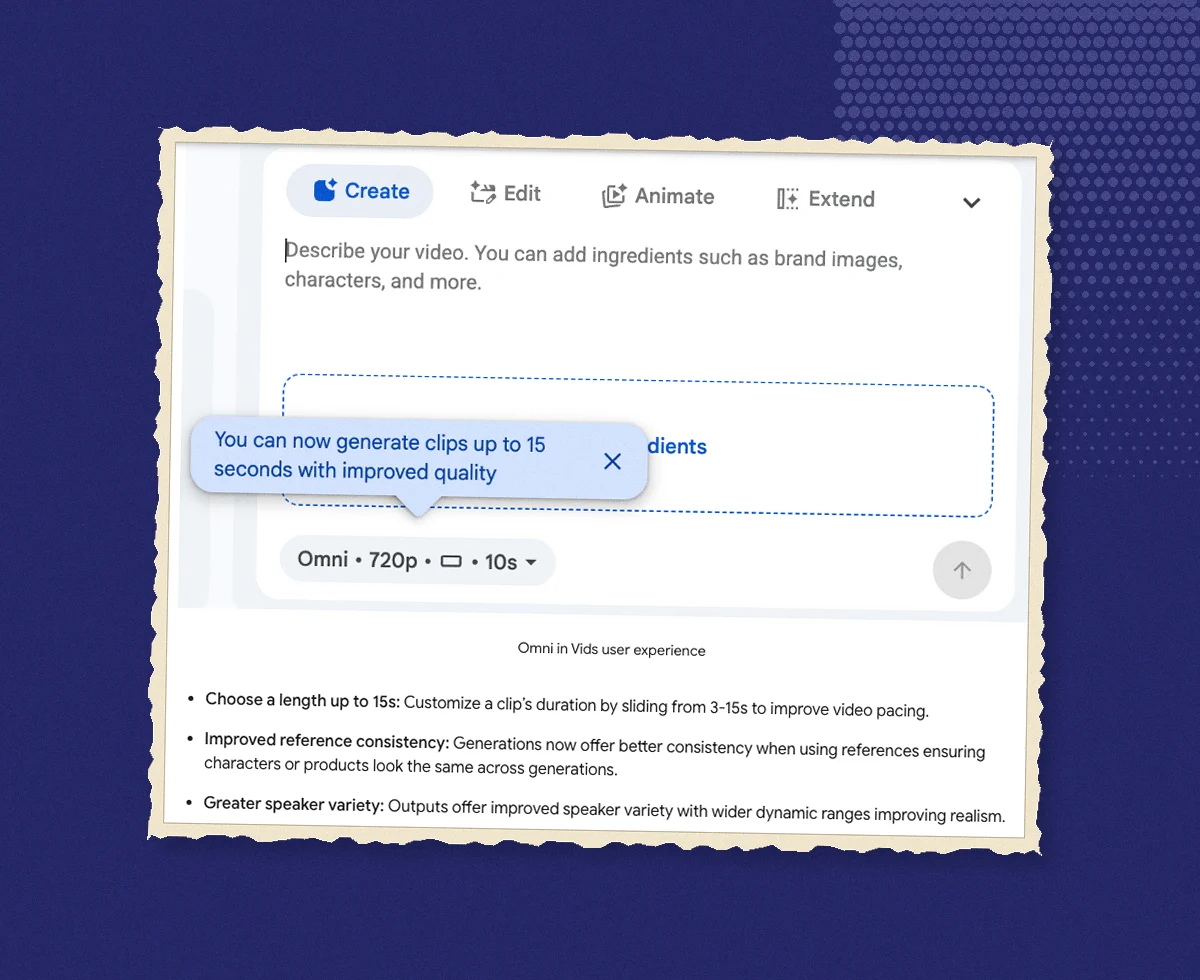
The Google Workspace Updates post dated 5 November 2026 puts the same model directly inside Vids. It lists three user-facing changes:
- Choose a length up to 15 seconds. A clip's duration can be set by sliding from 3 to 15 seconds, which the post frames as a way to improve pacing.
- Improved reference consistency. When references are used, characters or products are meant to look the same across generations.
- Greater speaker variety. Outputs offer more speaker variety with wider dynamic ranges, which the post calls improved realism.
Rollout started on 5 November 2026 for both Rapid Release and Scheduled Release domains, with one to three days for feature visibility. There is no admin control for the feature. Availability by edition, as the post lists it:
| Edition group | Editions named |
|---|---|
| Business | Business Starter, Standard, Plus |
| Enterprise | Enterprise Starter, Standard, Plus |
| Education | Education Plus; add-ons Google AI Pro for Education, Teaching and Learning |
| Consumer | Personal Google accounts; Google AI Pro and Ultra |
| Other | Enterprise Essentials, Enterprise Essentials Plus, Nonprofits, Individual |
| Add-on | AI Expanded Access, with higher usage limits for Omni in Vids |
The post links the Vids AI limits page for per-edition usage caps; it doesn't print the caps itself, so check that page for your edition before planning a batch of clips. If you're new to Vids, our Google Vids guide covers what the product is and who can use it.
What this means for tutorial creation
This is our reading, not the sources'. A 15-second generated clip is the length of a cold open, a transition or a product-in-context shot. It is not the length of a walkthrough, and more importantly it is not footage of your software. A tutorial for an admin panel needs the admin panel on screen, with the real labels, the real menus and the real result of each click, which generation from a prompt cannot promise. Three uses look sensible to us:
- The intro. A generated establishing shot before the screen recording starts, with the real narration continuing over it.
- Concept illustration. Where the thing being explained isn't on screen, for example what happens to an order after the button is pressed, a short generated clip with consistent characters across references fills the gap.
- Localized variants. Native audio in generated clips plus translated narration on the recorded part can give one tutorial several language versions, within the limits of each tool.
What it doesn't change: the recording of the product, the narration that has to match each on-screen action, and the written guide that some teams want alongside the video.
Where Vorec fits
Vorec is for the part a generated clip can't replace. It records your screen with its own macOS recorder, and an AI agent can drive it for you through the Claude Code plugin, capturing locally for you to review before anything is uploaded. It then drafts narration matched to the workflow it captured and generates the voiceover, so nothing is spoken into a microphone. In the editor you can add smooth cursor motion, cursor-follow zoom and click-based auto-zoom, and freeze-sync can hold a frame to give an explanation time to finish. The same capture can also produce a written step-by-step guide, with annotatable screenshots, and narration regenerates in supported languages on eligible plans, without re-recording. You can upload an existing recording instead if you already have one.
Vorec has a free trial, no credit card required (current allowances on the pricing page), then $9, $24 or $59 a month ($86, $230 or $566 a year). Read live from our plan catalogue on 6 November 2026.
Related reading
For Google's other video and voice moves this autumn, see NotebookLM video overviews, Gemini video understanding, Gemini TTS voice remixing and Gemini Computer Use. For how a recorded tutorial and a written guide come from one capture, see one recording, two outputs.
Frequently asked questions
Is Gemini Omni 1.2 Flash generally available?
Yes in the Gemini API, as of the changelog entry dated 5 November 2026, for developers on the paid tier; the pricing page shows the free tier as not available. In Google Vids it began rolling out on the same date to the editions listed above.
How long can a Gemini Omni 1.2 Flash video be?
3 to 15 seconds per generation, with native audio, at 360p, 720p, 1080p or 4K and 24 frames per second. Extension turns of 3 to 10 seconds can take a result up to 30 seconds in total, per the changelog. In Vids the slider runs from 3 to 15 seconds.
How much does Gemini Omni 1.2 Flash cost?
$12.00 per million video-output tokens, which at the pricing page's 5,792 tokens per second of 720p video works out to approximately $0.07 per second, or about $1.04 for a 15-second clip by Google's own example. 360p costs less per second and 1080p and 4K cost more, input tokens are $1.50 per million on top, and extension turns are extra requests. Prices are as read on 6 November 2026.
Is Gemini Omni 1.2 Flash the same as Veo?
No. The Gemini API deprecations page lists 22 October 2026 as the shutdown date for the Veo 3.1 preview models (its earliest-possible date) and names gemini-omni-1.2-flash as the replacement. Omni 1.2 Flash is the newer of the two stable Omni models on the model page.
Can Gemini Omni 1.2 Flash record my screen?
The sources describe generation from text, image and video prompts, and editing or extension of clips up to 15 seconds. They don't describe screen capture. A software tutorial still starts with a recording of the real product.
Want the recording to narrate itself? Record with Vorec, or upload one you already have, and get a narrated tutorial plus a written guide. Start your free trial, no credit card required (current allowances on the pricing page).