Gemini Computer Use GA (2026): What It Means for Tutorials
Vorec Team · 2026-11-04 · About 9 min read
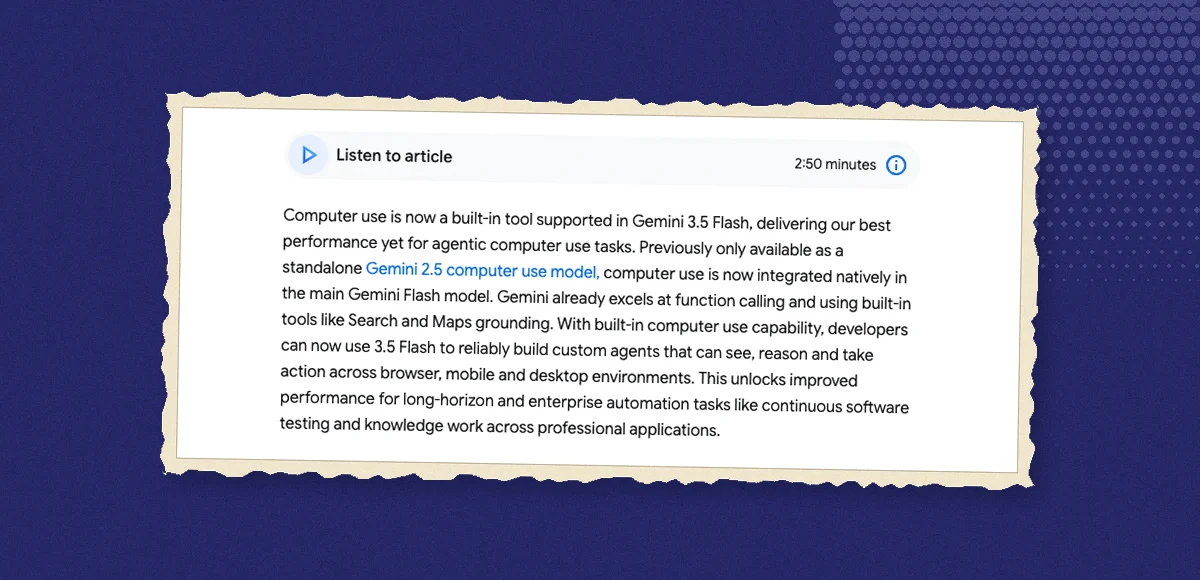
On 30 October 2026, Google's Gemini API release notes recorded the Computer Use tool as generally available across the Interactions and GenerateContent APIs. The tool had been in public preview in Gemini 3.5 Flash since 24 June 2026, after two earlier previews: a standalone Gemini 2.5 Computer Use preview model on 7 October 2025, and support in the Gemini 3 preview models on 29 January 2026. With it, a Gemini model looks at a screenshot, returns a UI action such as a click, a keypress or a scroll, and your own code executes that action and sends back the next screenshot. Google's documentation lists browser, mobile and desktop environments, four supported models, and a set of safety policies that can make the model ask for confirmation before sensitive actions.
This page summarises Google's Gemini API release notes and its Computer Use documentation, both read on 2 November 2026, plus the June 2026 Google blog post on computer use in Gemini 3.5 Flash. We haven't built an agent on the tool for this article, and every capability below is as Google describes it. Where a sentence is our reading rather than Google's statement, it says so. Because the tool only reached GA days before this was written, expect the documentation to keep changing.
What changed, and when
| Date (per Google) | Event |
|---|---|
| 7 October 2025 | "Launched Gemini 2.5 Computer Use Preview", a standalone preview model |
| 29 January 2026 | "Launched support for the Computer Use tool in gemini-3-pro-preview and gemini-3-flash-preview." |
| 24 June 2026 | "Launched public preview support for the Computer Use tool in Gemini 3.5 Flash." The same day, Google's blog described computer use as "a built-in tool supported in Gemini 3.5 Flash" |
| 30 October 2026 | "Released the Computer Use tool to general availability (GA) across the Interactions and GenerateContent APIs." |
Our reading of the label: GA is a contract word. In the preview period a vendor can change or withdraw an API with little notice; after GA, developers can usually expect stability and support commitments. Google's release note doesn't spell out those commitments for this tool, so we're describing the label, not a specific SLA.
How the Computer Use tool works
The documentation describes a loop with four steps, which your application repeats until the task is done:
- Your app sends the prompt, the tool configuration and a screenshot of the current screen.
- The model returns a function call describing one UI action, with an `intent` field explaining what it's trying to do. It may also attach a `safety_decision`.
- Your client executes the action. Google's examples use Playwright for the browser. Coordinates come back normalised, to a 0 to 999 range in the action reference (the code samples describe a 1000x1000 grid), and your code maps them to the real viewport.
- Your app captures a new screenshot, sends it back together with the current URL, and the loop continues.
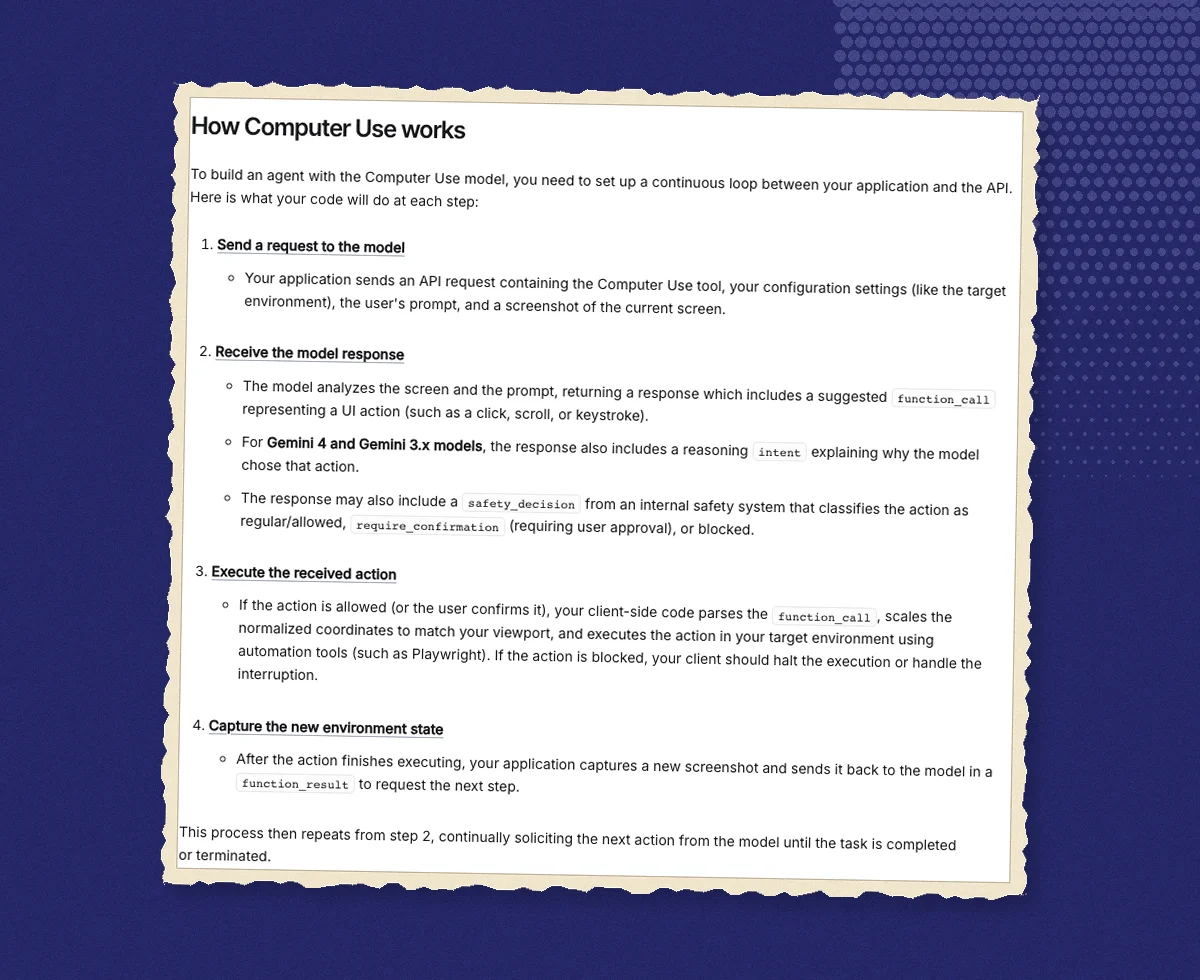
Our reading: two things follow from that design. First, the model never touches your computer directly; everything it does passes through code you wrote and can inspect, log or refuse. Second, the model's view of the interface comes from the screenshots you send, alongside your prompt, the configuration and, in the browser examples, the current URL, which is why Google's guidance is built around screenshots and confirmation rather than direct system access.
Supported models
The documentation lists four models for Computer Use:
| Model | How Google describes it |
|---|---|
| Gemini 4 Argon (`gemini-4-argon`) | The most capable model |
| Gemini 3.8 Flash (`gemini-3.8-flash`) | "The recommended model for computer use" |
| Gemini 3.5 Flash-Lite (`gemini-3.5-flash-lite`) | Low latency, cost-effective |
| Gemini 3 Flash Preview (`gemini-3-flash-preview`) | A preview model |
Only the last entry is labelled preview on that page. The earlier standalone Gemini 2.5 Computer Use model isn't in the list.
Three environments, three action sets
| Environment | Actions Google lists |
|---|---|
| Browser | click, double_click, triple_click, middle_click, right_click, mouse_down, mouse_up, move, type, drag_and_drop, wait, press_key, key_down, key_up, hotkey, take_screenshot, scroll, navigate, go_back, go_forward |
| Mobile (Android-oriented) | open_app, list_apps, click, long_press, type, drag_and_drop, press_key, wait, go_back, take_screenshot |
| Desktop (OS level) | The browser set without navigate, go_back and go_forward |
The browser environment has the widest set because it includes navigation. The desktop set is the same cursor and keyboard vocabulary without URL-level moves, which matches how a person operates a native app.
Safety policies and confirmations
Google's page is unusually direct about risk. It states that "Computer Use may contain errors and security vulnerabilities", recommends close supervision, and advises against critical or irreversible tasks.
The built-in policy categories cover financial transactions, sensitive data modification, communications, account creation, data modification, consent management and legal terms. When the model judges an action falls into one of them, it can return `require_confirmation`; your app is expected to ask the user and, if they agree, send a `safety_acknowledgement`. Blocked actions should stop execution. Developers can relax specific policies with `disabled_safety_policies`, but Google notes that overrides express a preference and the model may still ask for confirmation.
Prompt injection detection, which looks for hidden adversarial instructions on the screen, is opt-in (default `false`) and supported on Gemini 3.5 Flash-Lite or later. The June announcement described the same idea from the other side: optional safeguards to "Require explicit user confirmation for sensitive or irreversible actions" and to "Automatically stop tasks if an indirect prompt injection is identified", alongside a recommended defence-in-depth of sandboxing, human-in-the-loop checks and strict access controls.
What the documentation doesn't say, as of our read: there's no pricing specific to the tool on the Computer Use page, no stated rate or turn limits (the figure of 5 turns appears only in example code), and the page itself is stamped "Last updated 2026-10-30 UTC", the GA date.
Why a screen-operating agent matters for tutorials
Here's the connection to our corner of the world, stated as our reading rather than anything Google claims.
A tutorial is a recording of someone operating software correctly. The Computer Use loop produces exactly the raw material of a tutorial: a sequence of screenshots, each paired with an action and an intent ("open the Billing tab", "type the project name"). That's more than a video has; it's a structured log of what happened and why. A person recording a walkthrough has to reconstruct that log afterwards, from memory, to write narration.
Three practical implications:
- Agents can run the workflow; they don't produce the video. The tool returns actions and takes screenshots on request. Turning that into a watchable, narrated recording is a separate job: capturing continuous video, smoothing the cursor, zooming in on the control that matters, and timing an explanation to the moment it's needed.
- The intent field is a narration draft waiting to happen. Each step already says what the agent meant to do. Our reading is that this kind of action log, whether it comes from an agent or from a recorder that tracks clicks, is a better basis for drafting narration than a transcript of someone talking while they click.
- Confirmation prompts are also teaching moments. The actions Google gates (payments, account changes, deleting data) are the same steps a tutorial should slow down on. If an agent pauses there, a tutorial probably should too.
Our other pages on the same topic cover the broader picture: what computer-use agents are, what an AI agent can record, OpenAI's computer use in the Agents API and Claude's computer-use toolsets.
Where Vorec fits
Vorec isn't built on Gemini's Computer Use tool, and this page isn't a comparison. The overlap is the idea that an agent can operate software while something else captures the result.
Vorec records your screen. It has its own macOS recorder, and an AI coding agent can drive it for you through the Claude Code plugin: the agent plans the walkthrough, drives the recorder to capture locally, and you review the take before anything is uploaded. Vorec then drafts narration matched to the workflow it captured and generates the voiceover, so nothing is spoken into a microphone. In the editor you can add smooth cursor motion, cursor-follow zoom and click-based auto-zoom, and freeze-sync can hold a frame so an explanation has time to finish. The same capture can produce a written step-by-step guide, and you can upload an existing recording instead.
Vorec starts with a free trial, no credit card required (current allowances are on the pricing page). The trial includes up to 3 projects, and exports carry a watermark. Paid plans are Starter at $9 a month ($86 a year), Pro at $24 a month ($230 a year) and Business at $59 a month ($566 a year).
FAQ
What is the Gemini Computer Use tool?
A tool in the Gemini API that lets a model operate software by reading screenshots and returning UI actions (clicks, typing, scrolling, navigation) for your code to execute. Google lists browser, mobile and desktop environments.
When did Gemini Computer Use become generally available?
Google's release notes record general availability on 30 October 2026, across the Interactions and GenerateContent APIs. Public preview in Gemini 3.5 Flash began on 24 June 2026; a standalone Gemini 2.5 Computer Use preview had launched on 7 October 2025.
Which Gemini models support Computer Use?
Per the documentation on 2 November 2026: Gemini 4 Argon, Gemini 3.8 Flash (which Google calls the recommended model for computer use), Gemini 3.5 Flash-Lite and Gemini 3 Flash Preview.
Does the model control my computer directly?
No. The model returns an action; your own client code executes it, takes a new screenshot and sends it back. Google's browser examples use Playwright.
Can Gemini Computer Use ask before doing something risky?
Yes. Built-in safety policies can return a `require_confirmation` decision for categories such as financial transactions and data modification, and your app is expected to get the user's confirmation before continuing. Prompt injection detection is available as an opt-in on Gemini 3.5 Flash-Lite or later.
Does the Computer Use tool record video of what the agent does?
Not as described in the documentation. It works from screenshots your app sends, and `take_screenshot` is one of its actions. Continuous video, cursor polish and narration are outside the tool.
How much does Gemini Computer Use cost?
The Computer Use documentation page we read contains no pricing information. Check Google's Gemini API pricing page for the model you use.
Sources: Google AI for Developers, Gemini API release notes (entries dated 7 October 2025, 29 January 2026, 24 June 2026 and 30 October 2026) and Computer use; Google, Introducing computer use in Gemini 3.5 Flash (24 June 2026). All checked 2 November 2026.
Want the recording to narrate itself? Record with Vorec, or upload one you already have, and get a narrated tutorial plus a written guide. Start free. Trial includes up to 3 projects; exports carry a watermark.