Filmora Pricing 2026: Basic, Advanced and Perpetual
Vorec Team · 2026-10-14 · About 7 min read
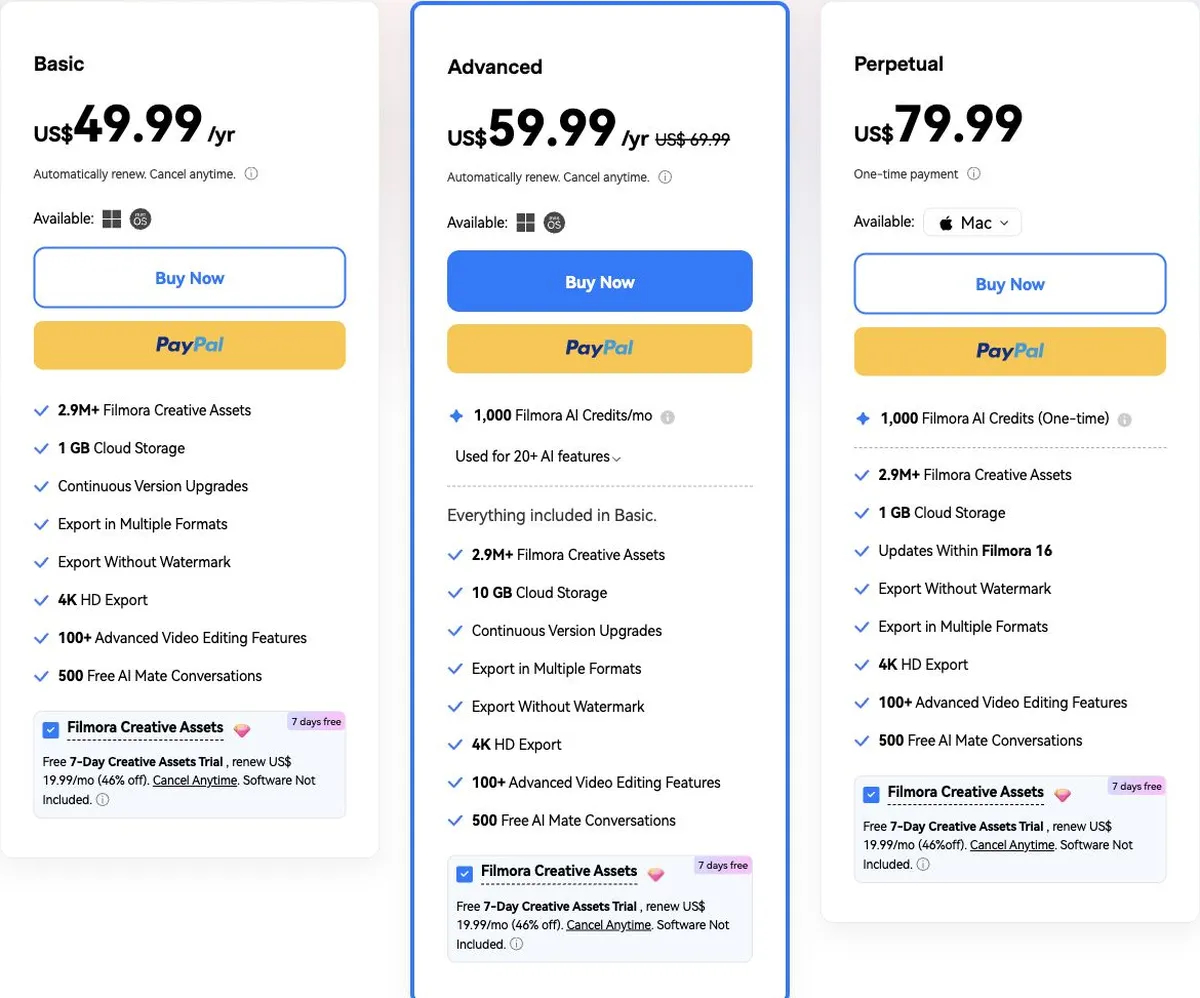
Filmora's individual pricing fits on one screen: two yearly plans and a one-time licence, all under US$80. The detail that changes what you actually pay sits below each price, where a separate Creative Assets subscription is already ticked.
We read Wondershare's Filmora buy page for individuals in a browser on 14 October 2026, twice. Every price and limit below comes from that capture. Where we calculated something, we show the arithmetic and say it is ours.
Verified 14 October 2026 from the rendered Filmora individual buy page, reached from Filmora's "See Pricing & Plans" link, with the page in its Mac state. Prices are labelled US$, and the checkout links carry USD. We read it without a US billing address, so confirm the figure at checkout. We did not check tax, and we did not capture the Windows-state page or the Team & Business and Education tabs.
Filmora pricing at a glance
| Plan | Price shown | Billing | AI credits | Cloud storage |
|---|---|---|---|---|
| Free | $0 | — | — | — |
| Basic | US$49.99/year | Renews automatically, cancel anytime | No bundled amount on the card | 1 GB |
| Advanced | US$59.99/year (US$69.99 struck through) | Renews automatically, cancel anytime | 1,000 a month | 10 GB |
| Perpetual | US$79.99 one-time | One-time payment | 1,000, one-time | 1 GB |
Basic and Advanced are yearly plans; this page state showed no monthly billing option. The struck-through US$69.99 on Advanced is a comparison price; the page does not say whether it is what Advanced renews at, so we have not treated it as a renewal price.
Our arithmetic
| Basic | Advanced | Perpetual | |
|---|---|---|---|
| Price | $49.99/year | $59.99/year | $79.99 once |
| Per month | $4.17 | $5.00 | — |
| Difference vs Basic | — | +$10.00/year | — |
Advanced costs $10 a year more than Basic and adds a 1,000-credit monthly AI allowance and 9 GB more cloud storage. Perpetual costs $30 more than one year of Basic, but its updates stop at Filmora 16 (see below).
The Creative Assets subscription is separate, and pre-ticked
Under every card, a Filmora Creative Assets option is already checked. Its terms on the page: a free 7-day Creative Assets trial, then US$19.99 a month (labelled 46% off), cancel anytime, and "Software Not Included".
That is a second, monthly subscription on top of the editor, not a trial of the editor itself. If you keep it past the trial, it costs 12 × $19.99 = $239.88 a year by our arithmetic, roughly four times the Advanced plan. If you only want the editor, untick it before checkout.
The plan cards also list "2.9M+ Filmora Creative Assets". Because the separate subscription exists, we can't tell from the page exactly which assets the editor plans include without it, so we haven't stated that.
What every paid plan includes
The Basic, Advanced and Perpetual cards each list:
- Export without watermark, in multiple formats, and 4K HD export
- 100+ advanced video editing features
- 500 free AI Mate conversations (the comparison table lists 500 uses a month on paid plans and 15 uses a day on Free)
Basic and Advanced add continuous version upgrades. The comparison table also shows larger built-in libraries on paid plans than on Free, for example 18K+ effects and filters against 1,500+.
AI credits, explained
Many of Filmora's AI features are listed as "Paid by AI Credits", including AI text-to-video, script-to-video, text-to-speech, speech-to-text, AI music, AI object remover and the AI video enhancer.
Filmora's FAQ sets the rules for subscription credits:
- Credits are issued every 30 days from the purchase date.
- Unused credits from the previous 30-day period are reclaimed when new ones are issued, so they don't roll over.
- Credits are shared across Windows and Mac on the same Wondershare account, and credits from more than one plan are combined.
The AI guide linked from the page says credit packs are also sold and that pack credits are valid for one year. We didn't capture pack sizes or prices, so check them in the app before relying on them.
Perpetual licence: what "one-time" covers
The Perpetual card lists "Updates Within Filmora 16". The FAQ says a perpetual licence lets you use a specific version continually for a single fee, does not include future versions, and that you "may need to pay an additional lower-cost fee to resubscribe for support and upgrades".
It is also platform-specific. The FAQ says Basic and Advanced work on both Windows and Mac, but a Windows perpetual licence only works on Windows and a Mac licence only on Mac. The card we captured was the Mac licence.
| If you want | Better fit |
|---|---|
| Lowest cost for a year, both platforms | Basic |
| Regular AI features | Advanced, for its monthly credits |
| To pay once and stay on one version | Perpetual |
The free version
Filmora's FAQ says the free edition gives you its basic editing features and export, but adds a watermark to exported files, and that cloud storage and the full Creative Assets library require an upgrade. The page also advertises a 30-day money-back guarantee "subject to" Wondershare's refund policy; we didn't review the policy's conditions.
Filmora vs other editors we've priced
For other desktop and browser editors, see our verified pricing for Camtasia, Descript, CapCut, Clipchamp and VEED. Our video and tutorial tool pricing study compares the wider category.
When the video is a software tutorial
Filmora is a general-purpose editor: you bring footage, and its AI features, including text-to-speech, run on credits. For software tutorials specifically, the slow part is often not the cut but the voiceover: writing a script that matches what happens on screen, then recording or generating it and lining it up.
Vorec records your screen. It has its own macOS recorder, and an AI agent can drive it for you through the Claude Code plugin, capturing locally for you to review before anything is uploaded. It then drafts narration matched to the workflow it captured and generates the voiceover, so nothing is spoken into a microphone. In the editor you can add smooth cursor motion, cursor-follow zoom and click-based auto-zoom, and freeze-sync can hold a frame to give an explanation time to finish. The same capture can also produce a written step-by-step guide, with annotatable screenshots, and narration regenerates in supported languages on eligible plans, without re-recording. You can upload an existing recording instead if you already have one.
Vorec's prices, read from our live plan catalogue on 14 October 2026, are $9, $24 and $59 a month, or $86, $230 and $566 a year. There is a 7-day trial with 100 credits and no credit card required. The trial includes up to 3 projects, and exports carry a watermark. Details are on Vorec pricing, and the narration workflow is explained in how to add narration to a screen recording.
FAQ
How much does Filmora cost?
As rendered on 14 October 2026 for individuals: Basic US$49.99 a year, Advanced US$59.99 a year, and Perpetual US$79.99 one-time.
Is Filmora free?
There is a free version with basic editing and export, but exported files carry a watermark. Paid plans export without a watermark.
What is the difference between Filmora Basic and Advanced?
Advanced is $10 a year more and adds 1,000 AI credits a month and 10 GB of cloud storage instead of 1 GB. Both work on Windows and Mac.
Do Filmora AI credits roll over?
Subscription credits don't. They are issued every 30 days, and unused credits from the previous period are reclaimed when new ones arrive.
Does the perpetual licence include future versions?
No. The card lists updates within Filmora 16, and the FAQ says future versions are not included and support and upgrades may cost extra.
What is the US$19.99 a month charge on the Filmora page?
It is the separate Filmora Creative Assets subscription, pre-ticked under each plan: a 7-day free trial, then US$19.99 a month, cancel anytime, software not included. Untick it if you only want the editor.
Want the recording to narrate itself? Record with Vorec, or upload one you already have, and get a narrated tutorial plus a written guide. Start free. 7-day trial, 100 credits, no credit card required. Trial includes up to 3 projects; exports carry a watermark. Paid plans start at $9/month.