CapCut Pricing 2026: Free, Standard and Pro Plans
Vorec Team · 2026-10-02 · About 7 min read
CapCut does not publish one universal price. Its own help page says what you pay depends on your region, device and current promotions, and tells you to open the Upgrade screen in your account to see your amount. The clearest public figures we could find are the US App Store listings: Standard Monthly at $9.99 and Pro Monthly at $19.99.
Everything below comes from CapCut's official help pages and the US App Store listing, read in a rendered browser on 2 October 2026. We browsed from outside the US, signed out, and did not start a trial or open a checkout. This is not a verified US web checkout price table, and the price you see may differ. Check your own Upgrade screen before you buy.
The Short Version
| What | What we could verify |
|---|---|
| Free | Free editing exists; some exports carry a watermark, depending on features and app version |
| Standard | $9.99 monthly on the US App Store; aimed at mobile and casual use |
| Pro | $19.99 monthly on the US App Store; cross-platform, with premium assets and advanced AI |
| Yearly | A $89.99 yearly entry appears on the US App Store, but its listing doesn't say which plan it belongs to |
| Web, Android, other countries | Not verified in our signed-out capture; see your own Upgrade screen |
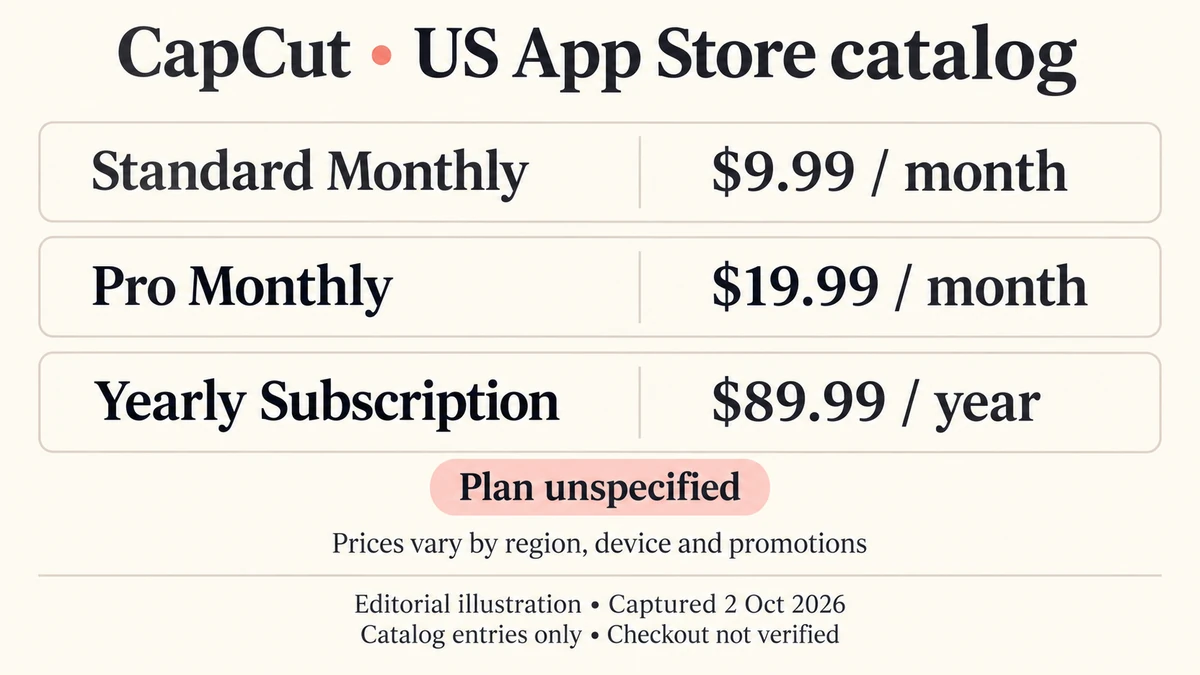
Don't assign the $89.99 yearly price to Pro or Standard. The store listing labels it only "Yearly Subscription". The same list also shows an unnamed $19.99 monthly entry and an unnamed $7.99 monthly entry, so treat the catalog as a set of store entries rather than a finished price list.
Where the Prices Come From
CapCut's cost help page, dated 23 September 2026, says prices depend on region, device and promotions. On the web you log in and choose Upgrade; on desktop you use the subscription button; on mobile you tap Join CapCut Pro. It gives no amount.
The US App Store listing shows the app as free with in-app purchases. It lists Standard Monthly at $9.99 and Pro Monthly at $19.99, and repeats those entries several times. Those repeats are catalog rows, not different plans. The public listing doesn't tell you whether a given account gets an introductory price, a renewal price or a legacy price, and it doesn't show tax.
Don't use the App Store amounts as web, desktop, Android or non-US prices.
Standard vs Pro
CapCut's Standard vs Pro page describes:
- Standard as focused on mobile and casual use: basic editing, free templates, essential AI features and around 100 GB of storage.
- Pro as cross-platform, with premium and commercial-use assets, advanced AI, collaboration and up to 1 TB of storage.
CapCut's pages disagree on Pro storage. The Standard vs Pro page says up to 1 TB, while the monthly and yearly plans page says both Pro billing options include 100 GB. Confirm the number on your own account screen.
The monthly and yearly page confirms both billing cycles exist but gives no amounts, no discount percentage and no annual renewal price. Pricing, seats and storage for Teams aren't published in the places we read.
Free Plan, Watermark and Export
Whether an export carries the CapCut watermark depends on features and app version, according to CapCut's watermark help. It describes editing manually with your own clips and free assets, avoiding premium templates, and removing the automatically added ending clip as ways to get a watermark-free result. Premium templates and effects can require Pro.
So neither "every free export has a watermark" nor "free exports are always clean" is accurate. We did not run an export, so exact resolution, frame-rate and length limits for Free are unverified.
The Pro Trial
CapCut's trial help describes a 7-day trial for eligible new users in supported regions. Eligibility depends on account history, region and app version; the mobile instructions name version 8.20 or later. Web activation requires a valid payment method, and mobile billing starts after seven days unless you cancel.
The editor's generic call to action says no credit card is required, but the trial instructions do ask for payment details. Don't assume the Pro trial is card-free.
AI Credits
Some AI features use credits on top of your plan. CapCut's help pages (which credits are used first and how to use credits) describe subscription credits that reset and expire, promotional credits with shorter validity, and purchased credits that typically don't expire.
CapCut's pages disagree on the order credits are used and on whether mobile supports credit-consuming features. Included credits, top-up prices and per-feature rates by plan weren't published where we looked. Pro is not unlimited AI generation.
Commercial Use
CapCut's Materials License Agreement, updated 22 January 2026, separates non-commercial assets from assets marked for commercial use, with asset-specific scope. Buying Pro doesn't turn every template or soundtrack into unrestricted commercial content. The agreement also says US users fall under a separate US licence, which we did not read, so check the terms that apply to you and each asset's label.
What The Pages Do Not Establish
- Web, Android and non-US prices, and any named annual price.
- Teams price, seats, storage and quotas.
- Included AI credits, top-up prices and which credit-use order is current.
- Renewal prices, taxes and trial eligibility for a specific account.
- Export limits on Free by region and app version.
Is CapCut Pro Worth It?
Pro may fit creators who need its premium assets, advanced AI and editing across devices; Standard is positioned for casual mobile editing. Confirm your own price on the Upgrade screen first.
Mind the variables. Region, device, promotions and eligibility change the price, so the number in the store listing is a starting point rather than a quote.
Reconsider if you need guaranteed commercial rights for every asset, or a published annual price before you commit.
How It Compares
| What we could verify | What you get | |
|---|---|---|
| CapCut | US App Store: Standard $9.99/mo, Pro $19.99/mo; region varies | Video editor with templates and AI features |
| VEED | See our VEED pricing breakdown | Browser video editor |
| Descript | See our Descript pricing breakdown | Text-based video and audio editing |
| Vorec | $86/yr billed annually ($7.17/mo equivalent); $9/mo billed monthly | Screen recording narrated from what happens on screen |
These products have different units, so the table is orientation rather than like-for-like.
Where Vorec Fits
CapCut focuses on short-form video editing with templates and AI effects; Vorec focuses on narrated screen tutorials and written guides. For editing social clips, evaluate CapCut.
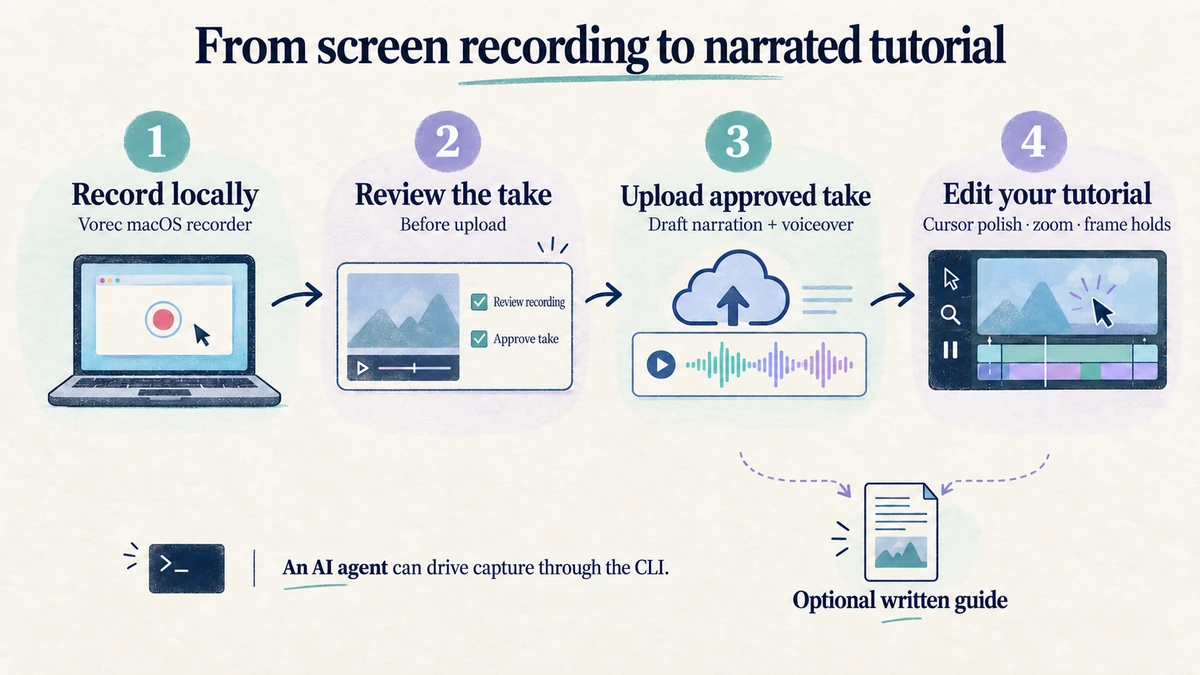
Where they meet is the product walkthrough. If the thing you are making is a walkthrough of an app, the narration comes from what happens on screen. Vorec records your screen through its macOS recorder, and an AI agent can drive that capture through the CLI, recording locally so you review the take before anything is uploaded. It then uses captured action data, or analyses a recording you upload, to draft narration matched to the workflow and generate the voiceover, so no microphone narration is required. In the editor you can add smooth cursor motion, cursor-follow zoom and click-based auto-zoom, and freeze-sync can hold a frame to give an explanation time to finish. The same capture can also produce a written step-by-step guide, and narration regenerates in supported languages on eligible plans without re-recording.
Pricing: plans start at $9/month billed monthly, with a 7-day free trial of 100 credits, no credit card required, whose exports carry a watermark.
Bottom Line
CapCut's US App Store lists Standard at $9.99 a month and Pro at $19.99 a month, and the price you actually pay depends on your region, device and promotions.
Three details to check before you buy: the Pro trial asks for payment details, CapCut's own pages disagree on Pro storage and AI-credit order, and the $89.99 yearly entry isn't tied to a plan.
Related: our Descript pricing breakdown covers another editor whose limits are spread across several pages.
Want the recording to narrate itself? Record with Vorec, or upload one you already have, and get a narrated tutorial plus a written guide. Start free: a 7-day trial with 100 credits, no credit card required, up to 3 projects and watermarked trial exports. Paid plans start from $9/month.