Opus Clip Pricing 2026: Plans, Credit Packs and Limits
Vorec Team · 2026-10-01 · About 6 min read
Starter is Opus Clip's lowest-priced month-to-month plan at $15. Pro costs $29 month-to-month or $174 billed annually ($14.50 a month equivalent); Business pricing is custom. Free clips carry a watermark and become unavailable to export after three days.
Everything below comes from Opus Clip's pricing page, read in a rendered browser with the monthly and annual views and every Pro pack size selected, on 1 October 2026. The page showed US dollars; tax treatment is not stated. Prices change; check before you buy.
The Short Version
| Plan | Monthly | Annual | Credits and key limits |
|---|---|---|---|
| Free | $0 | n/a | 60 credits/month; watermark; no editing; up to 1080p; clips unavailable to export after 3 days |
| Starter | $15, billed monthly | Monthly only | 150 credits/month; 1 brand template; removes the watermark |
| Pro (1 pack) | $29 | $174 a year ($14.50/mo equivalent) | 300 credits/month; 2 seats; 2 brand templates; 6 social connections |
| Business | Custom | Custom | Custom credits, seats and connections; API and custom integrations |
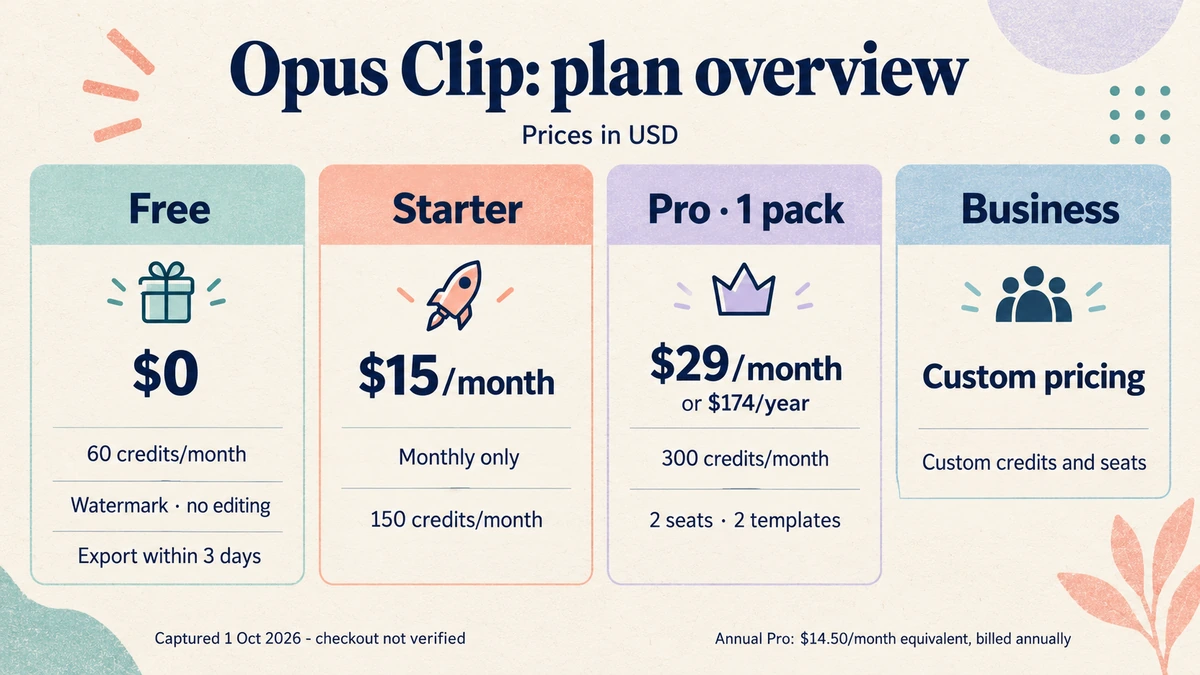
The annual Pro price is half of twelve monthly payments: $29 × 12 = $348 against $174, a difference of $174 (our arithmetic). The page says "up to 50%" savings.
The comparison header can mislead. In the annual view the comparison table's header still shows Pro at $29 a month, while the annual card shows $14.50. Price against the card for the billing cycle you selected.
Pro Pack Options
Pro is sold in packs of 300 credits. Each row below was selected in the page's dropdown, not extrapolated. Monthly billing offers 1 to 5 packs; annual billing offers 1 to 15.
| Packs | Credits/month | Monthly bill | Annual monthly equivalent | Annual bill |
|---|---|---|---|---|
| 1 | 300 | $29 | $14.50 | $174 |
| 2 | 600 | $58 | $29 | $348 |
| 3 | 900 | $87 | $43.50 | $522 |
| 4 | 1,200 | $116 | $58 | $696 |
| 5 | 1,500 | $145 | $72.50 | $870 |
| 6 | 1,800 | not selectable | $87 | $1,044 |
| 10 | 3,000 | not selectable | $145 | $1,740 |
| 15 | 4,500 | not selectable | $217.50 | $2,610 |
Packs 7 to 9 and 11 to 14 follow the same $14.50-per-pack pattern; we show only the endpoints and a few steps. Packs above 5 are annual-only on the page.
Beyond two packs, additional packs increase credits while seats, templates and social connections stay capped. One pack gives 2 seats, 2 brand templates and 6 social connections; two or more packs reach the cap of 4 seats, 4 templates and 12 connections. Unused Pro credits roll over one month on monthly billing and two months on annual billing.
What Each Plan Limits
- Free: 60 credits a month, a watermark, no editing, a 1080p ceiling, and media that expires after 3 days.
- Starter: removes the watermark; adds AI clipping with virality scores, animated captions in 20+ languages, direct posting to YouTube Shorts, TikTok and Instagram, the editor and filler and silence removal. B-roll is capped at three AI-image clips and three stock clips a month. Media storage expires after 29 days, while the export row says 30 days; the page does not reconcile the two.
- Pro: adds AI video, image and stock B-roll (image B-roll up to 50 clips a day, stock B-roll unlimited), more import sources, Premiere Pro and DaVinci Resolve export, social scheduling, 9:16, 1:1 and 16:9 formats, credit top-ups, custom fonts (up to two), video dubbing and Limited API Access. Storage is a fixed 100 GB.
- Business: adds priority processing, custom assets, seats and connections, API and custom integrations, priority support with a dedicated Slack channel, and enterprise security features.
Hard numbers worth knowing: local uploads are capped at 10 GB per video on Free and Starter and 30 GB on Pro and Business; paid AI voice-over is limited to 20 a day; speech enhancement to 10 a day on Pro; Zapier on Pro to 300 credits a month.
The pricing matrix marks 4K scheduling and downloading as Business-only. The MP4 export row says "highest resolution available" for Starter and Pro, so do not assume 4K on Pro without checking. The MP4 export row shows "No limit" for Pro; that does not establish unlimited processing or credits.
What The Page Does Not Establish
- How credits convert to minutes. We could not verify the credits-to-minutes conversion from the captured pricing page: the credit information buttons did not show a readable definition.
- Trial length. Starter and Pro offer a free trial with no credit card, but the page states neither its duration nor its allowance.
- Commercial-use rights, taxes, refunds and cancellation terms, the exact API rate limits, the maximum source-video duration, the precise Starter and Pro resolution ceiling, and any promotion end date.
- Top-up prices for extra credits.
- Business quotas and prices.
Is Opus Clip Worth It?
Yes, if your job is turning long recordings into short vertical clips with captions and direct posting. Pro at $174 a year is a low entry point for that, and the pack ladder scales smoothly.
Mind the credit unit. We could not verify a credits-to-minutes conversion from the pricing page, so run a real video through the free plan before you size a pack.
Reconsider if you need 4K scheduling and downloads (marked Business-only in the matrix) or want to keep clips beyond the Starter retention window.
How It Compares
| Entry paid price (billing basis shown) | What you get | |
|---|---|---|
| Opus Clip | $174/yr (Pro, annual); Starter $15/mo monthly-only | Credits for AI clipping and captions |
| HeyGen | See our HeyGen pricing breakdown | Avatar video, credits-based |
| VEED | See our VEED pricing breakdown | Browser video editor |
| Vorec | $86/yr ($7.17/mo equivalent) | Screen recording narrated from what happens on screen |
These products have different units, so the table is orientation rather than like-for-like.
Where Vorec Fits
Opus Clip focuses on cutting long videos into short social clips; Vorec focuses on narrated screen tutorials and written guides. For clipping a podcast or webinar into shorts, evaluate Opus Clip.
Where they meet is the product video. If the thing you are making is a walkthrough of an app, the narration comes from what happens on screen. Vorec records your screen through its macOS recorder, and an AI agent can drive that capture through the CLI, recording locally so you review the take before anything is uploaded. It then uses captured action data, or analyses a recording you upload, to draft narration matched to the workflow and generate the voiceover, so no microphone narration is required. In the editor you can add smooth cursor motion, cursor-follow zoom and click-based auto-zoom, and freeze-sync can hold a frame to give an explanation time to finish. The same capture can also produce a written step-by-step guide, and narration regenerates in supported languages on eligible plans without re-recording.
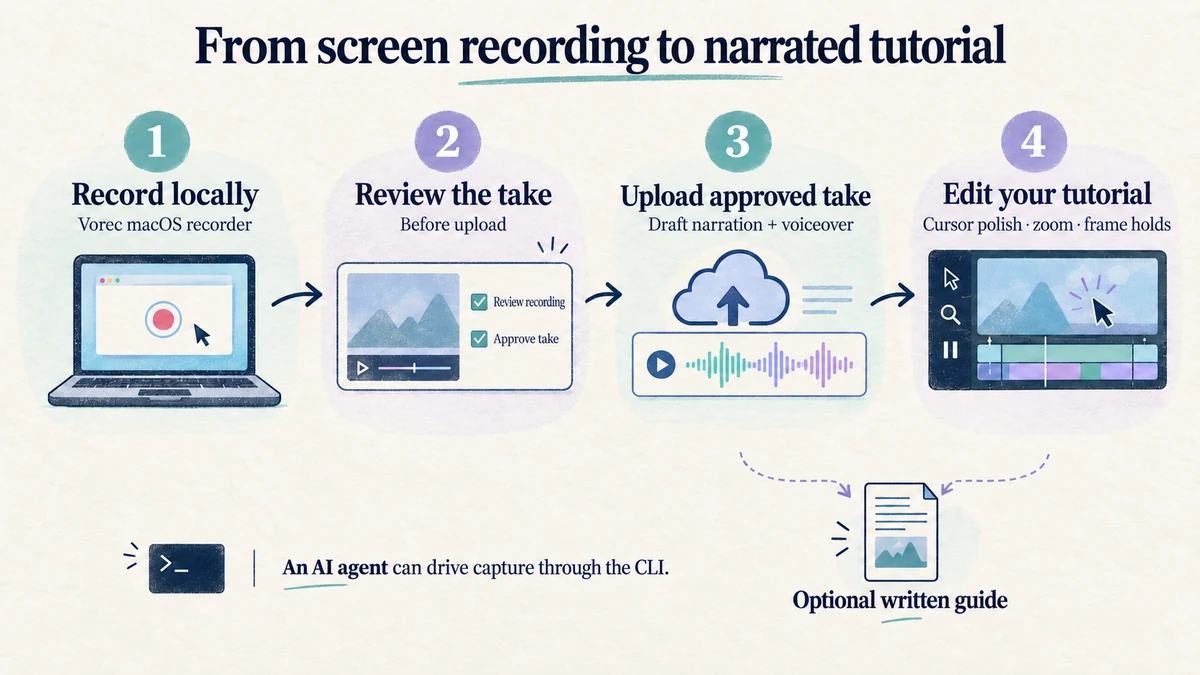
Plans start at $9/month, with a 7-day free trial of 100 credits, no credit card required, whose exports carry a watermark.
Bottom Line
Opus Clip runs $15 a month (Starter, month-to-month) or $29 a month for Pro ($174 a year), scaling in 300-credit packs up to a cap of four seats, four templates and twelve social connections.
Three details to check before you buy: we could not verify the credits-to-minutes conversion, the matrix marks 4K scheduling and downloading as Business-only, and the free plan's clips become unavailable to export after three days.
Related: our VEED pricing breakdown covers a browser editor with the same kind of annual-versus-monthly gap.
Want the recording to narrate itself? Record with Vorec, or upload one you already have, and get a narrated tutorial plus a written guide. Start free.