Clipchamp Pricing 2026: Free, Microsoft 365 and Work Plans
Vorec Team · 2026-10-13 · About 8 min read
If you search for a Clipchamp price, you won't find one on Clipchamp's pricing page. Clipchamp has a free plan, and its Premium features now come with a Microsoft 365 subscription rather than as a standalone Clipchamp plan. At work, the editor arrives as part of certain Microsoft 365 business and education licences.
So the real question is which Microsoft plan you need, and what Clipchamp gives you on it. We read Clipchamp's pricing page and the Microsoft pages it points to in a browser on 13 October 2026. Every price below comes from that capture, and we show our arithmetic where we calculated something.
Verified 13 October 2026 from the rendered Clipchamp pricing page, Microsoft's US consumer plan comparison, its US business plans with Teams, and Microsoft Support's article on accessing Clipchamp with a work or school account. Prices are the US dollar figures shown on en-us pages. We did not check whether tax is added at checkout.
Clipchamp pricing at a glance
| Route | Price shown | What it is |
|---|---|---|
| Clipchamp Free | $0 | Personal Microsoft account; exports up to 1080p, no watermark |
| Microsoft 365 Personal | $9.99/month or $99.99/year | Includes Clipchamp Premium features, for 1 person |
| Microsoft 365 Family | $12.99/month or $129.99/year | Includes Clipchamp Premium features, for 1 to 6 people |
| Microsoft 365 Business Standard | $14.00/user/month paid yearly, or $16.80/user/month on a monthly plan | Includes the work version of Clipchamp (Standard) |
| Microsoft 365 Business Premium | $22.00/user/month paid yearly, or $26.40/user/month on a monthly plan | Includes the work version of Clipchamp (Standard) |
All of these are prices for the whole Microsoft 365 plan, not for Clipchamp alone. Clipchamp's pricing page doesn't advertise a standalone paid Clipchamp plan.
What the free plan includes
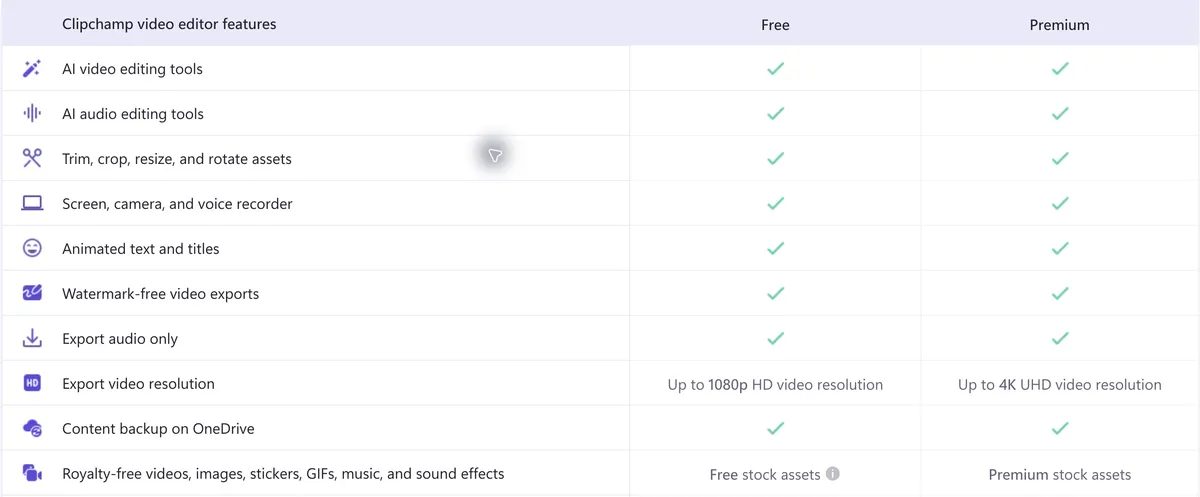
Clipchamp's comparison table lists these as included on the free plan:
| Feature | Free | Premium |
|---|---|---|
| AI video editing tools | Included | Included |
| AI audio editing tools | Included | Included |
| Trim, crop, resize and rotate | Included | Included |
| Screen, camera and voice recorder | Included | Included |
| Animated text and titles | Included | Included |
| Watermark-free video exports | Included | Included |
| Export audio only | Included | Included |
| Export resolution | Up to 1080p HD | Up to 4K UHD |
| Content backup on OneDrive | Included | Included |
| Stock videos, images, music and effects | Free stock | Premium stock |
| Filters, effects and colour correction | Free | Premium |
| Brand kit (logos, colours, fonts) | Not included | Single brand |
Two practical notes from the page. You need a personal Microsoft account to sign in. And a free user "cannot export videos that include premium assets", so using a premium stock clip or effect in a project locks that project's export until you upgrade or remove it.
We didn't find a cap on the number of videos, exports or video length on the pricing page.
Clipchamp Premium: through Microsoft 365 Personal or Family
The pricing page says Premium features are now included with Microsoft 365 Personal and Family. On Clipchamp's table, Premium adds 4K UHD exports, premium stock and effects, and a brand kit for one brand.
| Plan | Monthly | Yearly | 12 × monthly | Yearly saving |
|---|---|---|---|---|
| Microsoft 365 Personal | $9.99 | $99.99 | $119.88 | $19.89 (16.6%) |
| Microsoft 365 Family | $12.99 | $129.99 | $155.88 | $25.89 (16.6%) |
The saving amounts match what Microsoft's page states ("Save $19.89 with a yearly plan" for Personal). The percentages are our arithmetic: saving ÷ (12 × monthly).
Family covers 1 to 6 people. Microsoft's plan page adds that its Microsoft 365 AI features (the Copilot benefits it describes) are for the subscription owner only and cannot be shared, with usage limits. That statement is about Microsoft 365's AI benefits; it is not evidence that Clipchamp's own AI editing tools, which the comparison table lists even on the free plan, are limited to the owner. Microsoft's page also lists a Microsoft 365 Premium plan at $19.99/month or $199.99/year, but Clipchamp's pricing page names only Personal and Family, so we have not counted it as a Clipchamp route here.
Clipchamp for work: which business licences include it
Microsoft Support says the work version, Clipchamp Standard, is "an included service" in a list of business and education licences, and that it's enabled by default for users who have one assigned. The list includes:
- Microsoft 365 Business Standard and Business Premium (and the Office 365 equivalents)
- Microsoft 365 E3 and E5, and Office 365 E3 and E5
- Microsoft 365 Education A3 and A5, plus their Student Use Benefit and "Extra Features" variants, with conditions set out in the article
Microsoft 365 Business Basic is not on that list. Microsoft Support also says Clipchamp isn't available in Office 365 Education A3 and A5 "at this stage", so check which education product you actually have.
Even with an eligible licence, the article says access depends on your admin having the Clipchamp service enabled for you.
What the business plans cost
| Plan (with Teams) | Paid yearly | Monthly plan | Monthly premium |
|---|---|---|---|
| Microsoft 365 Business Standard | $14.00/user/month | $16.80/user/month | +20% |
| Microsoft 365 Business Premium | $22.00/user/month | $26.40/user/month | +20% |
Monthly premium = (monthly price − yearly-billed price) ÷ yearly-billed price. For a 10-person team on Business Standard, that is 10 × $14.00 × 12 = $1,680 a year paid yearly, or 10 × $16.80 × 12 = $2,016 a year on monthly billing.
Microsoft's business plans list identity and access management for up to 300 users. The one-month free trial requires a credit card and, per the trial terms, converts to a paid subscription when it ends unless you cancel.
Premium features and AI at work cost extra
Clipchamp's own FAQ says the work version's standard plan is included in some business and education licences, while access to all Clipchamp premium features and AI video creation "is available with a Copilot license."
On Microsoft's business pricing page, the Microsoft 365 Copilot Business add-on shows "Originally starting from $21.00 now starting from $18.00" per user per month, paid yearly. That is a promotion available from 1 July to 31 December 2026, for existing customers with an eligible Business plan, and per the footnote the promotional price "applies to the first year only." We did not establish a separate price for Clipchamp Premium at work.
Microsoft's page also shows bundles that include Copilot at different prices. Treat those as separate offers and check the current page rather than adding numbers together.
Which route fits which buyer
| You are | Likely route | Clipchamp cost on top |
|---|---|---|
| One person making occasional 1080p videos | Clipchamp Free | $0 |
| One person who wants 4K or premium stock | Microsoft 365 Personal | Included in $9.99/month |
| A household sharing Microsoft 365 | Microsoft 365 Family | Included in $12.99/month |
| A business already on Business Standard or Premium | Clipchamp Standard at work | Included, if your admin enables it |
| A business that wants work Premium features and AI video creation | A Copilot licence | Copilot pricing applies |
Clipchamp vs other editors we've priced
For editors with standalone plans, see our verified pricing for Canva, CapCut, VEED, Descript and Camtasia. Our video and tutorial tool pricing study puts 31 vendors side by side.
When the video is a software tutorial
Clipchamp includes a screen, camera and voice recorder on the free plan, and its site also offers an AI voiceover generator. Vorec takes a different approach for software tutorials: it drafts the narration script itself from the workflow it captured, then voices it.
Vorec records your screen. It has its own macOS recorder, and an AI agent can drive it for you through the Claude Code plugin, capturing locally for you to review before anything is uploaded. It then drafts narration matched to the workflow it captured and generates the voiceover, so nothing is spoken into a microphone. In the editor you can add smooth cursor motion, cursor-follow zoom and click-based auto-zoom, and freeze-sync can hold a frame to give an explanation time to finish. The same capture can also produce a written step-by-step guide, with annotatable screenshots, and narration regenerates in supported languages on eligible plans, without re-recording. You can upload an existing recording instead if you already have one.
Vorec's prices, read from our live plan catalogue on 13 October 2026, are $9, $24 and $59 a month, or $86, $230 and $566 a year. There is a 7-day trial with 100 credits and no credit card required. The trial includes up to 3 projects, and exports carry a watermark. Details are on Vorec pricing, and the narration workflow is explained in how to add narration to a screen recording.
FAQ
Is Clipchamp free?
Yes. The free plan includes the editor, AI video and audio tools, a screen, camera and voice recorder, and watermark-free exports up to 1080p. You need a personal Microsoft account, and you can't export a project that uses premium assets.
How much is Clipchamp Premium?
There is no standalone price on Clipchamp's pricing page. Premium comes with Microsoft 365 Personal ($9.99/month or $99.99/year) or Family ($12.99/month or $129.99/year), as rendered for the US on 13 October 2026.
What does Premium add?
Per Clipchamp's table: 4K UHD exports, premium stock assets, premium filters and effects, and a brand kit for one brand.
Is Clipchamp included in Microsoft 365 for business?
The work version, Clipchamp Standard, is included in licences including Microsoft 365 Business Standard, Business Premium, E3 and E5, per Microsoft Support. Business Basic is not on the list, and your admin must have the service enabled.
Does Clipchamp have AI features?
The free and Premium columns both list AI video and AI audio editing tools. At work, Clipchamp's FAQ says all premium features and AI video creation are available with a Copilot licence.
Are Microsoft 365 Family AI benefits shared?
Microsoft's plan page says its Microsoft 365 AI features are for the subscription owner only and cannot be shared, with usage limits. That applies to Microsoft 365's AI benefits. It doesn't establish that Clipchamp's own AI editing tools, listed on the free plan too, are owner-only.
Want the recording to narrate itself? Record with Vorec, or upload one you already have, and get a narrated tutorial plus a written guide. Start free. 7-day trial, 100 credits, no credit card required. Trial includes up to 3 projects; exports carry a watermark. Paid plans start at $9/month.