Canva Pricing 2026: Free, Pro, Business and AI Limits
Vorec Team · 2026-10-02 · About 8 min read
Canva shows prices in your local currency, so there is no single number to quote. In our capture the web pricing page displayed Pro at 40 MAD a month or 320 MAD a year (Moroccan dirham), even with English (US) selected. The US App Store separately lists Canva Pro monthly entries of $14.99, $15.00 and $18.00, and yearly entries of $119.99 and $143.99.
Everything below comes from Canva's pricing page, its help and licensing pages, and the US App Store listing, read in a rendered browser on 2 October 2026. We browsed signed out from outside the US, with no signup, trial or checkout. These are not verified US web prices, and we did not convert the dirham amounts into dollars. Check the pricing page in your own country before you buy.
The Short Version
| Plan | Monthly card (MAD) | Yearly card (MAD) | Who it covers | Storage |
|---|---|---|---|---|
| Free | 0 | 0 | One person | 5 GB |
| Pro | 40 | 320 | One person | 100 GB |
| Business | 58 per person | 580 per person | Per person | 500 GB |
| Enterprise | Contact sales | Contact sales | Organizations | 1 TB |
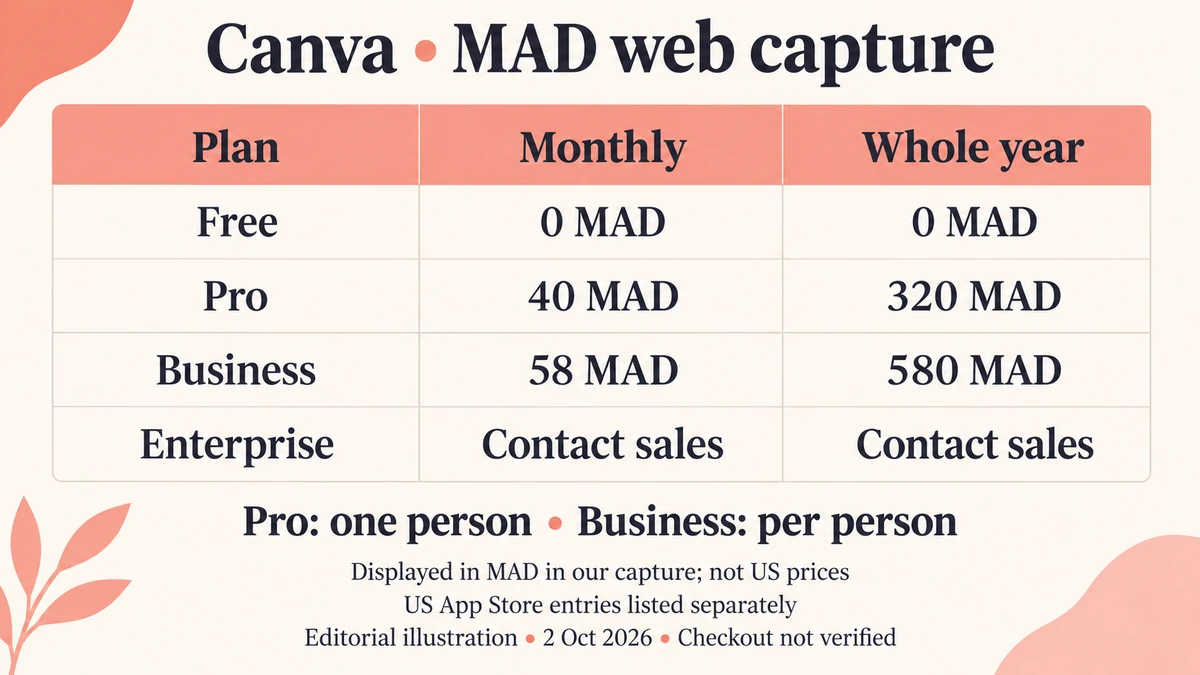
The yearly cards show the whole-year amount, not a monthly equivalent. Our arithmetic: 320 ÷ 12 is about 26.67 MAD a month for Pro, and 580 ÷ 12 is about 48.33 MAD a month per person for Business. Those equivalents are calculations, not card text. Separately, the page says savings start at 16%.
Language is not region. Choosing English (US) did not switch the page to US dollars in our capture. Don't treat the dirham figures as dollar prices, and don't convert them and quote the result.
What The US App Store Lists
The US App Store listing for Canva is free with in-app purchases. Its expanded purchase list shows:
| Item | USD amounts displayed |
|---|---|
| Canva Pro, monthly | $14.99, $15.00, $18.00 |
| Canva Pro, yearly | $119.99 (listed twice), $143.99 |
| Canva Business, monthly | $25.00 |
| Canva Teams, monthly | $30.00 |
| Canva Credit | $1.99; two-pack $2.99 |
The listing doesn't say which account gets which variant, whether an entry is introductory or legacy, or how many seats it covers. Don't pick the lowest as "the" price. These are US store catalog amounts, not web or Android prices, and they are not a checkout quote. Don't compare them with the dirham web prices to claim an app-store surcharge.
What Each Plan Includes
- Free: 1.6 million-plus templates, 4.7 million-plus assets, one brand kit limited to three colors, and 5 GB of storage.
- Pro: 3.6 million-plus templates and 141 million-plus premium assets, five brand kits, 100 GB of storage, plus resize, translate and background tools and social scheduling.
- Business: adds team admin and collaboration, approvals, ad tools, 500 GB of storage and 100 brand kits. It is priced per person.
- Enterprise: adds SSO and SCIM and custom apps. A dedicated success manager applies at 150 or more contracted seats; that footnote does not establish a purchase minimum.
Canva Teams is closed to new signups and upgrades, according to the pricing FAQ. Existing Teams subscribers can stay, but new Business-only features don't automatically extend to them. Don't use old Teams prices as the current Business price.
AI Allowance: One Pool, Not Several
Canva's AI usage help describes a monthly allowance per person for its AI tools, shown as estimated alternatives rather than separate quotas:
| Plan | Estimated monthly allowance |
|---|---|
| Free | Up to 20 Standard or Premium uses; no Ultra |
| Pro | Up to 200 Premium or up to 20 Ultra uses |
| Business | Up to 400 Premium or up to 40 Ultra uses |
| Enterprise | Up to 400 Premium or up to 40 Ultra uses |
| Pro and Business trials | Up to 20 Standard or Premium uses; no Ultra |
The estimates assume simple tasks and lower-consumption tools. Tool choice, task complexity and model tier change how fast the allowance is used. The allowance is per member, not shared across an organization, and it refreshes monthly on the billing day, including on annual plans. Free resets at midnight UTC on the first of the month. Paid Standard AI and design tools generally don't use this pool but stay subject to fair use. Don't read any of this as unlimited generation or as a promise of a fixed number of videos.
AI Pass
Canva also sells an AI Pass add-on. Its help page states USD $100 per person per month, globally, on top of the base plan. It applies to web-managed, auto-renewing Pro, Teams, Business and Nonprofits subscriptions, and excludes Free, Education, Enterprise, trials, prepaid plans and App Store or Google Play subscriptions. A user can hold one at a time, and an annual subscriber can pick monthly or annual billing for it. We did not verify a checkout total or tax.
Business top-ups are described as one-time purchases equal to the monthly allowance, valid for 30 days. We found no top-up price.
Free Exports, Watermarks and Commercial Use
The comparison table lists PDF, JPG and PNG export on all four main plans. It excludes print-ready CMYK export, bulk creation, saving designs as templates and the content planner from Free. We did not test video resolution, frame rate or length limits.
On the watermark: Canva's licensing page says Free users see watermarks on Pro content, not on every design. Pro content can be licensed for a single design for a fee, or used through a Pro subscription. A paid plan permits many commercial uses inside your designs, but not reselling standalone assets or treating stock content as an exclusive trademark (fonts, simple shapes and lines excepted), and Popular Music has separate terms that bar commercial use. A subscription is not blanket clearance for every asset, so follow the linked license terms.
Trials, Education and Nonprofits
Pro and Business trials are offered on the pricing page. Canva's own plan guide mentions a 30-day Pro trial; it doesn't establish the same length for Business. Canva's terms of use say the payment method on file is charged after the trial unless you cancel first, so don't assume a card-free trial. AI use during a trial is limited to the Free-level allowance above.
Eligible K-12 teachers and schools get Canva free, and higher-education Campus is sales-quoted. Eligible nonprofits can get a free team of up to 50 users under the application program. These are eligibility programs, not universal free access to paid plans.
What The Pages Do Not Establish
- US web prices and Android prices.
- Checkout totals, tax and renewal prices for a specific account.
- Business trial length, Pro Lite and prepaid prices, and top-up prices.
- Video export limits by plan.
- Enterprise and Campus quotes.
Is Canva Pro Worth It?
Pro may fit people who make designs regularly and want premium assets, brand kits and the AI tools. The web price in your country is the number that counts, so check it first.
Mind the AI pool. Premium and Ultra uses draw on the same monthly allowance. On Pro the estimate is up to 200 Premium uses or up to 20 Ultra uses. Tools and tasks vary, so treat those as estimates, not a fixed exchange rate between the two.
Reconsider if you only need occasional designs, since Free covers a lot, or if you need guaranteed commercial clearance for every asset.
How It Compares
| What we could verify | What you get | |
|---|---|---|
| Canva | Web cards in local currency; US App Store Pro $14.99 to $18 monthly | Design, templates and AI tools |
| VEED | See our VEED pricing breakdown | Browser video editor |
| Descript | See our Descript pricing breakdown | Text-based video and audio editing |
| Vorec | $86/yr billed annually ($7.17/mo equivalent); $9/mo billed monthly | Screen recording narrated from what happens on screen |
These products have different units, so the table is orientation rather than like-for-like.
Where Vorec Fits
Canva focuses on design, templates and brand assets across many formats; Vorec focuses on narrated screen tutorials and written guides. For graphics, presentations and social posts, evaluate Canva.
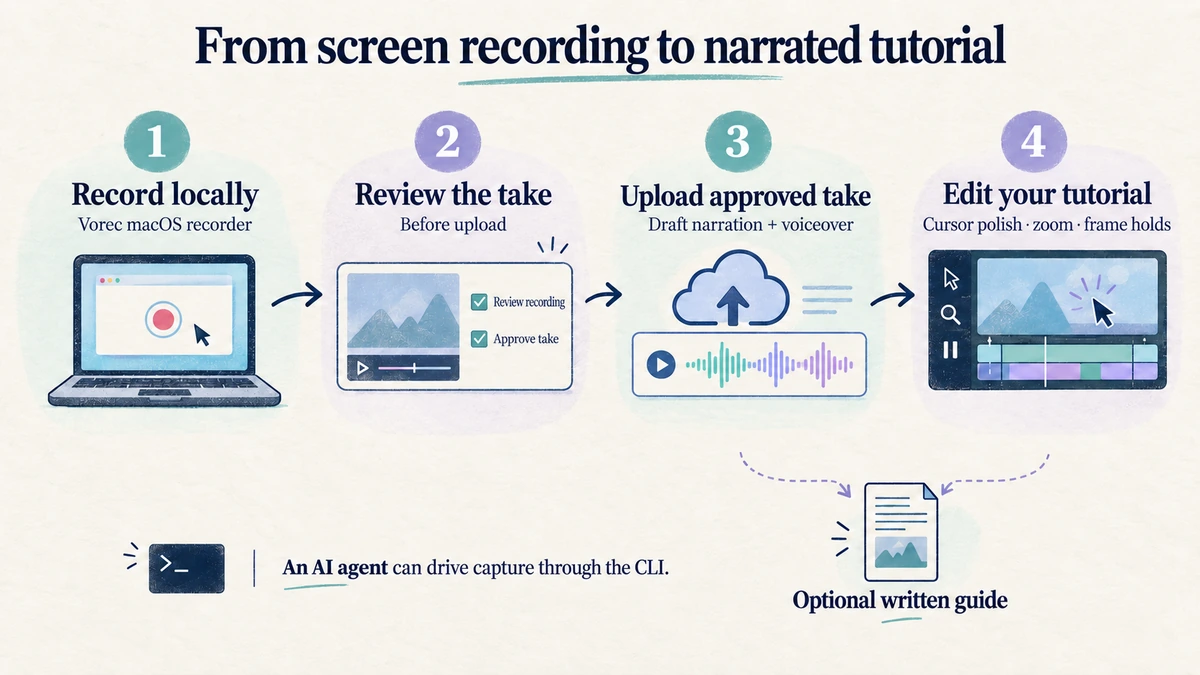
Where they meet is the product walkthrough. If the thing you are making is a walkthrough of an app, the narration comes from what happens on screen. Vorec records your screen through its macOS recorder, and an AI agent can drive that capture through the CLI, recording locally so you review the take before anything is uploaded. It then uses captured action data, or analyses a recording you upload, to draft narration matched to the workflow and generate the voiceover, so no microphone narration is required. In the editor you can add smooth cursor motion, cursor-follow zoom and click-based auto-zoom, and freeze-sync can hold a frame to give an explanation time to finish. The same capture can also produce a written step-by-step guide, and narration regenerates in supported languages on eligible plans without re-recording.
Pricing: plans start at $9/month billed monthly, with a 7-day free trial of 100 credits, no credit card required, whose exports carry a watermark.
Bottom Line
Canva's web prices follow your region, and in our capture Pro showed 40 MAD a month or 320 MAD a year; the US App Store lists Pro monthly entries from $14.99 to $18.00.
Three details to check before you buy: the yearly cards are whole-year totals, AI use comes from one pooled monthly allowance, and the $100-a-month AI Pass is a separate add-on.
Related: our VEED pricing breakdown covers a browser editor with an annual-versus-monthly gap.
Want the recording to narrate itself? Record with Vorec, or upload one you already have, and get a narrated tutorial plus a written guide. Start free: a 7-day trial with 100 credits, no credit card required, up to 3 projects and watermarked trial exports. Paid plans start from $9/month.