Kapwing Pricing 2026: Free, Pro and Business Plans
Vorec Team · 2026-10-12 · About 8 min read
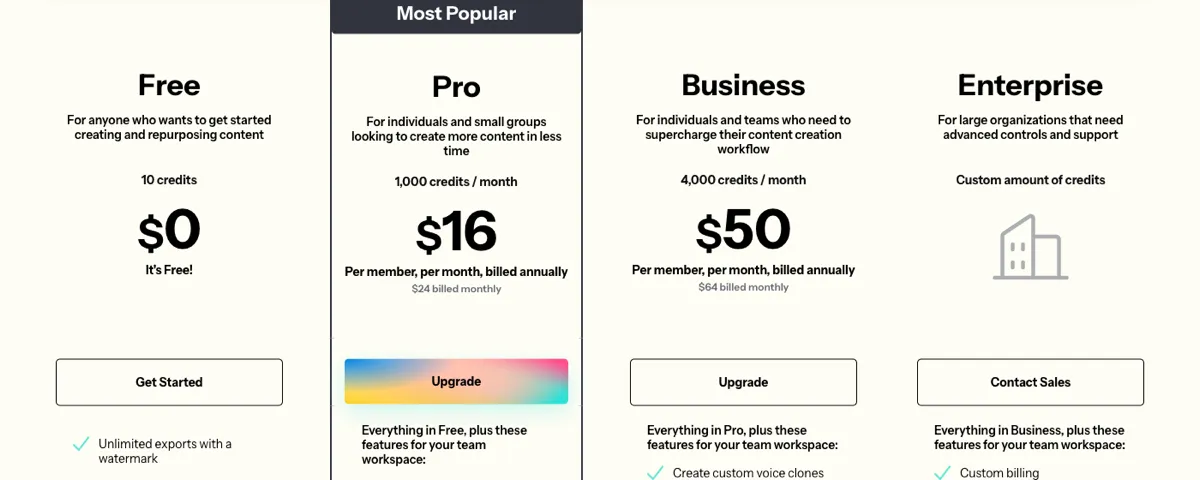
Kapwing has a Free plan and two self-serve paid plans: Pro at $24 per member a month and Business at $64 per member a month. Billed annually, they work out to $16 and $50 per member a month ($192 and $600 a year). Enterprise is priced by sales. Paid plans come with a monthly pool of credits that covers AI features such as text-to-speech, dubbing and subtitles.
Everything below comes from Kapwing's public pricing page, read in a rendered, signed-out browser on 12 October 2026. The page shows monthly and annual prices together on each card, with no toggle, and the cards were read twice. The FAQ says all prices are in USD and that fees, taxes and exchange rates are included: "You will not be charged more than the listed rates." Prices change, so check before you buy.
The Short Version
| Plan | Monthly (per member) | Billed annually (per member, per month) | Annual total (per member) | Credits |
|---|---|---|---|---|
| Free | $0 | $0 | $0 | 10 (refresh not stated) |
| Pro | $24 | $16 | $192 | 1,000 a month |
| Business | $64 | $50 | $600 | 4,000 a month |
| Enterprise | Contact sales | Contact sales | Contact sales | Custom |
The cards say "Per member, per month, billed annually", so a team pays these prices for each member. We didn't see a minimum number of members.
Quick Answers
How much is Kapwing Pro? It's $24 per member billed monthly, or $16 per member a month billed annually ($192 a year).
How much does annual billing save? Here's the arithmetic from the displayed prices:
- Pro: 12 × $24 = $288 a year on monthly billing, against $192 annually, so you save $96 (about 33%).
- Business: 12 × $64 = $768 a year, against $600 annually, so you save $168 (about 22%).
Is Kapwing free? Yes, there's a Free plan. Its exports are watermarked, limited to 720p and to 4 minutes each. The plan comes with 10 credits; the page doesn't say whether those refresh. See the export caveat below.
Does Kapwing have a free trial of Pro? No. The FAQ says, "We do not currently offer a free trial for Kapwing's paid plans," and suggests trying the free tools instead.
How much text-to-speech do you get? Up to 1 minute on Free, 50 minutes a month on Pro and 200 minutes a month on Business. These come out of the plan's shared credit pool (see below).
How Kapwing Credits Work
Paid plans include a monthly credit pool: 1,000 credits on Pro and 4,000 on Business. Each card lists what the credits can be used for, and the comparison table gives the ceilings:
| Feature | Free | Pro | Business |
|---|---|---|---|
| Auto-subtitling | Up to 10 minutes | Up to 1,000 min/month | Up to 4,000 min/month |
| Auto-translating | Up to 5 minutes | Up to 500 min/month | Up to 2,000 min/month |
| Text to speech | Up to 1 minute | Up to 50 min/month | Up to 200 min/month |
| Clean audio | Up to 5 minutes | Up to 500 min/month | Up to 2,000 min/month |
| Dubbing | Not listed | Up to 50 min/month | Up to 200 min/month |
| Lip sync | See note | Up to 30 min/month* | Up to 130 min/month* |
Read these as alternatives, not separate allowances. The figures are what the credit pool could buy if you spent all of it on that one feature. Using credits for dubbing leaves fewer for text-to-speech or subtitles. The page doesn't publish a per-minute credit rate for each feature, so check your credit balance in the product before planning a large job.
\*The lip-sync row in the comparison table has three values (30 minutes a month, 130 minutes a month, and Custom) under four plan columns. Our reading is that they belong to Pro, Business and Enterprise, but the page doesn't label them. The Pro card doesn't mention lip sync, while the Business card lists "Lip sync videos", so check in the product before you rely on lip sync on Pro.
Business can buy additional credits. The page we read doesn't show a price for them.
The Free Plan's Export Limit: Two Different Answers
The Free card and the comparison table don't agree:
- The Free card says "Unlimited exports with a watermark".
- The comparison table gives Free a "Monthly video export limit" of 30 minutes, against "Unlimited" on the paid plans.
Both appear on the same page. Our reading is that the card counts exports while the table limits total exported minutes, but the page doesn't reconcile them. If you plan to stay on Free, assume the 30-minute monthly limit could apply.
Other Free limits from the comparison table:
- 4-minute maximum per export
- 720p resolution
- Kapwing watermark on exports
- 2 GB upload limit
- 5 GB of cloud storage, kept for 3 days
- One workspace folder and a starter set of stock assets
What Each Paid Plan Adds
Pro ("For individuals and small groups") includes:
- No watermark
- 4K exports, up to 2 hours long
- 6 GB uploads
- Unlimited projects
- 200 GB of cloud storage, kept for the duration of the subscription
- Unlimited stock assets
Business ("For individuals and teams who need to supercharge their content creation workflow") includes everything in Pro, plus:
- 800 GB of storage
- Custom voice clones
- The option to buy additional credits
The Business card also lists "Lip sync videos". As noted above, the comparison table appears to give Pro some lip-sync minutes too.
Enterprise is a custom quote. It lists custom credits and storage, SAML SSO, onboarding and training, and dedicated support with an account manager.
Exports come as MP4, PNG, JPG, MP3 or GIF.
What The Page Does Not Establish
- Whether Free credits refresh. The page says 10 credits but gives no cadence.
- Per-feature credit rates. Only the "up to" ceilings are shown.
- The price of extra credits on Business.
- Which Free export limit governs. The card and the table differ, as described above.
- Lip sync on Pro. The comparison table appears to list it, but the Pro card doesn't.
Which Kapwing Plan Fits
This section is our reading of the published limits, not Kapwing's recommendation.
- Occasional, short social clips where a watermark is acceptable: Free, within its 4-minute, 720p and possible 30-minute monthly limits.
- A creator or small team exporting regularly without a watermark: Pro. Annual billing saves about a third.
- Heavy dubbing, voice cloning or lip sync: Business. It has 4× Pro's credits, custom voice clones, and the larger lip-sync allowance.
- Large organisations needing SSO: Enterprise.
For other editors, see our breakdowns of VEED pricing, CapCut pricing, Canva pricing and Descript pricing.
Where Vorec Fits
Kapwing is a general online video editor with AI tools for subtitles, voiceover and dubbing. If your video is a software tutorial, writing the narration is often the slow part. You have to watch the recording and script each step before any voiceover tool can read it.
Vorec records your screen. It has its own macOS recorder, and an AI agent can drive it for you through the Claude Code plugin, capturing locally for you to review before anything is uploaded. It then drafts narration matched to the workflow it captured and generates the voiceover, so nothing is spoken into a microphone.
In the editor you can add smooth cursor motion, cursor-follow zoom and click-based auto-zoom. Freeze-sync can hold a frame to give an explanation time to finish. The same capture can also produce a written step-by-step guide, with annotatable screenshots. Narration regenerates in supported languages on eligible plans, without re-recording. You can upload an existing recording instead if you already have one.
Vorec's plans:
- Trial: 7 days, 100 credits, up to 3 projects, watermarked exports.
- Starter: $9 a month ($86 a year).
- Pro: $24 a month ($230 a year).
- Business: $59 a month ($566 a year).
Monthly credits are 500, 1,500 and 5,000 for the first three months, then 150, 500 and 1,500.
Vorec focuses on narrated software tutorials and written guides. For general social video editing, repurposing and dubbing existing footage, Kapwing is built for that.
Bottom Line
Kapwing charges per member: $24 or $64 a month, or $16 and $50 on annual billing. Annual billing saves about a third on Pro but only about a fifth on Business. The AI features share one credit pool, so the "up to" minutes are alternatives, not separate allowances. If you're staying on Free, plan around the watermark, 720p, the 4-minute cap and the 30-minute monthly export limit shown in the comparison table.
FAQ
How much does Kapwing cost?
Pro is $24 per member a month, or $16 a month billed annually ($192 a year). Business is $64 per member a month, or $50 a month billed annually ($600 a year). Enterprise is a custom quote. Prices were checked on 12 October 2026.
Is Kapwing free to use?
Yes, with limits. Free exports carry a watermark, are 720p and can be up to 4 minutes each. The Free card says exports are unlimited, but the comparison table caps Free at 30 minutes of exported video a month.
Does Kapwing remove the watermark on Pro?
Yes. Pro and Business exports have no Kapwing watermark, per the pricing page.
Is Kapwing priced per user?
Yes. The paid cards say "Per member, per month", so each team member is billed at the plan price.
How much text-to-speech does Kapwing Pro include?
Up to 50 minutes a month, out of Pro's 1,000 monthly credits. Those credits are shared with subtitles, dubbing, translation and other AI features, so using them elsewhere reduces what's left for text-to-speech.
Does Kapwing offer a free trial of its paid plans?
No. Its FAQ says it doesn't currently offer a free trial of paid plans, and that you can try the free tools before upgrading.
Want the recording to narrate itself? Record with Vorec, or upload one you already have, and get a narrated tutorial plus a written guide. Start free. 7-day trial, 100 credits, no credit card required. Trial includes up to 3 projects; exports carry a watermark. Paid plans start at $9/month.