Trainual Pricing 2026: Plans, Gates, No Public Rates
Vorec Team · 2026-11-05 · About 7 min read
Trainual pricing is not published as a number. The pricing page at trainual.com/pricing, read on 5 November 2026, lists four plans, Core, Pro, Premium and Enterprise, but shows no monthly or annual subscription rate and no billing toggle; its cost FAQ says pricing varies by team size and features and sends you to a demo. One figure does appear: an onboarding FAQ states a one-time $1,000 implementation fee, and the comparison marks implementation support as Required on all four tiers. What the page does publish is the feature gates, and those are what this article covers.
Verified: rendered page, 5 November 2026, about 11:18 to 11:23 UTC, Training tab selected, two consecutive rendered-text reads matched exactly. Captures are saved. If you have seen a dollar-per-month figure for Trainual elsewhere, it did not come from this page as read on 5 November 2026; this page doesn't show one, and we are not going to repeat one. Vorec, which publishes this page, comes up at the end.
The four plans
| Core | Pro | Premium | Enterprise | |
|---|---|---|---|---|
| Subscription price shown | No | No | No | No |
| Training paths | Not included | Individual | Individual + templates | Individual + templates |
| SCORM uploading | Not included | 5 GB | 15 GB | Talk to us |
| Version history | 30 days | 90 days | Unlimited | Unlimited |
| Video storage | 2 GB | 15 GB | Unlimited | Unlimited |
| E-signatures | Not included | 300 per year | Unlimited | Unlimited |
| Customer success | Group coaching | Customer Success Manager | Customer Success Manager | Designated Customer Success Manager |
The page offers a "Get a demo" button rather than a checkout, and no plan has a buy button. Enterprise is the only tier with contact-sales wording inside the feature rows (the SCORM row reads "Talk to us"), but in practice all four are sales-led, because none can be bought from the page.
Features the comparison shows with a check in all four columns: built-in screen recording, AI-powered knowledge search, AI-assisted documentation, and more than 500 customisable templates. The courses library is marked as an add-on on every tier. Many rows on the page are icon-only; the table above includes only the rows with readable text or limits, and the other icon-only rows were not interpreted.
What the page says about cost
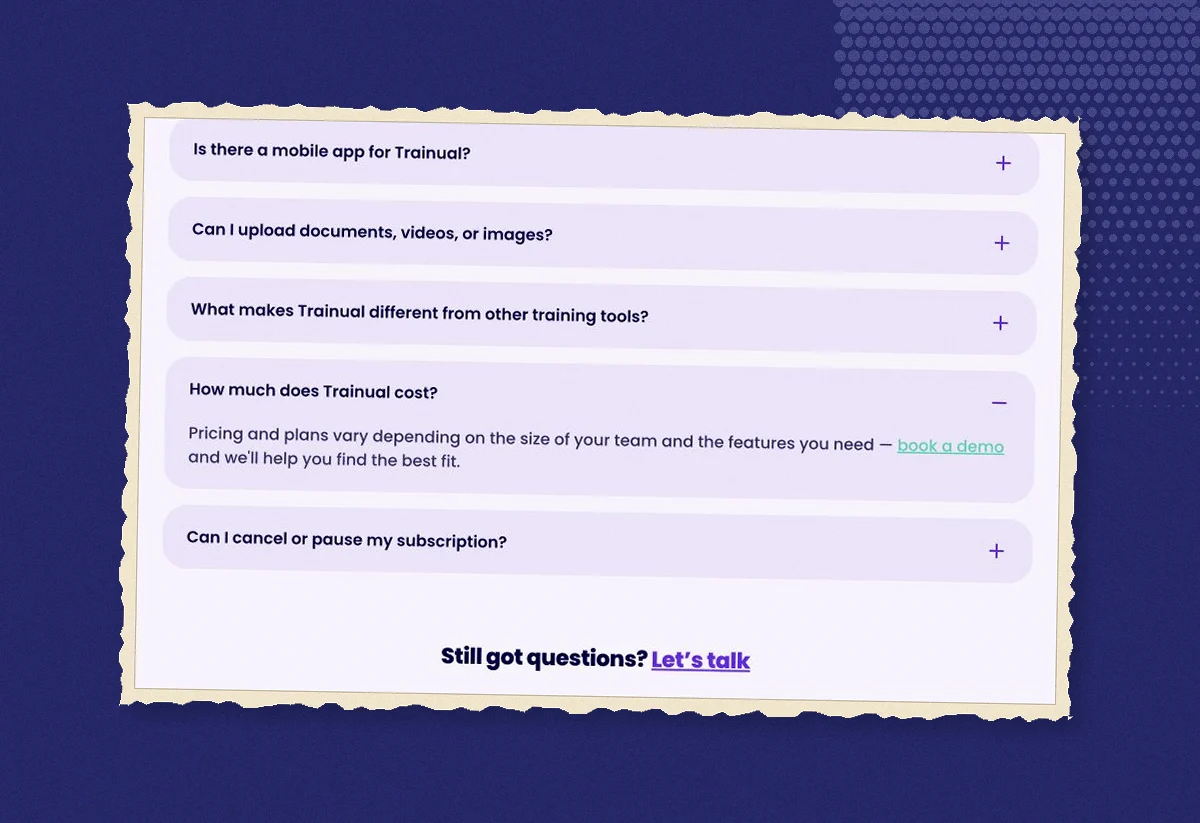
The FAQ "How much does Trainual cost?" doesn't answer with a figure. It says pricing and plans vary with team size and the features you need, and directs you to book a demo. That is the whole public answer as of this read.
Three other statements on the page bear on what you'll pay:
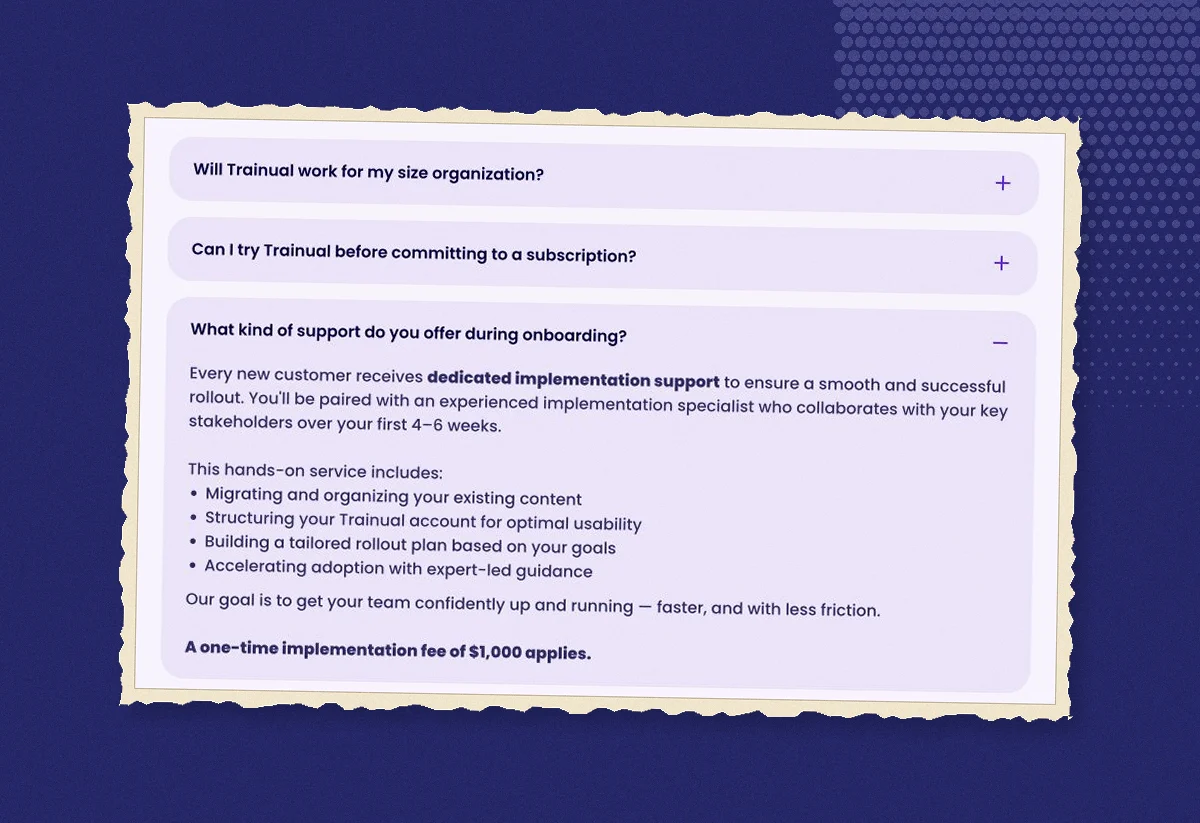
- A one-time $1,000 implementation fee. The onboarding FAQ states it, describes the service as an implementation specialist working with your stakeholders over the first four to six weeks, and the comparison marks implementation support as Required in every tier. The page doesn't say whether the fee is ever waived or scoped differently by plan, so confirm it with sales before you treat it as a fixed line item.
- "Best suited for companies with 25 to 1,000 employees." This is positioning, not a seat minimum, and the page adds that companies with thousands of employees also use it.
- Trial terms are not stated on this pricing page. The FAQ "Can I try Trainual before committing?" offers a hands-on look in a demo. It doesn't mention a free tier, a trial length or a card requirement, so don't assume any of the three.
What you can and can't calculate
Because the subscription rate isn't public, the only arithmetic you can do from this page is the first-year total once sales gives you a quote:
- First-year cost = (monthly quote × 12) + $1,000 implementation fee, if the fee applies to your contract.
- Year two onward = monthly quote × 12, assuming no renewal change.
As an illustration only, with a made-up quote of $300 a month: 300 × 12 = $3,600, plus $1,000 = $4,600 in year one, then $3,600 a year. Replace the $300 with your real quote; the page gives you nothing to replace it with.
What you can't derive: an annual discount (no toggle exists), a per-seat price (none is shown), or a comparison with vendors that do publish rates, except to note that Trainual asks you to talk to sales first and they don't.
Which plan do the gates point to?
Reading the comparison as a buyer, the tiers sort by three limits:
- SCORM. Core has none. If you need to upload SCORM packages from an authoring tool, you start at Pro (5 GB) or Premium (15 GB); Enterprise is negotiated.
- E-signatures. Core has none, Pro caps at 300 a year, Premium and Enterprise are unlimited. In our reading, a policy acknowledgement for a few hundred employees could reach Pro's 300-a-year cap.
- Storage and history. Core's 2 GB of video and 30 days of version history are the smallest of the four; Premium removes both limits.
Training paths are not in Core at all, which in our reading is the clearest sign that Core is the documentation tier and Pro upward is the training tier.
Where Vorec fits
Trainual's comparison shows built-in screen recording checked on every tier, inside a platform whose job is assigning and tracking training. Vorec focuses on the recording itself: it records your screen with its own macOS recorder, and an AI agent can drive it for you through the Claude Code plugin, capturing locally for you to review before anything is uploaded. It then drafts narration matched to the workflow it captured and generates the voiceover, so nothing is spoken into a microphone. In the editor you can add smooth cursor motion, cursor-follow zoom and click-based auto-zoom, and freeze-sync can hold a frame to give an explanation time to finish. The same capture can also produce a written step-by-step guide, with annotatable screenshots, and narration regenerates in supported languages on eligible plans, without re-recording. You can upload an existing recording instead if you already have one.
Teams that need training paths, SCORM packaging, e-signature tracking or a customer success manager should evaluate Trainual for those workflows; teams that mainly need the training videos and written guides made quickly can produce them with Vorec and host them wherever their people already look.
Vorec's prices are public: a free trial, no credit card required (current allowances on the pricing page), then $9, $24 or $59 a month ($86, $230 or $566 a year). Read live from our plan catalogue on 5 November 2026.
Frequently asked questions
How much does Trainual cost per month?
The pricing page doesn't say. As of 5 November 2026 it lists four plans without a subscription rate and tells you to book a demo; cost varies by team size and features.
Does Trainual have a free plan or free trial?
The pricing page states neither. The "try before committing" FAQ offers a demo; no free tier, trial length or card requirement is stated on the page.
What is Trainual's $1,000 fee?
A one-time implementation fee stated in the onboarding FAQ. Implementation support is marked Required on all four tiers. Confirm its scope with sales.
Which Trainual plan includes SCORM?
Pro (5 GB of SCORM uploads), Premium (15 GB) and Enterprise (negotiated). Core doesn't include SCORM uploading.
Is Trainual priced per employee?
The page doesn't state a pricing unit. It says pricing varies with team size, and that the product is best suited for companies with 25 to 1,000 employees.
Does Trainual record screens?
The comparison shows built-in screen recording checked in all four columns. The page doesn't describe narration or editing features, so we can't say what the recorder does beyond capture.
Related reading
For priced alternatives in the same category, see TalentLMS pricing, iSpring Suite pricing and Articulate 360 pricing, or the full video and tutorial tool pricing study. For making the training content itself, see best training video software and SOP training videos.
Want the recording to narrate itself? Record with Vorec, or upload one you already have, and get a narrated tutorial plus a written guide. Start free.