Riverside Pricing 2026: Pro, Grow, Webinar Plans
Vorec Team · 2026-10-02 · About 7 min read
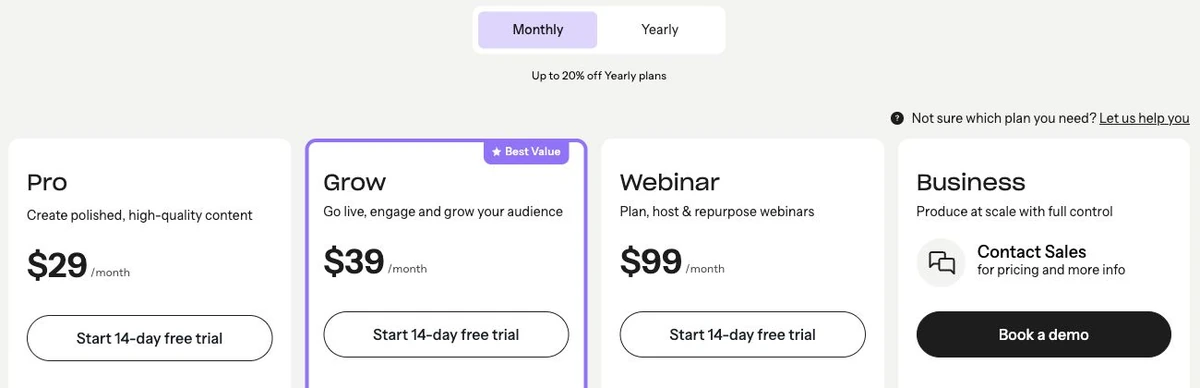
Riverside has three self-serve plans — Pro at $29 a month, Grow at $39 and Webinar at $99 — and a Business plan priced by its sales team. Billed annually, the same three work out to $24, $34 and $79 a month. Recording time is unlimited on every plan. What the tiers mainly limit is studios, hours of separate-track downloads, and webinar features.
Everything below comes from Riverside's public pricing page and help center, read in a rendered, signed-out browser on 2 October 2026, with the monthly and annual views each selected and read twice. Prices were displayed in dollars; the page does not state the currency code or tax treatment. Prices change; check before you buy.
The Short Version
| Plan | Monthly | Billed annually (per month) | Studios | Separate-track downloads | Seats |
|---|---|---|---|---|---|
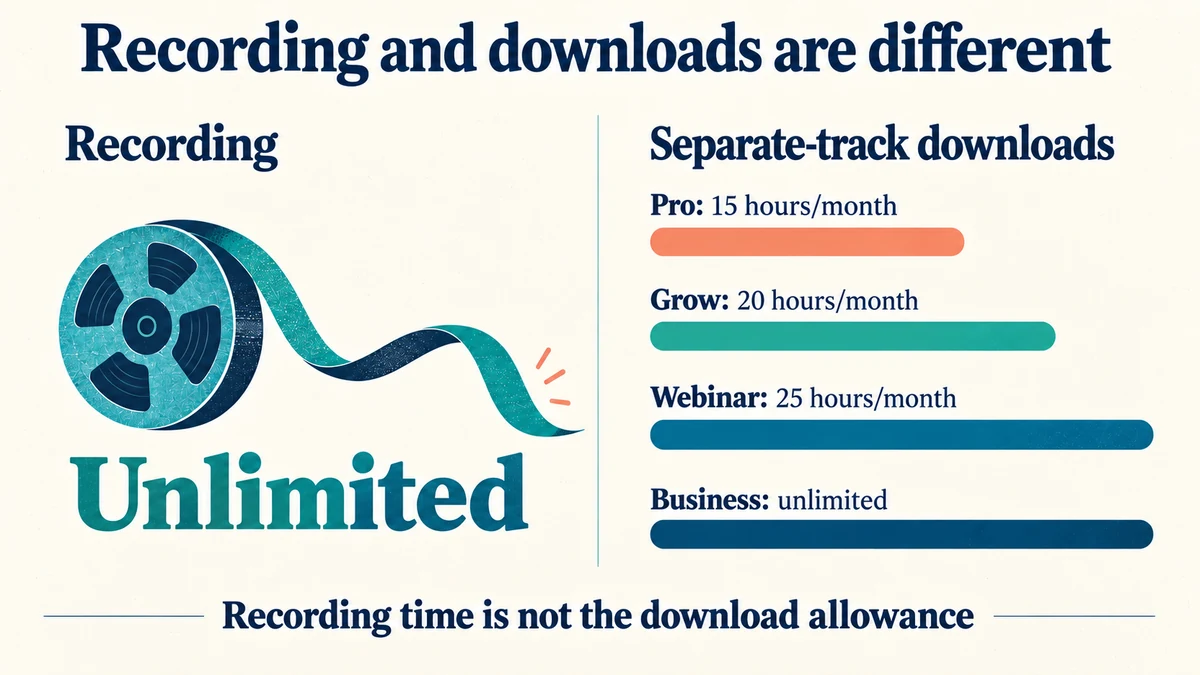
| Pro | $29 | $24 | 1 | 15 hours/month | 1, plus one editor as a paid add-on |
| Grow | $39 | $34 | 2 | 20 hours/month | 1, plus one editor as a paid add-on |
| Webinar | $99 | $79 | 3 | 25 hours/month | 1, plus one editor as a paid add-on |
| Business | Contact sales | Contact sales | Unlimited | Unlimited | Custom package |
The pricing page says annual billing saves "up to 20%". It shows the annual price only as a monthly equivalent. Multiplied out, that is $288, $408 and $948 a year — our arithmetic, not a figure checked at checkout. The add-on editor's price is not stated.
What Each Plan Adds
Pro is the base plan. The pricing page lists no watermark, text-based editing, unlimited transcriptions, audio enhancement, AI editing, show notes and podcast hosting.
Grow includes Pro's features and adds full HD 1080p live streaming and multistreaming, scheduling, newsletters, a creator website, podcast hosting for 2 shows and video hosting.
Webinar adds webinars with up to 100 registrants, plus registration and engagement tools. Riverside's own FAQ says you need at least this plan to run a webinar: Grow includes live streaming and multistreaming, but audience registration, Q&A, polls, email reminders, HubSpot integration and webinar analytics are Webinar features.
Business lists up to 10,000 webinar registrants, collaborative editing, unlimited studios, unlimited separate-track downloads and unlimited video storage. The FAQ says Business is the only plan with collaborative editing and custom roles built in, and points to it for SSO, SOC 2/ISO 27001 compliance, Salesforce integration, multiple producers or a dedicated success manager.
On every plan, the comparison table lists desktop recording and clip export up to 4K, audio at 44.1/48 kHz, and screen-share recording. Mobile-app recording is up to 1080p on Pro, Grow and Webinar, and up to 4K on Business. The table lists 10 people recorded in a single session on each plan. That is a session limit, not ten licensed seats.
What "Download Hours" Actually Limit
This is the part of Riverside's pricing that is easiest to misread.
Recording is unlimited. The 15, 20 and 25 hours are allowances for downloading separate tracks — the individual, studio-quality audio and video file for each participant, which you would take into a multi-track editor.
Riverside's download-hours help article adds several details the pricing card does not:
- The allowance resets each month, and unused hours do not roll over.
- The number of participants does not multiply the hours used: three people in a one-hour session uses one hour.
- Deleting past recordings does not give hours back.
- Live streaming counts toward download hours.
- Downloads of cloud recordings, exports, and clips made from uploaded media do not count.
- Unlimited recording, unlimited editing, and unlimited exports of high-quality recordings and clips remain available regardless of hours used — "just not the separate tracks".
Two Riverside pages describe the cap differently. The pricing FAQ says that if you hit it, you "won't be able to download new separate tracks until the next billing cycle or if you upgrade". The help article says the option to download individual tracks "made from any recording at any time" disappears once you have recorded over your allotted hours. The second reading would also affect older recordings. We could not reconcile the two from the public pages, so if separate tracks matter to your workflow, download them as you go and confirm the current behaviour with Riverside.
AI Credits
Some AI features run on credits. Riverside's pricing FAQ says AI credits power features such as AI translation, AI B-roll and animated clips, while Magic Clips, Magic Audio and the AI Co-Creator do not use credits.
- Pro, Grow and Webinar show "2000 free credits to start"; Business shows 12000.
- The AI credits help article says credits do not renew monthly. It is a starting balance, not a monthly allowance.
- More credits can be bought separately, by account owners or admins only. The top-up prices and any expiry were not shown on the pages we read.
The help article's rates, as published:
| Feature | Credits |
|---|---|
| AI translation | 100 per minute |
| AI B-roll | 100 per 5 seconds |
| AI Twin video | 200 per minute |
| Voice-clone audio | 200 per hour |
At those rates, a 2,000-credit starting balance covers 20 minutes of AI translation, or 100 seconds of AI B-roll — our arithmetic from the published rates.
Uploads and the Free Trial
Uploading external files is a separate allowance. Riverside's upload-limits article lists 15 hours a month on Pro, Grow, Webinar and Mobile Plus, and unlimited on Business.
The trial. Each self-serve card offers a 14-day free trial. For the Pro trial, Riverside's trial help page says you need a credit card to begin, and that you won't be charged until the trial ends and can cancel anytime. We didn't find the card terms for the Grow and Webinar trials, so don't assume they're the same.
The free account. There was no free plan card on the pricing page we captured. Riverside's help article about what a free account includes redirected to a sign-in page, so we could not read its limits or watermark rules. We are not stating what a free account includes.
What The Pages Do Not Establish
- The annual total charged at checkout (we multiplied the monthly equivalent).
- The price of the add-on editor seat.
- Business pricing or minimum seat commitment.
- AI credit top-up prices and whether purchased credits expire.
- Numeric storage limits on Pro, Grow and Webinar (Business lists unlimited video storage).
- What a free account includes today.
- Which of the two descriptions of the download cap applies to older recordings.
Which Riverside Plan Fits
| If you mainly… | Start with | Why |
|---|---|---|
| Record a single show and edit inside Riverside | Pro | Unlimited recording; exports aren't capped by download hours |
| Run two shows, or need live streaming and a creator website | Grow | Two studios, 1080p streaming, scheduling |
| Run registered webinars | Webinar | Riverside's FAQ says registration and webinar tools start here |
| Need SSO, compliance, or several producers | Business | Listed only on Business; priced by sales |
If you edit outside Riverside with separate tracks, the download allowance is the number to plan around, not recording time.
Where Vorec Fits
Riverside is built around recording people: podcast and video interviews, live streams and webinars, with remote guests in one studio. It also records screen share.
Vorec does a different job. It narrates software walkthroughs — product tutorials, onboarding, how-to videos — where nobody needs to be on camera or on a microphone. Vorec has its own macOS recorder, and an AI agent can drive it for you, capturing locally for you to review before anything is uploaded. You can also upload a recording you already have. It uses captured action data, or analyses an uploaded recording, to draft narration matched to the workflow and generate the voiceover. In the editor you can add smooth cursor motion, cursor-follow zoom and click-based auto-zoom, and freeze-sync can hold a frame to give an explanation time to finish. The same capture can also produce a written step-by-step guide.
Riverside focuses on recording conversations, live streams and webinars; teams producing those should evaluate Riverside. Vorec focuses on narrated screen tutorials and written guides.
Vorec plans start at $9/month, with a 7-day free trial of 100 credits and no credit card required. The trial includes up to 3 projects, and its exports carry a watermark.
Bottom Line
Riverside's self-serve plans cost $29, $39 and $99 a month, or $24, $34 and $79 a month billed annually, with Business on a quote. Recording is unlimited on all of them.
Three details to check before you buy: download hours limit separate-track downloads, not recording, and two Riverside pages describe the cap differently; AI credits are a starting balance that does not renew monthly; and the 14-day Pro trial needs a credit card (card terms for the other trials weren't stated).
Related: our Descript pricing breakdown and Loom pricing breakdown cover two other recording and editing tools, checked the same way.
Want the recording to narrate itself? Record with Vorec, or upload one you already have, and get a narrated tutorial plus a written guide. Start free. 7-day trial, 100 credits, no credit card required. Trial includes up to 3 projects; exports carry a watermark. Paid plans start at $9/month.