Pictory Pricing 2026: Starter, Professional, Team
Vorec Team · 2026-10-02 · About 7 min read
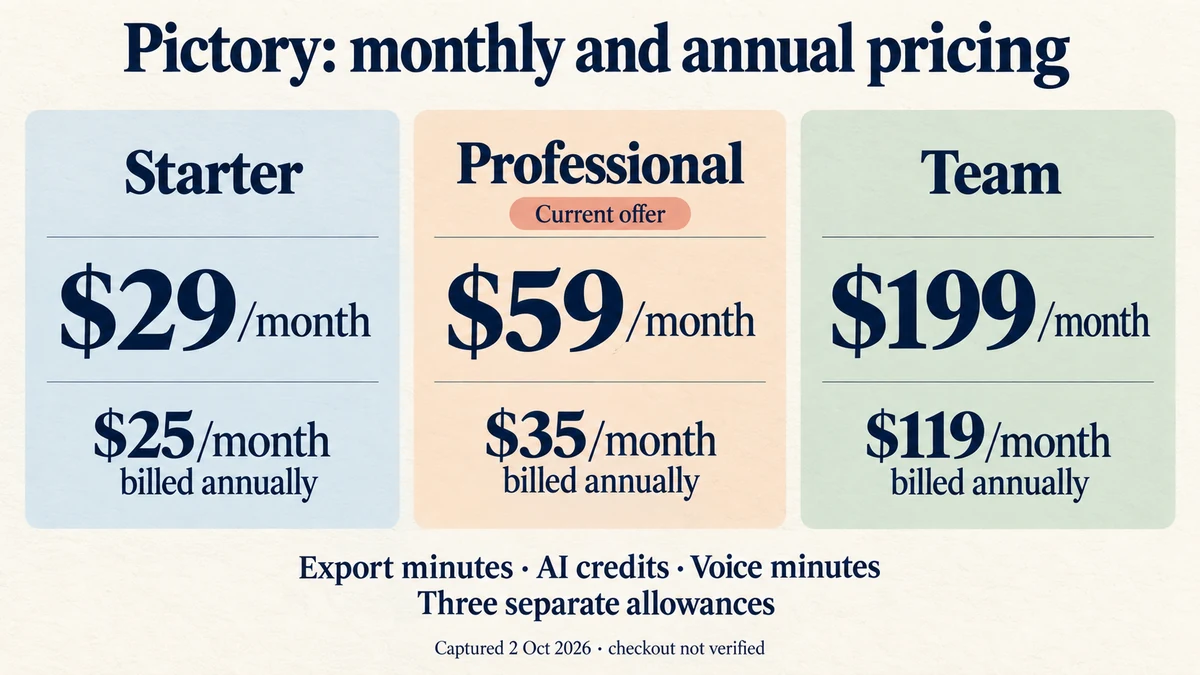
Pictory has three self-serve plans — Starter at $29 a month, Professional at $59 and Team at $199 — and a custom-priced Enterprise plan. Billed annually, they work out to $25, $35 and $119 a month. Each plan meters three separate things: export minutes, AI credits and premium voice minutes. Mixing them up is the easiest way to misjudge which plan you need.
Everything below comes from Pictory's public pricing page, its API pricing page and its help center, read in a rendered, signed-out browser on 2 October 2026. Monthly and annual views were each selected and read twice. Pictory's FAQ states prices are in USD; tax treatment is not stated. Prices change; check before you buy.
The Short Version
| Plan | Monthly | Billed annually (per month) | Users | Storage | Export minutes |
|---|---|---|---|---|---|
| Starter | $29 | $25 | 1 | 5 GB | 200/month, or 2,400/year upfront |
| Professional | $59 | $35 (labelled an "Exclusive Pictory 2.0 offer") | 1 | 20 GB | 600/month, or 7,200/year upfront |
| Team | $199 | $119 | 3+ | 100 GB | 1,800/month shared, or 21,600/year upfront |
| Enterprise | Custom | Custom | 10+ | Custom | Custom |
The page advertises annual pricing as "save up to 40%". It shows annual prices as monthly equivalents; multiplied out, that is $300, $420 and $1,428 a year — our arithmetic, not a figure checked at checkout. The Professional annual price is labelled an "Exclusive Pictory 2.0 offer", and the page shows no end date for it or what the plan renews at afterwards.
The Three Allowances
1. Export minutes
Pictory's FAQ defines video minutes as the minutes of video you export. Previewing, editing and sharing videos inside your account do not use any. Monthly plans get an allowance that refreshes every month. Annual plans get the whole year's minutes upfront — the FAQ's example is 7,200 minutes at the start of a Professional annual subscription — so you can use more in a busy month. Team minutes are shared across the team. Extra minutes can be bought in the app; the rate is not shown on the pricing page.
2. AI credits
AI credits pay for generative features — the cards describe generating images, videos and avatars. The figures:
| Plan | Monthly plan | Annual plan |
|---|---|---|
| Starter | 100 credits/month | 1,200 credits/year |
| Professional | 500 credits/month | 12,000 credits/year |
| Team | 2,400 credits/month | 28,800 credits/year |
Don't assume annual is just monthly × 12. For Starter and Team it is. For Professional it is not: 500 a month comes to 6,000 a year, but the annual card shows 12,000 credits a year as part of the current offer. If AI credits matter to you, compare the annual figure on the card, and note there is no stated end date or renewal price for the offer.
The cards also show what credits can produce, phrased as "up to" amounts of generated videos, avatars or images. Read those as alternative uses of the same credits, not three separate allowances. The Team comparison row lists 800 credits per user, which is consistent with 2,400 for a three-user team.
3. Premium voice minutes
Separately from export minutes, each plan includes minutes of premium AI voices:
| Plan | Monthly plan | Annual plan |
|---|---|---|
| Starter | 60 minutes | 720 minutes |
| Professional | 120 minutes | 1,440 minutes |
| Team | 240 minutes | 2,880 minutes |
What Each Plan Adds
Starter lists basic AI tools, syncing uploaded narration to your video, one brand kit and watermark-free paid exports.
Professional adds voice cloning, custom avatars, advanced AI tools, long-video summarisation and five brand kits.
Team adds shared workspaces and onboarding, ten brand kits and shared export minutes.
Enterprise lists SSO, custom templates, success support and interactive hosting with SCORM.
Paid plans export at 1080p. Script- or URL-to-video output can run up to 30 minutes on paid plans. For editing recorded video, the input limit is 60 minutes or 1 GB on Starter, and 180 minutes or 5 GB on Professional and Team.
Stock footage — one inconsistency. The Starter card describes a library of millions of videos "from Getty Images and Storyblocks". The comparison table's Starter cell lists Storyblocks only, while the Professional and Team cells list both. If Getty footage matters to you, confirm it on Starter before buying.
The Free Trial
The comparison table lists a 14-day trial with:
- 15 video minutes, and script or URL output of up to five minutes
- recorded-video input up to 60 minutes or 1 GB, and 50 slides
- one brand kit and 50 generative credits
- 720p export
Pictory's watermark help article says trial downloads carry Pictory branding and paid-plan downloads do not, and that videos downloaded during the trial must be downloaded again after upgrading to lose it. Its pricing and plans FAQ says that after the trial you keep access to your account, but downloads need a paid subscription.
We could not establish from these pages whether the trial requires a credit card.
The API Is Priced Separately
Pictory's API has its own pricing page. At the page's default setting, API Self-Serve is $99 a month with 600 video minutes and 120 premium voice minutes a month, or $79 a month billed annually with 7,200 video minutes and 1,440 voice minutes a year upfront. The page has a slider for larger volumes; we captured only the default position, so we are not quoting the higher tiers. API for Enterprises is custom-priced, with a one-time setup fee (amount not stated) and video minutes billed monthly on actual use.
What The Pages Do Not Establish
- The annual total charged at checkout, and tax treatment.
- When the Professional annual offer ends and what it renews at.
- The price of extra seats, extra export minutes or extra AI credits.
- Exactly how unused AI credits roll over.
- Whether the free trial needs a credit card.
- API pricing above the default slider position.
Which Pictory Plan Fits
| If you mainly… | Start with | Why |
|---|---|---|
| Make a few short videos a month | Starter | 200 export minutes; watermark-free 1080p |
| Need voice cloning or custom avatars | Professional | Listed from Professional up |
| Use a lot of generative AI | Professional, annual | The current annual offer shows 12,000 credits a year |
| Produce as a team | Team | Shared minutes and workspaces, 3+ users |
| Generate video from your own software | API | Priced separately from the web plans |
Where Vorec Fits
Pictory is built around turning scripts, articles and recordings into videos, with stock footage, AI voices and generative features.
Vorec does a narrower job: narrated software walkthroughs — product tutorials, onboarding and how-to videos made from a screen recording. Vorec has its own macOS recorder, and an AI agent can drive it for you, capturing locally for you to review before anything is uploaded. You can also upload a recording you already have. It uses captured action data, or analyses an uploaded recording, to draft narration matched to the workflow and generate the voiceover, so nobody records narration into a microphone. In the editor you can add smooth cursor motion, cursor-follow zoom and click-based auto-zoom, and freeze-sync can hold a frame to give an explanation time to finish. The same capture can also produce a written step-by-step guide.
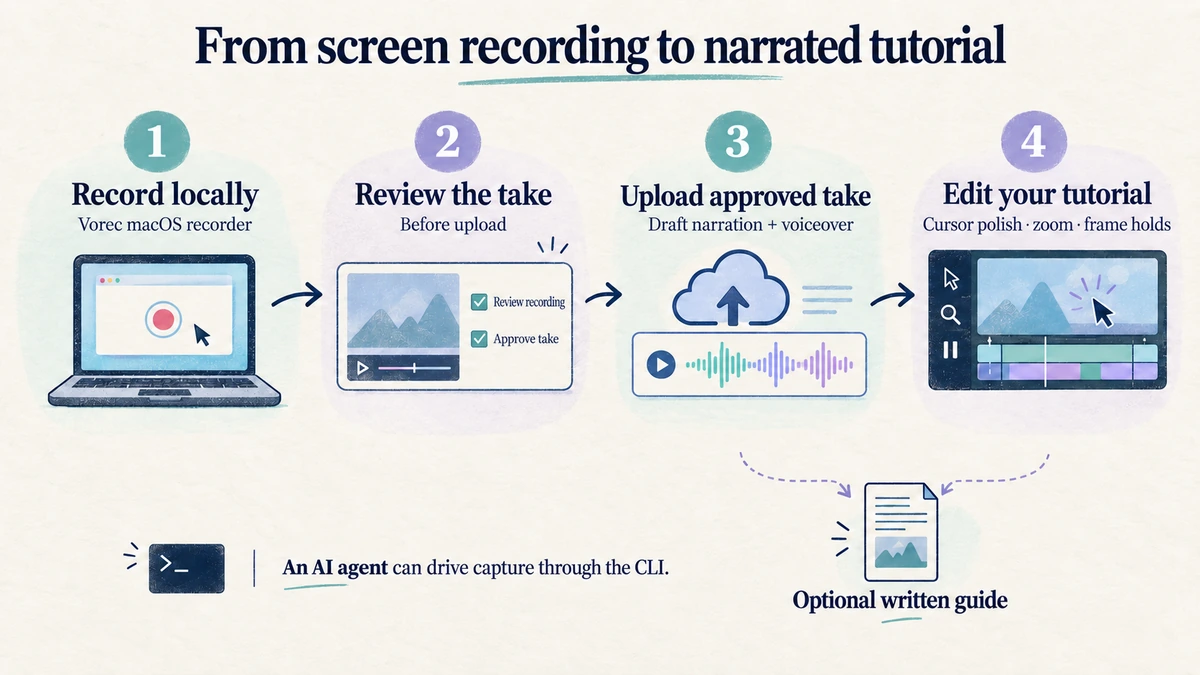
Pictory focuses on turning scripts, articles and recordings into produced videos. Vorec focuses on narrated screen tutorials and written guides.
Vorec plans start at $9/month, with a 7-day free trial of 100 credits, no credit card required, whose exports carry a watermark.
Bottom Line
Pictory's self-serve plans cost $29, $59 and $199 a month, or $25, $35 and $119 a month billed annually, with Enterprise on a quote and the API priced separately from $99 a month.
Three details to check before you buy: export minutes, AI credits and premium voice minutes are separate allowances; the Professional annual price and its 12,000 credits a year are a promotional offer with no stated end date; and the trial exports at 720p with Pictory branding.
Related: our InVideo AI pricing breakdown and Synthesia pricing breakdown cover two other AI video tools, checked the same way.
Want the recording to narrate itself? Record with Vorec, or upload one you already have, and get a narrated tutorial plus a written guide. Start free: a 7-day trial with 100 credits, no credit card required, up to 3 projects and watermarked trial exports. Paid plans start from $9/month.