Murf AI Pricing 2026: Creator, Business and API Costs
Vorec Team · 2026-10-12 · About 9 min read
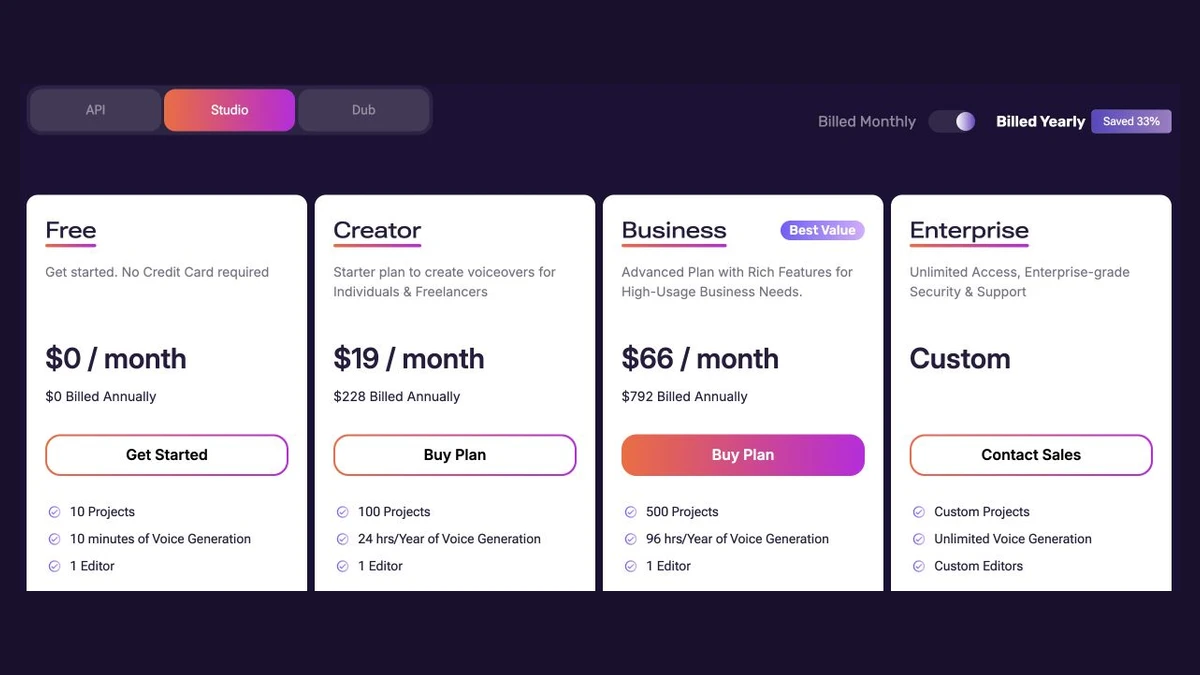
Murf AI's Studio has two self-serve paid plans: Creator at $29 a month and Business at $99 a month. Billed annually, they work out to $19 and $66 a month ($228 and $792 a year). There's also a Free plan with 10 minutes of voice generation and an Enterprise plan priced by sales. The API is priced separately, pay as you go, from $0.01 per 1,000 characters.
Everything below comes from Murf's public pricing page, read in a rendered, signed-out browser on 12 October 2026. The Studio tab was read in both its annual and monthly views, each twice after the toggle settled, and the API tab and FAQ were read once. Prices were shown with a dollar sign. The FAQ has an entry on sales or consumption taxes, but this check didn't capture its answer. Prices change, so check before you buy.
The Short Version
| Studio plan | Monthly | Billed annually (per month) | Annual total | Voice generation | Projects | Editors |
|---|---|---|---|---|---|---|
| Free | $0 | $0 | $0 | 10 minutes | 10 | 1 |
| Creator | $29 | $19 | $228 | 2 hours/month, or 24 hours/year | 100 | 1 |
| Business | $99 | $66 | $792 | 8 hours/month, or 96 hours/year | 500 | 1 |
| Enterprise | Custom | Custom | Custom | Unlimited | Custom | Custom (5+) |
The paid cards show these prices with "1 Editor". They don't label the price as per seat, and we saw no seat slider on the Studio tab. The comparison table lists Enterprise editor seats as "Custom (5+)".
Quick Answers
How much is Murf AI per month? Creator is $29 a month and Business is $99 a month on monthly billing. On annual billing, they're $19 and $66 a month.
How much do you save with annual billing? The page labels annual billing "Save 33%". Here's the arithmetic from the displayed prices:
- Creator: 12 × $29 = $348 a year on monthly billing, against $228 annually, so you save $120 (about 34%).
- Business: 12 × $99 = $1,188, against $792, so you save $396 (about 33%).
Is Murf AI free? There's a Free plan with no card required. It includes 10 minutes of voice generation in total, but the card says "No Downloads" and "No Commercial Rights". The FAQ says the free plan has no time limit: you can use it until those 10 minutes run out. It's a one-off allowance to try the product, not a monthly free quota.
What does an hour of voice generation cost? Divide each price by its included hours:
- Creator: $14.50 an hour on monthly billing ($29 ÷ 2) and $9.50 an hour on annual billing ($228 ÷ 24).
- Business: about $12.38 an hour on monthly billing ($99 ÷ 8) and $8.25 an hour on annual billing ($792 ÷ 96).
These figures assume you use the whole allowance.
How much does the Murf API cost? It's pay as you go:
- Falcon text-to-speech: $0.01 per 1,000 characters.
- Gen2 text-to-speech: $0.03 per 1,000 characters.
- Translation: $0.02 per 1,000 characters.
- Voice Changer: $0.10 per minute.
New users get $10 in free API credits.
How Voice-Generation Time Is Counted
The main limit on Murf's Studio plans is voice-generation time, so it's worth knowing exactly what uses it up. The FAQ says:
- Generation time is "the sum of generated speech length of every text block".
- It's consumed whenever you render a new text block or change the text in an existing one.
- Changing the voice actor, style, pitch, speed, pause, emphasis, pronunciation, punctuation or volume for the same text doesn't consume generation time.
In practice, editing your wording costs time, while adjusting how it sounds doesn't. Once a script is final, you can tune delivery freely. Rewriting lines after rendering uses up the allowance.
Annual plans pool the allowance. The FAQ says yearly plans "have no monthly limits, just an overall yearly limit". Its example: 24 hours a year lets you use more than 2 hours in a busy month and less in others.
One inconsistency: that FAQ example calls the plan "Basic", while the current cards say Creator. The 24 hours a year matches Creator's card. We use the current plan names throughout.
What Each Plan Adds
Free includes 10 projects, 10 minutes of voice generation and 1 editor. The card says it lets you try Business plan features, but without downloads or commercial rights.
Creator is described as a "Starter plan to create voiceovers for Individuals & Freelancers". Its card lists:
- All 200+ voices, styles and tonalities, and multi-native voices
- Unlimited downloads
- Canva integration
- Commercial rights
Business includes everything in Creator, plus:
- A Business License
- Emphasis, Variability and "Say It My Way" controls
- PowerPoint integration
- Audio to Text, with transcription time listed at 48 hours a year on the annual comparison and 4 hours a month on the monthly view
- Murf voices for Windows apps
The comparison table also marks Google Slides for Business and Enterprise.
Enterprise is "Custom". The comparison table lists unlimited voice generation, unlimited transcription, unlimited AI translation credits and unlimited viewer seats, with 5+ editor seats. Full broadcasting rights are listed as an add-on.
Export quality is listed as Full HD on Creator and Business, and "Full HD, higher bitrate" on Enterprise.
Creator vs Business: The License Question
Both paid plans include commercial rights. The difference is the license type, and Murf's FAQ frames it as a recommendation:
- Personal License (Creator): "permits individuals to use Murf for both personal and commercial purposes on an individual basis."
- Business License (Business): "designed for users representing businesses and organizations."
- The FAQ adds that "As a registered business, it is ideal to opt for the Business Plan rather than the Creator Plan."
That's guidance on the pricing page, not the full license terms. If your company is buying Murf, read Murf's terms or ask its sales team which license fits.
API Pricing
The API has its own tab and is billed separately from Studio plans.
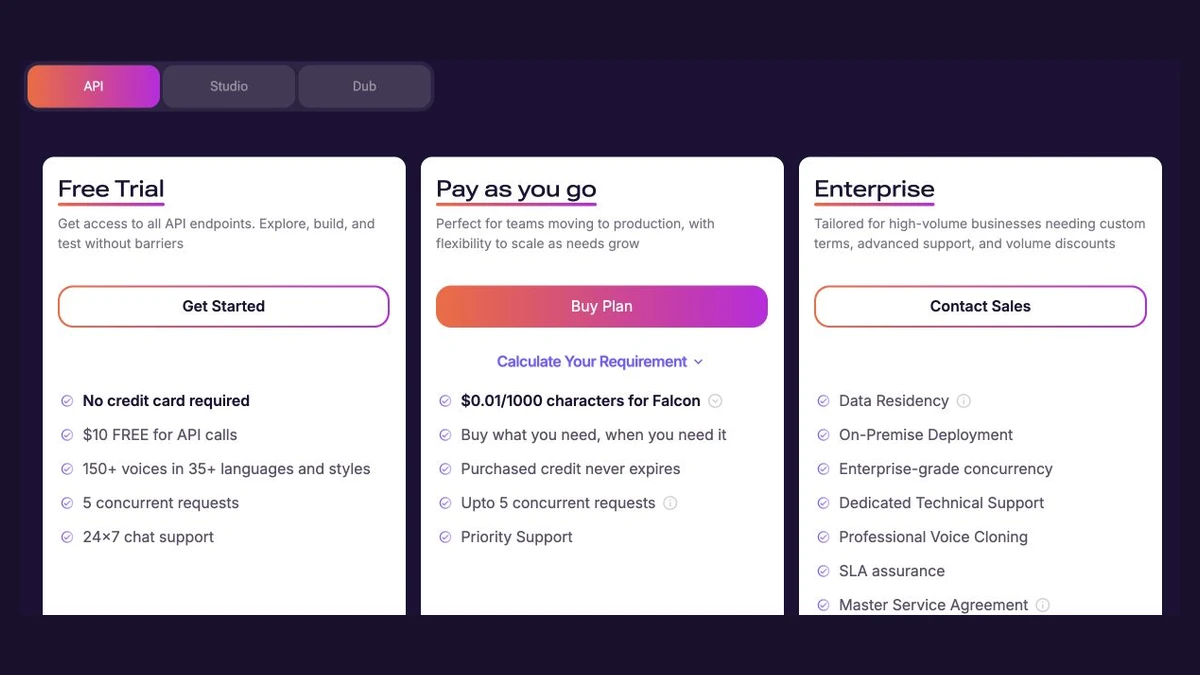
| API option | What the page shows |
|---|---|
| Free Trial | $10 of API credit, no card required, 5 concurrent requests, 150+ voices in 35+ languages and styles |
| Pay as you go | Falcon $0.01, Gen2 $0.03 and Translation $0.02 per 1,000 characters; Voice Changer $0.10 per minute; "Purchased credit never expires"; up to 5 concurrent requests |
| Enterprise | Contact sales; lists data residency, on-premise deployment, enterprise-grade concurrency and SLA assurance |
What the $10 free credit covers, by arithmetic: 1,000,000 characters of Falcon speech ($10 ÷ $0.01 × 1,000), or about 333,000 characters of Gen2. The FAQ describes Falcon as its latest model, "optimized for real-time applications".
The pricing page we read doesn't say whether Studio plans include any API credit, so don't assume they do.
What The Pages Do Not Establish
- Per-seat pricing for more editors. Paid cards show 1 editor, and Enterprise lists 5+. We found no price for adding editors on Creator or Business.
- Recurring free minutes. The Free plan's 10 minutes are described as a total allowance with no time limit, not a monthly refresh.
- Overage pricing. The page we read doesn't show a price for extra generation time once a Studio allowance runs out.
- Dubbing. Murf's pricing page has a separate Dub tab that this check didn't cover.
- Tax treatment. The FAQ asks whether Murf charges sales or consumption taxes; this check didn't capture the answer, so confirm at checkout.
Which Murf Plan Fits
This section is our reading of the published limits, not Murf's recommendation.
- Trying it out: the Free plan's 10 minutes are enough to test voices, but you can't download the audio or use it commercially.
- A freelancer or solo creator making regular voiceovers: Creator. Annual billing makes sense if your usage is uneven, since the 24 hours pool across the year.
- A company producing training or marketing narration: Business. It has 4× Creator's generation time, and it's the license Murf's FAQ recommends for registered businesses.
- Developers building voice into an app: the API, priced per character, separately from Studio.
For other voice tools, see our breakdowns of ElevenLabs pricing and Speechify pricing, and our guide to AI voiceover for videos.
Where Vorec Fits
Murf turns a script you write into a voiceover. If what you're narrating is a screen recording of software, the script is often the slow part: you have to watch the recording and write each step.
Vorec records your screen. It has its own macOS recorder, and an AI agent can drive it for you through the Claude Code plugin, capturing locally for you to review before anything is uploaded. It then drafts narration matched to the workflow it captured and generates the voiceover, so nothing is spoken into a microphone.
In the editor you can add smooth cursor motion, cursor-follow zoom and click-based auto-zoom. Freeze-sync can hold a frame to give an explanation time to finish. The same capture can also produce a written step-by-step guide, with annotatable screenshots. Narration regenerates in supported languages on eligible plans, without re-recording. You can upload an existing recording instead if you already have one.
Vorec has a 7-day trial with 100 credits, up to 3 projects and watermarked exports. Paid plans are Starter at $9 a month, Pro at $24 and Business at $59 ($86, $230 and $566 a year). Monthly credits are 500, 1,500 and 5,000 for the first three months, then 150, 500 and 1,500.
Vorec focuses on narrated software tutorials and written guides. If you need a standalone voice library for scripts you've already written, or a text-to-speech API, Murf is built for that.
Bottom Line
Murf's Studio pricing is simple at the top level: $29 or $99 a month, or $19 and $66 a month on annual billing. The real decisions are how much generation time you'll use, remembering that rewording text consumes it while restyling doesn't, and whether you need the Business License. The API is a separate, per-character bill.
FAQ
How much does Murf AI cost?
Creator costs $29 a month, or $19 a month billed annually ($228 a year). Business costs $99 a month, or $66 a month billed annually ($792 a year). Enterprise is a custom quote. Prices were checked on 12 October 2026.
Does Murf AI have a free plan?
Yes. It includes 10 projects and 10 minutes of voice generation with no card required, but no downloads and no commercial rights. The 10 minutes are a total allowance, not a monthly one.
What happens to unused hours on Murf's annual plans?
The FAQ says annual plans have an overall yearly limit rather than a monthly cap. You can use more in some months and less in others. The page we read doesn't say whether unused hours carry over to the next year.
Does changing the voice use up Murf generation time?
No. Per Murf's FAQ, changing the voice actor, style, pitch, speed, pauses, emphasis, pronunciation, punctuation or volume for the same text doesn't consume generation time. Rendering new text or editing existing text does.
Is the Murf API included in Studio plans?
The pricing page lists the API separately, as pay as you go after $10 of free credit. It doesn't say Studio plans include API credit.
Can I use Murf voiceovers commercially?
Creator and Business both list commercial rights; the Free plan doesn't. Murf's FAQ recommends the Business plan, with its Business License, for registered businesses.
Want the recording to narrate itself? Record with Vorec, or upload one you already have, and get a narrated tutorial plus a written guide. Start free. 7-day trial, 100 credits, no credit card required. Trial includes up to 3 projects; exports carry a watermark. Paid plans start at $9/month.