Arcade Pricing 2026: Free, Growth and Enterprise Explained
Vorec Team · 2026-09-30 · About 5 min read
Arcade's paid plan is $50 per seat a month, or $42.50 per seat per month with yearly billing selected, and there is no middle tier: the page shows Free, Growth and Enterprise.
Everything below was read from Arcade's pricing page in a rendered browser, with both billing states checked, on 30 September 2026. The prices animate as digit reels, so we took them from settled screenshots rather than page text. Taxes and checkout totals were not verified. Prices change; check before you buy.
The Short Version
| Plan | Monthly billing | Yearly billing | Basis |
|---|---|---|---|
| Free | $0 | n/a | One user; 200 AI credits/month |
| Growth | $50/seat/mo | $42.50/seat/mo (15% badge) | Up to ten users; 800 AI credits/month |
| Enterprise | Custom | Custom | Multiple users; 100,000 AI credits/year |
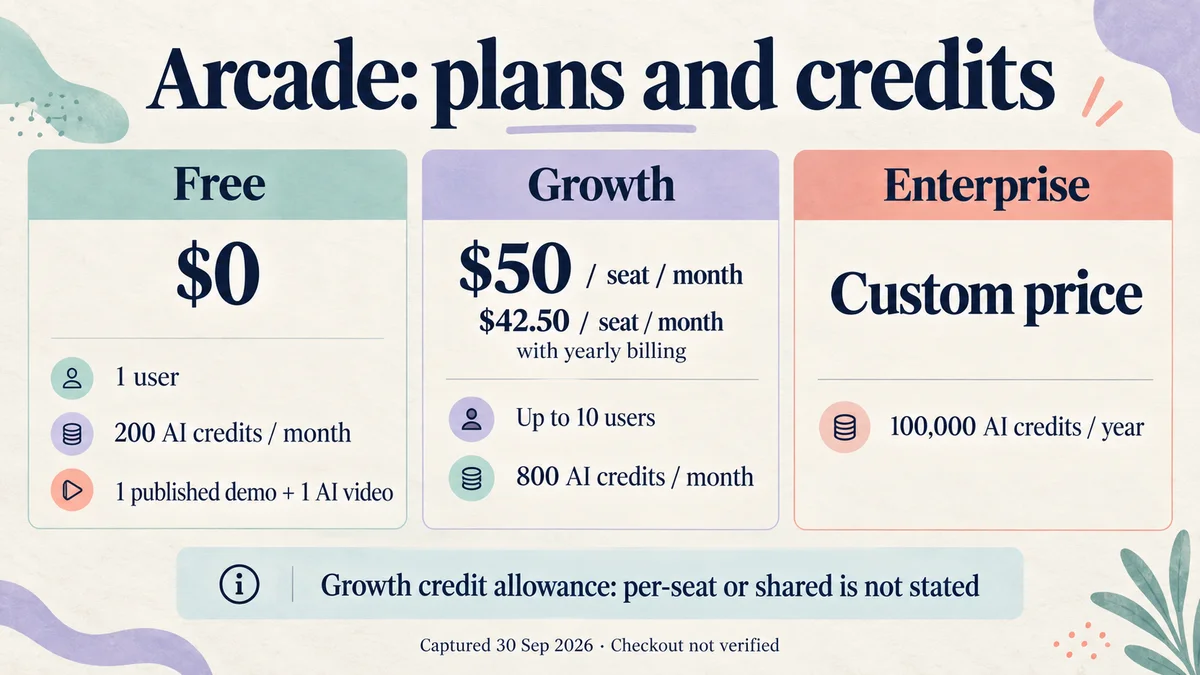
The yearly card shows $42.50 per seat per month. Twelve of those is $510 per seat per year; that total is our arithmetic, not a figure Arcade prints as an invoice. Against $600 on monthly billing, it is a saving of $90 per seat.
What The Free Plan Actually Allows
The Free card says "unlimited" for creating AI demos, but it also limits you to one published demo and one published AI video. Those two statements describe different things: how many you can create versus how many you can put live. Unlimited views are listed.
Free includes the Chrome extension, Mac and Windows desktop capture, the Figma plugin, media upload, hotspots and callouts, chapters, AI copy, AI voiceover, camera, music and mobile view. Share links and iframe embeds are on every plan.
What it does not include: GIF and MP4 export, watermark removal, custom branding and landing pages, and step-by-step guides. Those start on Growth.
The downgrade FAQ uses a third number. It says moving to Free loses the ability to edit more than three Arcades. That is a different metric from "one published demo and one published video," and the page does not reconcile them. We are leaving that as an open question rather than claiming "three free demos."
What Growth Adds
Growth adds blur, autoplay, pan and zoom, video editing and splitting, branching, CTA buttons, forms, custom variables, AI translations and collaboration. It also unlocks watermark removal, custom branding, landing pages, GIF and MP4 export and step-by-step guides. Free and Growth each get one Brand Kit; Enterprise gets ten.
Enterprise-only items: HTML capture, the API, custom fonts, custom links, collections, custom domains, role controls, multiple teams, SSO, version history, offline access, a dedicated CSM and Slack channel, and white-glove context setup.
How AI Credits Work
Credits are the metered part. The usage table on the page sets the rates:
| Action | Credits |
|---|---|
| Demo | 0 |
| AI video | 50 per 30 seconds |
| AI visual | 50 each |
Arithmetic, not a guarantee: 200 credits covers four 30-second video units or four visuals, and 800 covers sixteen, before mixing the two. The page does not say how a partial 30-second interval is rounded or whether retries are charged, so these are not promised maximum video durations.
Growth can buy top-ups in the app. Free cannot buy extra credits, and Enterprise goes through its CSM. The page states no price for a top-up.
Do not multiply 800 credits by your seat count. The page does not say whether Growth's allowance is per seat or shared across the workspace. Ask before you size a team.
Seats, And What Is Not Stated
- Growth is $50 per seat a month, with the FAQ listing extra seats at $50 a month. It does not explain how the yearly discount applies to added seats.
- The Growth card says up to ten users; Enterprise is listed for multiple users with the included seat count unspecified.
- No timed trial for paid plans was established on the page, and Free's credit-card requirement isn't stated. A free-signup button doesn't tell you either way.
- No export resolution, export length or export-count cap appears on the page.
Is Arcade Worth It?
Yes, if you make interactive product demos: click-through walkthroughs with hotspots, branching, forms and CTAs. Those interactive features are what the Growth price is buying.
Free lets you try the format, but with one published demo and one published video, you'll hit the publishing cap fast.
Reconsider if you need an exact team cost. The credit allocation is unclear per seat, and the yearly discount on additional seats isn't spelled out.
How It Compares
| Paid price (billing basis shown) | Notable | |
|---|---|---|
| Arcade | $50/seat/mo monthly; $42.50/seat/mo with yearly billing | Interactive demos; AI credits for video |
| Storylane | See our Storylane pricing breakdown | Another interactive demo platform |
| Supademo | See our Supademo pricing breakdown | Another interactive demo platform |
| Vorec | $86/yr ($7.17/mo equivalent) | Records your screen and drafts the narration for it |
Formats differ, so this is orientation rather than like-for-like. For a longer look at alternatives, see our Arcade alternative guide.
Where Vorec Fits
Arcade's centre of gravity is the interactive demo: a clickable walkthrough with hotspots, branching and forms. Vorec does not have a native branched interactive product-demo builder, and if that is the deliverable, evaluate Arcade or a similar tool.
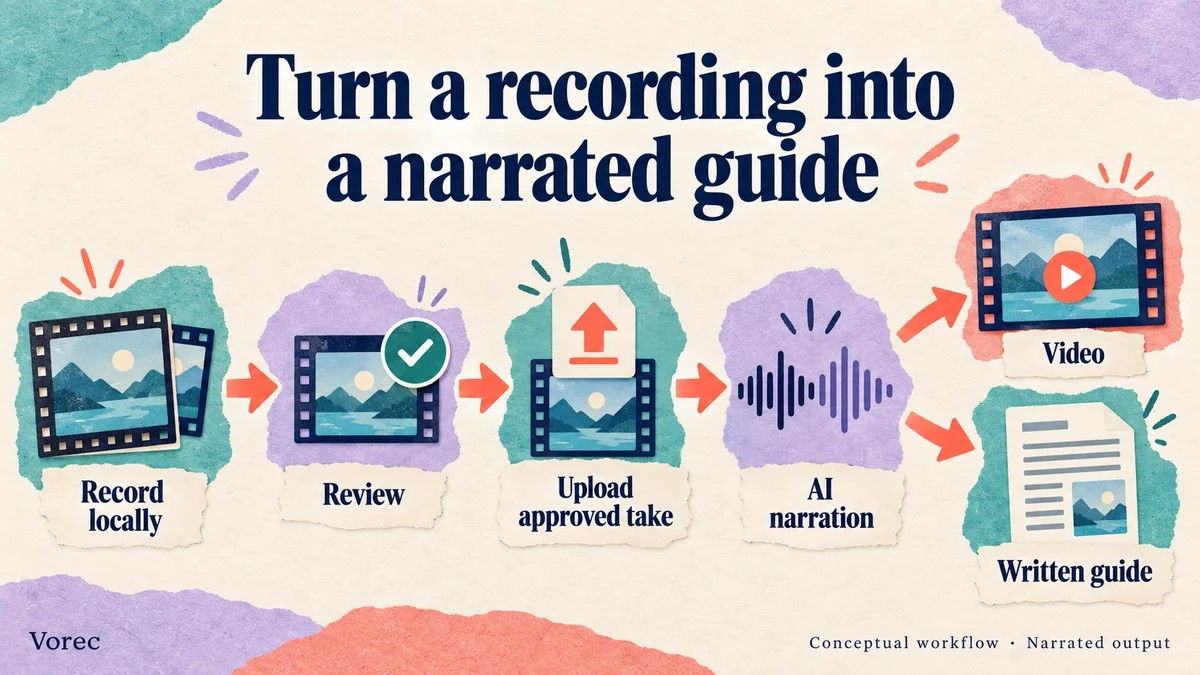
Vorec is for the narrated version. It records your screen through its own macOS recorder, and an AI agent can drive that capture through the CLI, recording locally so you review the take before anything is uploaded. It then uses the captured action data, or analyses a recording you upload, to draft narration matched to the workflow and generate the voiceover, so no microphone narration is required. In the editor you can add smooth cursor motion, cursor-follow zoom and click-based auto-zoom, and freeze-sync can hold a frame to give an explanation time to finish. The same capture can also produce a written step-by-step guide with annotatable screenshots.
Plans start at $9/month, with a 7-day free trial of 100 credits, no credit card required, whose exports carry a watermark.
Bottom Line
Arcade is $50 per seat monthly or $42.50 per seat per month on yearly billing ($510 per seat per year, our arithmetic), with 200 credits on Free and 800 on Growth.
Three details to check: Free allows only one published demo and one published video, GIF and MP4 export starts on Growth, and it is unclear whether the 800 credits are per seat or shared.
Related: our Arcade vs Storylane comparison.
Want the recording to narrate itself? Record with Vorec, or upload one you already have, and get a narrated tutorial plus a written guide. Start free.