Product Hunt Launch Checklist 2026 (Free Template)
Vorec Team · 2026-04-02 · About 12 min read
Most Product Hunt launches fail before they even go live. Not because the product is bad, but because the founder treated launch day like a single event instead of a campaign.
After studying hundreds of PH launches — the ones that hit #1 Product of the Day and the ones that quietly disappeared — there is a clear pattern. The winners start preparing weeks before launch day, and they treat every asset, every comment, and every share as part of a system.
This is the checklist we wish existed when we launched. It covers everything from four weeks out to post-launch follow-up, with a special focus on the asset that matters most: your demo video.
Why Product Hunt Still Matters in 2026
You have heard people say Product Hunt is dead. They are wrong — it has just evolved.
In 2026, Product Hunt is no longer just a leaderboard. It is a discovery engine for early adopters, journalists, and investors. A strong launch still drives:
- Thousands of targeted visitors in 24 hours
- Backlinks from tech publications that pick stories from the PH front page
- Social proof that compounds — "Product of the Day" badges convert on landing pages for months
- SEO authority from a high-domain-rating dofollow link
- Investor attention — many VCs actively browse PH for deal flow
The difference in 2026 is that the bar is higher. A logo and a tagline no longer cut it. You need a polished gallery, a compelling demo video, and a launch community ready to engage from minute one.
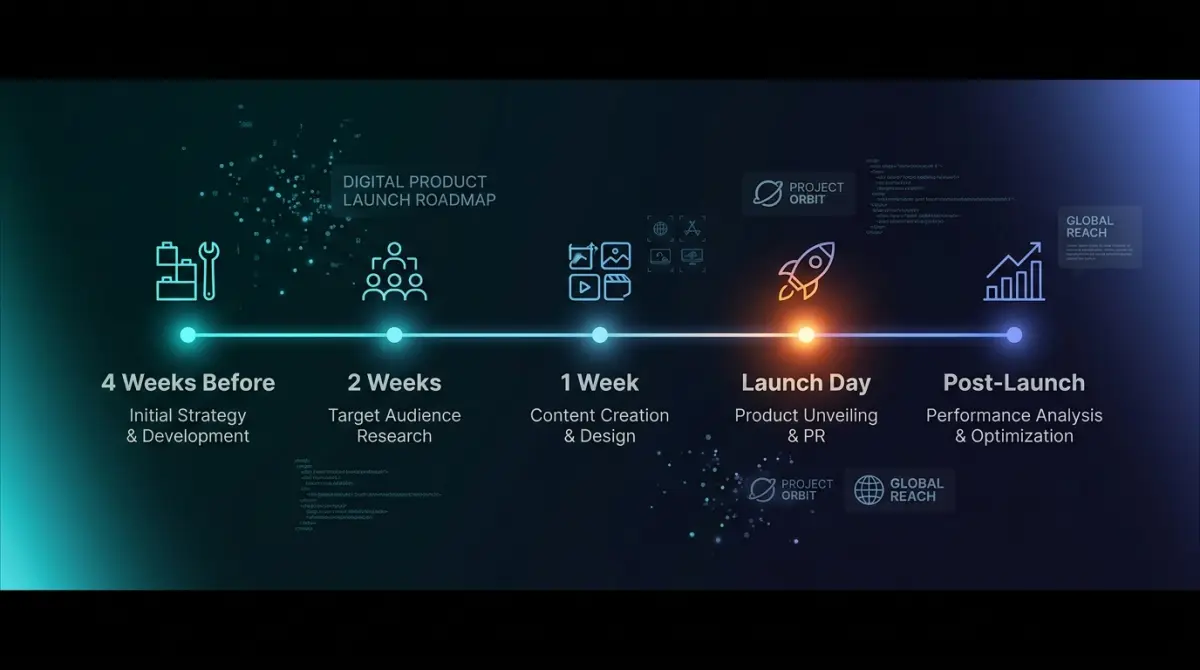
The 4-Week Launch Timeline
Here is your complete timeline. Each phase builds on the last.
4 Weeks Before Launch
This is your foundation phase. Skip it and you will be scrambling later.
Lock Down Your Landing Page
Your Product Hunt listing sends traffic to your website. If that page is not ready, you are wasting your best traffic day of the year.
Landing page essentials:
- A clear headline that explains what your product does in under 10 words
- A hero demo video or GIF (more on this below)
- Social proof if you have it — beta users, testimonials, logos
- A single CTA — sign up, try free, or join waitlist
- Fast load times — under 2 seconds on mobile
- Open Graph tags so social shares look professional
Start Building Your Audience
The biggest mistake founders make is launching to zero. You need people who will show up on day one.
Where to build pre-launch buzz:
- Twitter/X: Share building-in-public updates. Show progress, not polish. Indie hackers love watching products evolve.
- Relevant communities: Find where your target users hang out — subreddits, Discord servers, Slack groups, indie hacker forums. Be a genuine member, not a drive-by promoter.
- Product Hunt "Coming Soon" page: Set this up early. It collects followers who get notified on launch day.
- Email list: Even 50 engaged subscribers who will show up at midnight PT is more valuable than 5,000 passive followers.
Identify Your Hunter
A "hunter" is the person who submits your product to PH. You can hunt your own product, but having a well-known hunter with followers gives you a visibility boost since their followers get notified.
How to find a hunter ethically:
- Reach out to active hunters on Twitter — many have open DMs and enjoy discovering new products
- Do not pay for hunters or offer equity — PH's community detects this and it will backfire
- If you cannot find one, hunt it yourself — a strong product with good assets will still perform well
2 Weeks Before Launch
Now you are building your assets and locking in your launch support.
Create Your Product Hunt Gallery
Your gallery is the first thing visitors see. PH allows up to 8 images plus a video. Use them all.
Gallery best practices:
- First image: Your product's hero shot with a clear value proposition overlay
- Images 2-4: Key features with brief annotations — show, do not tell
- Images 5-6: Before/after, workflow comparisons, or use cases
- Image 7-8: Social proof, integrations, or pricing
- Video: Your demo video (the single most important asset — see the next section)
Specs to follow:
- Images: 1270x760px recommended, PNG or GIF
- Video: Upload directly or embed from YouTube
- Keep text on images large and readable on mobile
Write Your Tagline and Description
Your tagline appears everywhere — the feed, notifications, social shares. It needs to work in isolation.
Tagline formula that works:
- "[Action verb] + [what] + [with/without qualifier]"
- Example: "Turn screen recordings into narrated tutorials with AI"
- Keep it under 60 characters
- No buzzwords, no jargon, no "revolutionary" or "game-changing"
Description tips:
- First paragraph: what it does and who it is for
- Second paragraph: how it is different
- Use markdown formatting — bullets, bold, headers
- Include a "Made by" note — PH values transparency about who built it
Build Your Launch Day Support List
Create a spreadsheet of people who have agreed to support your launch:
- Friends and fellow founders (ask them personally, not in a mass DM)
- Beta users who love the product
- Community members you have genuinely helped
- Newsletter operators in your niche
Important: Do not ask people to upvote. Ask them to check out your launch and leave a comment if they find it interesting. PH's algorithm rewards genuine engagement over raw upvote counts. Asking for upvotes can get your launch penalized.
1 Week Before Launch: The Demo Video
This is where most founders either crush it or fumble. Your demo video is the single most important asset in your Product Hunt launch.
Why? Because Product Hunt visitors are scanning dozens of products. They will spend maybe 5 seconds on your gallery images. But a good demo video holds attention for 60-90 seconds — long enough to understand, appreciate, and upvote your product.
What Makes a Great PH Demo Video
Length: 60-90 seconds. Not a minute longer. PH audiences have short attention spans and are browsing dozens of products.
Structure for a high-converting demo video:
- Hook (0-5 seconds): State the problem. "Ever spent hours writing documentation for your app?"
- Solution (5-15 seconds): Show your product in one sentence. "Now you can turn any screen recording into a narrated tutorial automatically."
- Demo (15-70 seconds): Walk through the core workflow. Show the product doing its thing. No slides, no talking heads — just the product in action.
- Result (70-85 seconds): Show the output. The finished thing your product creates.
- CTA (85-90 seconds): "Try it free at yoursite.com"
What to avoid:
- Corporate intros or logo animations (waste of precious seconds)
- Talking head segments (show the product, not your face)
- Feature dumps (pick your best 2-3 features, not all 20)
- Stock music that drowns out narration
- Tiny text that is unreadable on mobile
Creating Your Demo Video Fast
Here is the reality: most founders are not video editors. And hiring a video team for a PH launch does not make sense when you need to iterate quickly.
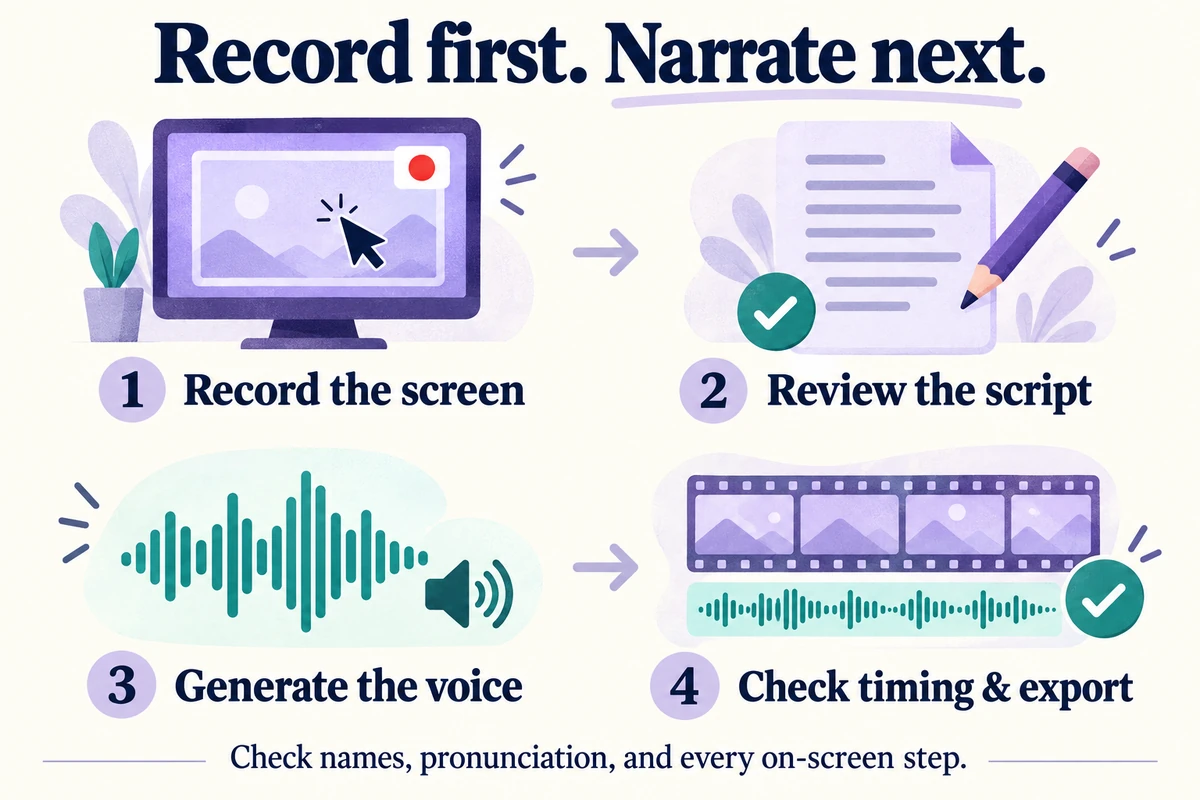
The fastest approach in 2026 is to record your screen and add AI narration. Tools like Vorec let you record a silent walkthrough of your product, and AI generates the voiceover that syncs with your on-screen actions. No scripting, no re-recording, no editing timeline headaches.
The workflow:
- Open your product and plan a 60-90 second walkthrough of the core use case
- Record your screen — just click through the product naturally, no need to narrate live
- Upload the recording and let AI analyze what is happening on screen
- AI writes and voices the narration, synced to your clicks and actions
- Export and upload to your PH listing
There is no voiceover to record and no timeline to edit, which is where a traditional demo video spends its time. And because there is no manual scripting, you can re-record if your product changes before launch day.
For a deeper walkthrough on creating demo videos quickly, check out our guide on how to create a product demo video fast.
Demo Video Checklist
Before uploading your video to Product Hunt:
- [ ] Video is under 90 seconds
- [ ] First 5 seconds clearly state the problem or hook
- [ ] Core product workflow is shown (not slides or mockups)
- [ ] Narration is clear and well-paced
- [ ] Text on screen is readable at small sizes
- [ ] No dead air or long pauses
- [ ] Ends with a clear CTA
- [ ] Exported at 1080p minimum
Launch Day Strategy
You have done the prep work. Now it is time to execute.
Timing: Midnight Pacific Time
Product Hunt resets at midnight PT (12:00 AM Pacific). Your product should go live right at reset to maximize the full 24-hour window.
Set an alarm. If you are in a different timezone, do the math now. Midnight PT is 3:00 AM ET, 8:00 AM London, 9:00 AM Berlin.
Have everything ready to go the night before:
- PH listing drafted and scheduled (if using the scheduling feature)
- First comment written and ready to paste
- Social media posts pre-written for Twitter, LinkedIn, and communities
- Support list notified with a "launching tomorrow at midnight PT" message
Your First Comment
The maker's first comment is critical. It sets the tone for your entire launch. PH surfaces it prominently, and it is often the most-read piece of text on your listing.
What to include:
- Why you built this (the personal story)
- Who it is for
- What makes it different from alternatives
- An honest note about where you are in the journey (beta, v1, etc.)
- An offer to answer questions
Tone: Authentic and humble. The PH community respects builders, not marketers.
The First 4 Hours Are Everything
PH's ranking algorithm weighs early engagement heavily. The first 4 hours after launch determine whether you stay on the front page.
Your launch morning playbook:
- Post on Twitter/X immediately — share your PH link, the story behind the product, and tag relevant people
- Send your support list a direct message — "Hey, we just launched on PH. Would love your thoughts: [link]"
- Post in communities where you have been active (not spamming cold communities)
- Respond to every single comment on PH within minutes — engagement velocity matters
- Share on LinkedIn with a personal story angle
- Send to your email list if you have one
Responding to Comments
Every comment on your PH launch deserves a thoughtful response. This is not optional — comment engagement directly affects your ranking.
Tips for great responses:
- Thank people genuinely (not copy-paste responses)
- Answer questions in detail — this builds trust
- If someone gives feedback, acknowledge it and explain your roadmap
- If someone reports a bug, fix it live if possible and reply with the fix
- Be present all day — block your entire calendar for launch day
Handling Negative Feedback
Not everyone will love your product. Some comments will be critical. This is normal and actually good for credibility.
- Never get defensive
- Acknowledge valid criticism: "That is great feedback, we are working on that for v2"
- If someone is being unfair, other community members will often come to your defense
- Critical comments with thoughtful responses actually build more trust than a wall of praise
Post-Launch: Converting Traffic Into Users
Congratulations, you survived launch day. Now capitalize on the momentum.
The First 48 Hours
- Update your landing page with your PH badge and ranking
- Write a "lessons learned" Twitter thread — these go viral and extend your reach
- Follow up with everyone who commented on your PH page — connect on Twitter, offer early access, ask for feedback
- Track your analytics — where is traffic coming from? Which channels performed best?
The First Week
- Publish a blog post about your launch experience — what worked, what you would change
- Reach out to journalists and bloggers who covered similar PH launches
- Email your new signups with an onboarding sequence
- Fix the bugs that inevitably surfaced on launch day
Long-Term Leverage
A successful PH launch is not a one-day event — it is an asset you use for months:
- Add "Featured on Product Hunt" badge to your website
- Reference your ranking in cold emails and pitch decks
- Use your PH page as social proof in partnership conversations
- The dofollow backlink from PH improves your SEO permanently
If you are also creating tutorial content for your product, check out our complete guide on how to make tutorial videos in 2026 to keep the momentum going after launch.
Common Product Hunt Launch Mistakes
Learn from other founders' failures so you do not repeat them:
- Launching on a Monday or Friday — Tuesday through Thursday see the most engagement
- Asking for upvotes directly — PH's algorithm detects this and may penalize you
- Ignoring comments — low comment engagement kills your ranking
- Having a broken landing page — test everything the night before
- Not preparing assets in advance — rushing your gallery and demo video shows
- Launching without a support network — even 20 committed supporters make a difference
- Going dark after launch day — the follow-up is where real growth happens
- Targeting the wrong day — check PH for major launches on your planned date and avoid stacking against well-funded companies
The Complete Product Hunt Launch Checklist
Print this out. Check off each item as you go.
4 Weeks Before Launch
- [ ] Finalize your landing page with clear CTA and fast load times
- [ ] Set up Open Graph and Twitter Card meta tags
- [ ] Create your Product Hunt "Coming Soon" page
- [ ] Start posting building-in-public updates on Twitter/X
- [ ] Join 3-5 communities where your target users are active
- [ ] Begin reaching out to potential hunters
- [ ] Start collecting beta user testimonials
2 Weeks Before Launch
- [ ] Design your PH gallery images (1270x760px, 8 images)
- [ ] Write your tagline (under 60 characters)
- [ ] Write your PH description with markdown formatting
- [ ] Build your launch support spreadsheet (aim for 30+ people)
- [ ] Send "launching soon" messages to your support list
- [ ] Draft your maker's first comment
1 Week Before Launch
- [ ] Record your product demo video (60-90 seconds)
- ] Add AI narration with a tool like [Vorec for fast turnaround
- [ ] Test video at small sizes for mobile readability
- [ ] Upload all assets to your PH draft listing
- [ ] Write your launch day social media posts
- [ ] Draft your email to subscribers
- [ ] Test your landing page on mobile and multiple browsers
- [ ] Confirm your launch date (Tuesday-Thursday is ideal)
Launch Day (Midnight PT)
- [ ] Publish your PH listing at midnight PT sharp
- [ ] Post your maker's first comment immediately
- [ ] Tweet your launch with PH link and product story
- [ ] Send direct messages to your support list
- [ ] Post in your active communities (not cold ones)
- [ ] Send your email blast
- [ ] Post on LinkedIn with a personal angle
- [ ] Respond to every PH comment within 15 minutes
- [ ] Monitor and engage all day — block your calendar
- [ ] Fix any bugs reported in real-time
Post-Launch (48 Hours - 1 Week)
- [ ] Add PH badge and ranking to your website
- [ ] Write a launch retrospective Twitter thread
- [ ] Follow up with everyone who commented on PH
- [ ] Connect with new users — onboarding emails, welcome messages
- [ ] Track analytics and identify top traffic sources
- [ ] Reach out to press with your PH results
- [ ] Plan your next content push to sustain momentum
Launching on Product Hunt is a skill, not a lottery. The founders who consistently rank on the front page are not luckier — they are more prepared. Follow this checklist, put extra effort into your demo video, and treat launch day as the beginning of your growth story, not the end of it.
Ready to create your demo video? Get started with Vorec and have your narrated product walkthrough ready in 15 minutes.
Related reading: Demo Videos for Indie Hackers.