How to Create Tutorial Videos in Multiple Languages with AI
Vorec Team · 2026-03-19 · About 5 min read
One Tutorial, Many Languages
Your product has users in Brazil, Germany, Japan, and France. They all need tutorial videos. The traditional approach: hire translators, record separate voiceovers for each language, edit each version individually. Each language version requires translation, voice recording and review.
With AI-powered translation, the workflow is different: record one tutorial, then generate narrated versions in the supported languages you need, on plans that include translation.
Why Multilingual Tutorials Matter
- Most people would rather read and watch in their first language
- Localized help content answers the question without the reader translating it first
- Onboarding completion rates double when tutorials are in the user's language
- Global expansion stalls without localized documentation — users churn when they cannot understand your product
Most companies skip multilingual tutorials because the cost and effort seem prohibitive. AI changes that equation entirely.
The Old Way: Manual Translation
For each language version of a tutorial video:
- Send the script to a human translator, priced per word
- Wait for the translation to come back
- Hire a voice actor for that language, priced per video
- Record the voiceover in a studio
- Re-edit the video to sync the new audio with on-screen actions
- Repeat for every language
Cost per language per video: a translator and a voice artist, per language, per video Time per language: as long as it takes to brief, translate, record and review For 10 languages: that cost and turnaround, multiplied by ten
This is why most companies only translate their top 2-3 tutorials, if any.
The AI Way: Translation Without Re-Recording
With Vorec, multilingual tutorial creation works like this:
- Record your screen once — in any language, or silently
- Upload to Vorec — AI generates narration in your primary language
- Click translate — on an eligible paid plan, select target languages and generate new versions without re-recording
- Export all versions — each language gets its own narrated MP4
Cost: See current plan terms Time: No translator to brief, no voice artist to book For 10 languages: The same recording, regenerated per language
How Vorec's Translation Engine Works
Intelligent Script Translation
Vorec does not just run your narration through a generic translator. The translation engine understands the instructional context of each segment. Technical terms, UI element names, and action descriptions are translated with the correct meaning — not just word-for-word substitution.
For example, "Click the gear icon to open Settings" translates differently than a generic sentence because the engine understands "gear icon" refers to a UI element and "Settings" may need to remain in English (or be localized) depending on whether the software itself is translated.
Voice Synthesis Per Language
Each translated version gets a natural-sounding AI voice in the target language — not an English voice reading foreign words. The speech synthesis adapts pronunciation, cadence, and intonation to match native speech patterns for each language.
Adaptive Timing Per Language
Different languages have different word lengths and speaking speeds. German sentences typically run longer than their English equivalents. Japanese is often shorter. Vorec's timing engine adapts the video playback for each language version independently — pausing where needed so narration never feels rushed, regardless of the language.
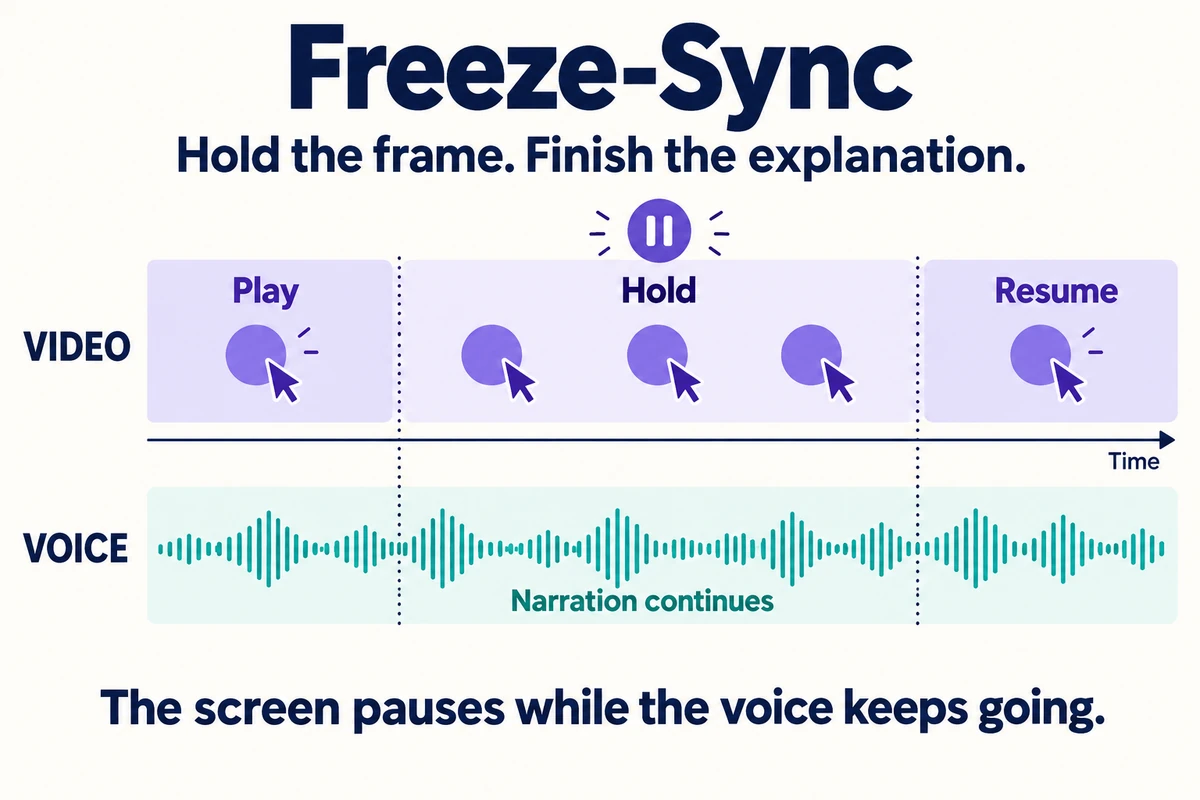
Concept diagram: the voice continues during a held frame; screen motion resumes afterward.
Supported Languages
Vorec can generate narration in supported languages, with translation available on eligible paid plans. Languages include:
- European: English, Spanish, French, German, Italian, Portuguese, Dutch, Swedish, Norwegian, Danish, Finnish, Polish, Czech, Romanian, Hungarian, Greek
- Asian: Japanese, Korean, Chinese, Hindi, Thai, Vietnamese, Indonesian, Malay
- Middle Eastern: Arabic, Turkish, Hebrew
- Other: Russian, Ukrainian
Use Cases for Multilingual Tutorials
Global SaaS Products
Your product is used across continents. Instead of maintaining separate tutorial libraries per region, record once and generate all language versions from the same source. When the product UI changes, re-record once and regenerate all translations.
International Onboarding
New users in non-English markets can follow the steps in their own language instead of translating as they go. AI translation makes it feasible to localize onboarding for the markets you serve in supported languages.
Multinational Team Training
Internal training for global teams — HR processes, compliance workflows, tool tutorials — can be translated into supported languages instead of requiring separate recording sessions per office location.
Localized Help Centers
Help center articles and videos in the user's language let someone resolve the issue without translating as they read. With AI translation, every tutorial video in your help center can have versions in the supported languages your customers speak.
Translation Quality: What to Expect
AI translation for tutorial content is strong because the language is instructional and structured:
- Action instructions ("Click the button", "Enter your email") translate with high accuracy
- Technical terms are handled correctly in context
- UI references can be localized or kept in English based on your preference
- Conversational tone is maintained — translations do not sound robotic
Where AI translation may need review: industry-specific jargon, culturally sensitive content, and humor. For standard software tutorials, review the translated narration before publishing.
Step-by-Step: Your First Multilingual Tutorial
1. Create Your Base Tutorial
Record a screen walkthrough and upload to Vorec. Generate AI narration in your primary language. Review and finalize the narration.
2. Select Target Languages
Choose which languages you need. Start with your top 3-5 markets if you are unsure.
3. Generate Translations
Click translate. The engine processes each language version — translating the script, generating voice, and adapting timing. Review each generated language version before publishing.
4. Review Key Languages
For your most important markets, do a quick review of the translated narration. Most segments will be accurate. Adjust any that need fine-tuning.
5. Export All Versions
Export each language version as a separate MP4. Upload to your help center, YouTube channel, or knowledge base — organized by language.
ROI of Multilingual Tutorials
| Approach | Cost per language | Time per language | 10 languages |
|---|---|---|---|
| Manual translation + voiceover | Translator + voice artist per language | Brief, translate, record, review | Multiplied by every language |
| AI translation with Vorec | See current plan terms | No booking or briefing | Same recording, regenerated |
For a company with tutorials in 10 languages, that removes a translator and a voice artist from every video, in every language.
Getting Started
Create your first multilingual tutorial:
- Upload a screen recording to vorec.ai — the 7-day trial includes 100 credits
- Generate AI narration in your primary language
- On an eligible paid plan (Starter, Pro or Business), translate into the supported languages your plan includes
- Export all versions
One recording. Many supported languages. No re-recording.
Related reading: How to Translate Tutorial Videos Into Other Languages, Global Software Training in Multiple Languages and Localize Tutorial Videos Without Re-Recording.